
Important Safety Instructions
Please read this manual carefully before operating the Power Dynamics PDV240Z amplifier. Keep these instructions for future reference. Failure to follow these safety guidelines may result in electric shock, fire, or other hazards.
- Electrical Safety: Always connect the unit to a grounded power outlet. Do not expose the unit to rain or moisture. Do not open the amplifier casing; there are no user-serviceable parts inside. Refer all servicing to qualified personnel.
- Ventilation: Ensure adequate ventilation around the unit. Do not block ventilation openings. Avoid installing the unit in enclosed spaces or near heat sources.
- Power Cord: Protect the power cord from being walked on or pinched. Do not operate the unit if the power cord is damaged.
- Liquid and Objects: Do not place objects filled with liquids, such as vases, on the apparatus. Do not insert any objects into the unit's openings.
- Cleaning: Clean only with a dry cloth.
- Overload Protection: The amplifier features protection against overload, overheating, and overvoltage. However, avoid operating the unit beyond its specified limits.
Warning labels are present on the rear panel of the amplifier. Observe these warnings carefully.
Product Overview
Introduction
The Power Dynamics PDV240Z is a versatile 240W PA mixer amplifier designed for professional audio installations, such as in gastronomy or public spaces. It features a 4-zone output mode, multiple input options, and comprehensive protection circuits to ensure reliable performance.
Key Features
- 240W RMS power output.
- 4-zone output mode for flexible audio distribution.
- Protection against overload, overheating, and overvoltage.
- Slow start function for component longevity.
- Three microphone inputs.
- Three line/microphone inputs.
- AUX input and output.
- Recording output.
- Input-1 priority function (interrupts other inputs).
- Bass and treble tone controls.
- 19-inch rack mount option.
- Emergency power supply option via 24V battery (not included).
- Speaker connections for 4 Ohm, 8 Ohm, 70V, and 100V systems.
Package Contents
- 1x Power Dynamics PDV240Z PA Amplifier
- 1x Power Cord
- 1x User Manual (this document)
Setup Guide
Unpacking
Carefully remove the amplifier from its packaging. Inspect the unit for any signs of damage during transit. Retain the original packaging for future transport or storage.
Physical Placement
The PDV240Z is designed for 19-inch rack mounting. Ensure the rack provides adequate ventilation. If not rack-mounted, place the amplifier on a stable, flat surface, ensuring sufficient space around the unit for airflow to prevent overheating.
Rear Panel Connections
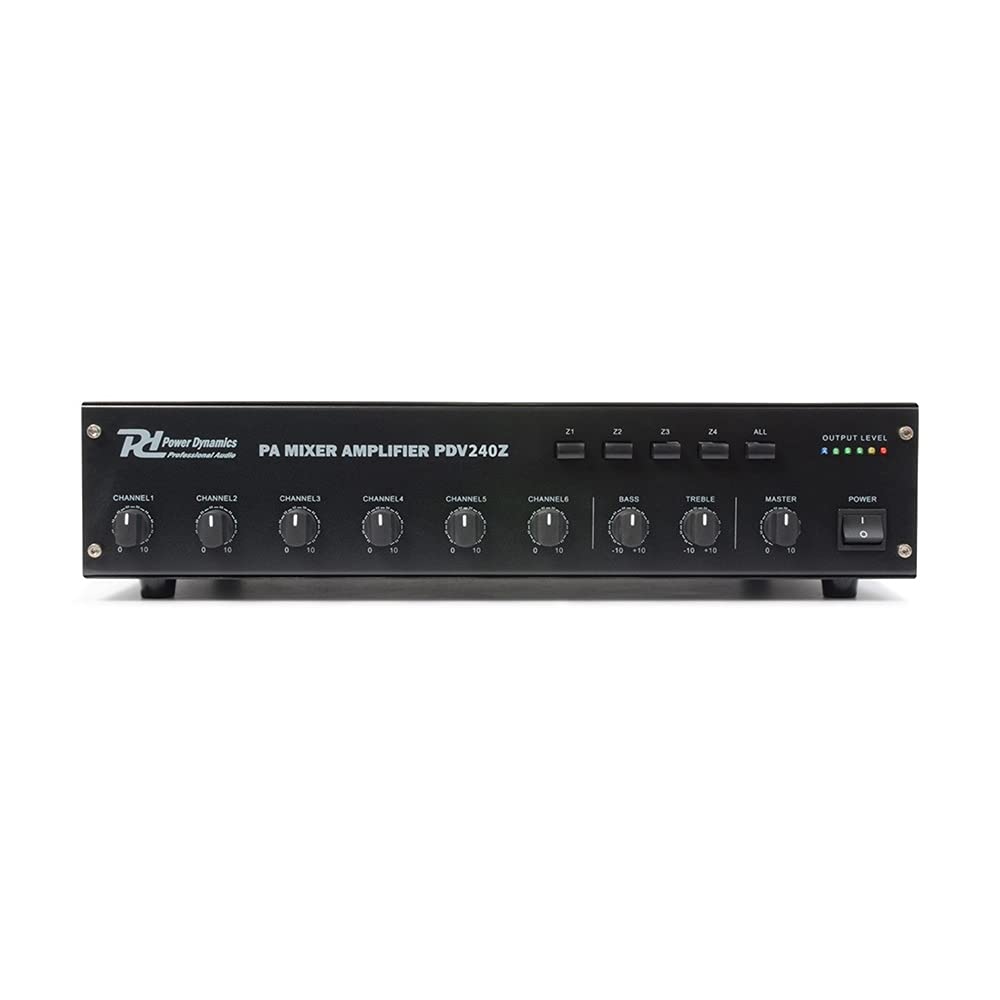
Figure 1: Rear panel of a Power Dynamics mixer amplifier. Note: The image displays model PDV120Z, but the connection layout is representative for the PDV240Z.
The rear panel provides all necessary connections for power, speakers, and audio inputs/outputs. Refer to Figure 1 for a visual guide.
- Power Input (220-240VAC/50Hz): Connect the supplied power cord here. Includes a fuse holder (T2.5A).
- Speaker Outputs (COM, 4Ω, 8Ω, 70V, 100V, Z1-Z4): Terminal block for connecting speakers.
- DC 24V Input: Terminal block for optional emergency 24V battery power supply.
- REC OUT (RCA): Output for connecting to a recording device.
- AUX OUT (RCA): Auxiliary line-level output.
- AUX IN (RCA): Auxiliary line-level input.
- INPUT 1-3 (6.3mm Jack): Line-level inputs.
- INPUT 4-6 (XLR/6.3mm Combo Jack with Line/Mic Switch): Versatile inputs for microphones or line-level sources. Ensure the switch is set correctly for the connected device.
Power Connection
- Ensure the amplifier's power switch is in the OFF position.
- Connect the supplied power cord to the AC power input on the rear panel.
- Plug the other end of the power cord into a suitable grounded 220-240V AC, 50Hz power outlet.
- For emergency power, connect a 24V DC battery to the "DC 24V" terminal block, observing correct polarity.
Speaker Connections
The PDV240Z supports various speaker configurations. Choose the appropriate connection method for your speaker system.
- Low Impedance Speakers (4Ω, 8Ω): Connect conventional low-impedance speakers to the COM and 4Ω or 8Ω terminals. Ensure the total impedance of connected speakers matches the selected terminal.
- 100V/70V Line Speakers: For distributed audio systems, connect 100V or 70V line speakers to the COM and 100V or 70V terminals. Ensure all speakers in the system are equipped with 100V/70V transformers.
- Zone Outputs (Z1-Z4): For multi-zone installations, connect speakers for each zone to the corresponding Z1, Z2, Z3, or Z4 terminal, along with the COM terminal. Each zone can be controlled independently.
Important: Never connect low-impedance speakers and 100V/70V line speakers simultaneously to the same output terminals. Ensure all connections are secure to prevent short circuits.
Input Connections
- Microphone Inputs: Connect microphones to INPUT 4, 5, or 6 using XLR or 6.3mm jack cables. Set the LINE/MIC switch to "MIC".
- Line Inputs: Connect line-level sources (e.g., CD players, media players) to INPUT 1, 2, 3 (6.3mm jack) or INPUT 4, 5, 6 (XLR/6.3mm combo) with the switch set to "LINE". The AUX input (RCA) is also available for line-level devices.
Output Connections
- REC OUT: Use the RCA "REC OUT" to connect to a recording device for capturing the mixed audio output.
- AUX OUT: Use the RCA "AUX OUT" for a general line-level output to another amplifier or audio system.
Operating Instructions
Powering On/Off
- Ensure all connections are secure and input/master volume controls are set to minimum before powering on.
- Flip the main power switch (usually located on the front panel) to the ON position. The amplifier will perform a slow start.
- To power off, set all volume controls to minimum, then flip the main power switch to the OFF position.
Input Selection and Volume Control
- Each input channel (MIC, LINE, AUX) has its own volume control knob on the front panel. Adjust these to balance the levels of your audio sources.
- The master volume control adjusts the overall output level of the amplifier.
Zone Control
The PDV240Z features independent volume controls for its four output zones (Z1-Z4) on the front panel. Use these controls to adjust the audio level in each specific zone as required.
Tone Controls (Bass/Treble)
Adjust the BASS and TREBLE knobs on the front panel to fine-tune the tonal characteristics of the audio output to suit your preferences or room acoustics.
Input Priority Function
Input 1 has a priority function. When an audio signal is detected on Input 1, it will automatically attenuate or mute the audio from other active inputs, making it suitable for announcements or emergency messages.
Maintenance
- Cleaning: Regularly wipe the exterior of the amplifier with a soft, dry cloth. Do not use abrasive cleaners, solvents, or waxes.
- Ventilation: Periodically check that the ventilation openings are clear of dust and debris. Use a soft brush or compressed air to clean them if necessary.
- Inspection: Occasionally inspect all cables and connections for wear or damage. Replace any damaged cables immediately.
No user-serviceable parts are inside the amplifier. Do not attempt to open the casing.
Troubleshooting
| Problem | Possible Cause | Solution |
|---|---|---|
| No power | Power cord disconnected; power outlet faulty; fuse blown; power switch off. | Check power cord connection; test outlet; replace fuse (T2.5A); ensure power switch is ON. |
| No sound output | Speaker cables disconnected/incorrectly wired; input source not connected/selected; input/master volume too low; zone volume too low. | Verify speaker connections and wiring (COM, 4/8/70/100V, Z1-Z4); check input source connection and selection; increase input/master/zone volumes. |
| Distorted sound | Input level too high (clipping); speaker impedance mismatch; faulty speaker/cable. | Reduce input volume; verify speaker impedance matches amplifier output; test with different speakers/cables. |
| Overheating | Insufficient ventilation; prolonged high-volume operation; blocked vents. | Ensure adequate airflow around the unit; reduce volume; clear any obstructions from vents. |
Technical Specifications
| Model | PDV240Z |
| Item Number | 952.066 |
| RMS Power | 240 W |
| Speaker Connections | 4 Ohm, 8 Ohm, 70 V, 100 V |
| Frequency Response | 50 Hz - 18 kHz |
| Signal-to-Noise Ratio | > 75 dB |
| Input Sensitivity (Line) | 16 dB |
| Input Sensitivity (MIC) | -50 dB |
| Power Supply | 220-240 V AC / 50 Hz |
| Emergency Power Input | 24 V DC (battery not included) |
| Dimensions (L x W x H) | 48.2 x 31.5 x 8.8 cm (19-inch rack mountable) |
| Weight | 10 kg |


