
1. Introduction
Thank you for choosing the Yale Locks MINISAFE Digital Safe, model YSV/170/DB1. This electronic safe is designed to provide secure storage for your valuables, documents, and personal items. It features a programmable digital keypad for easy access and a manual override key for emergency situations. Please read this manual thoroughly before installation and operation to ensure proper use and maximum security.

Figure 1.1: Front view of the Yale MINISAFE Digital Safe, showing the digital keypad and key lock.
2. Safety Information
- Keep override keys in a secure location, separate from the safe, and not inside the safe itself.
- Do not expose the safe to extreme temperatures or humidity.
- Ensure the safe is securely mounted to prevent unauthorized removal.
- Replace batteries promptly when the low battery indicator appears to avoid lockout.
- This safe is not water-resistant. Avoid placing it in areas prone to water exposure.
3. Package Contents
Verify that all items are present in the package:
- 1 x Yale MINISAFE Digital Safe (Model YSV/170/DB1)
- 2 x Manual Override Keys
- 4 x AA Batteries (included)
- Mounting Screws and Anchors
- Instruction Manual (this document)
4. Setup
4.1 Battery Installation
- Open the safe using one of the manual override keys. Insert the key into the lock, turn it clockwise, and pull the door open.
- Locate the battery compartment on the inside of the safe door.
- Insert 4 AA batteries, ensuring correct polarity (+/-).
- Close the battery compartment cover.
- The safe is now powered and ready for programming.

Figure 4.1: Interior of the safe, showing the battery compartment on the door and pre-drilled mounting holes.
4.2 Mounting the Safe
For enhanced security, it is recommended to securely mount the safe to a wall or floor. The safe features pre-drilled holes for internal mounting.
- Choose a suitable location for mounting, such as inside a cabinet or closet.
- Open the safe door.
- Mark the positions for drilling through the pre-drilled holes on the back or bottom of the safe.
- Drill pilot holes in the wall or floor using an appropriate drill bit.
- Align the safe with the drilled holes and secure it using the provided mounting screws and anchors.
- Ensure the safe is firmly attached and does not wobble.

Figure 4.2: Example of the safe mounted within a closet for discreet storage.
5. Operating Instructions
5.1 Setting Your Personal Identification Number (PIN)
The safe allows you to set a PIN of 3 to 8 digits.
- With the safe door open, press the red reset button located on the inside of the door (usually near the hinge or battery compartment). You will hear a beep, and the yellow indicator light on the keypad will illuminate.
- Within 5 seconds, enter your desired 3 to 8 digit PIN on the keypad.
- Press the 'A' or '#' button to confirm your new PIN. You will hear a confirmation beep.
- Test your new PIN with the door open before closing it. Enter your PIN and press 'A' or '#'. The green light should illuminate, and the locking bolts should retract.
5.2 Opening the Safe with Your PIN
- Enter your 3 to 8 digit PIN on the keypad.
- Press the 'A' or '#' button.
- The green light will illuminate, and you will hear a click. Within 5 seconds, turn the knob clockwise to open the safe door.
5.3 Closing and Locking the Safe
- Close the safe door.
- Turn the knob counter-clockwise to engage the locking bolts. The safe is now locked.
5.4 Manual Override (Emergency Key Access)
In case of forgotten PIN, battery failure, or electronic malfunction, you can open the safe using the manual override key.
- Locate the keyhole cover, usually hidden behind the Yale logo plate or a small removable panel on the keypad.
- Remove the cover to expose the keyhole.
- Insert one of the manual override keys into the keyhole and turn it clockwise.
- While holding the key turned, rotate the main knob clockwise to open the safe door.
- Once open, you can replace the batteries or reset the PIN as needed.
- Remember to keep override keys in a secure location outside the safe.
6. Maintenance
6.1 Battery Replacement
When the batteries are low, the red indicator light on the keypad will flash, or the safe may not respond to PIN entry. Replace all 4 AA batteries promptly to avoid being locked out.
- Open the safe using your PIN or the manual override key.
- Locate the battery compartment on the inside of the door.
- Remove the old batteries and dispose of them responsibly.
- Insert 4 new AA batteries, ensuring correct polarity.
- Close the battery compartment cover.
6.2 Cleaning
Wipe the exterior of the safe with a soft, damp cloth. Do not use abrasive cleaners or solvents, as these can damage the finish or electronic components.
7. Troubleshooting
| Problem | Possible Cause | Solution |
|---|---|---|
| Safe does not open with PIN. | Incorrect PIN entered. Low batteries. Electronic malfunction. | Re-enter PIN carefully. Replace batteries. Use manual override key. |
| Keypad does not respond. | Dead batteries. | Use manual override key to open and replace batteries. |
| Safe beeps continuously. | Low battery warning. | Replace all 4 AA batteries immediately. |
| Cannot set new PIN. | Reset button not pressed correctly or timing issue. | Ensure the red reset button is pressed firmly and the new PIN is entered within 5 seconds. |
8. Specifications
| Feature | Detail |
|---|---|
| Brand | Yale |
| Model Number | YSV/170/DB1 |
| Product Dimensions (External) | 9.06"D x 6.69"W x 6.69"H (approx. 230mm D x 170mm W x 170mm H) |
| Internal Dimensions (approx.) | 220mm W x 160mm H (depth varies) |
| Lock Type | Electronic, Key |
| Color | Mini Black |
| Capacity | 4.2 Liters |
| Material | Alloy Steel |
| Special Feature | Programmable Digital Keypad (3-8 digits) |
| Mounting Type | Internal mounting (wall/floor) |
| Item Weight | 2.3 Kilograms (approx. 5.06 pounds) |
| Alarm | Audible (for incorrect entries/tampering) |
| Water Resistance Level | Not Water Resistant |
| Batteries | 4 x AA batteries (included) |
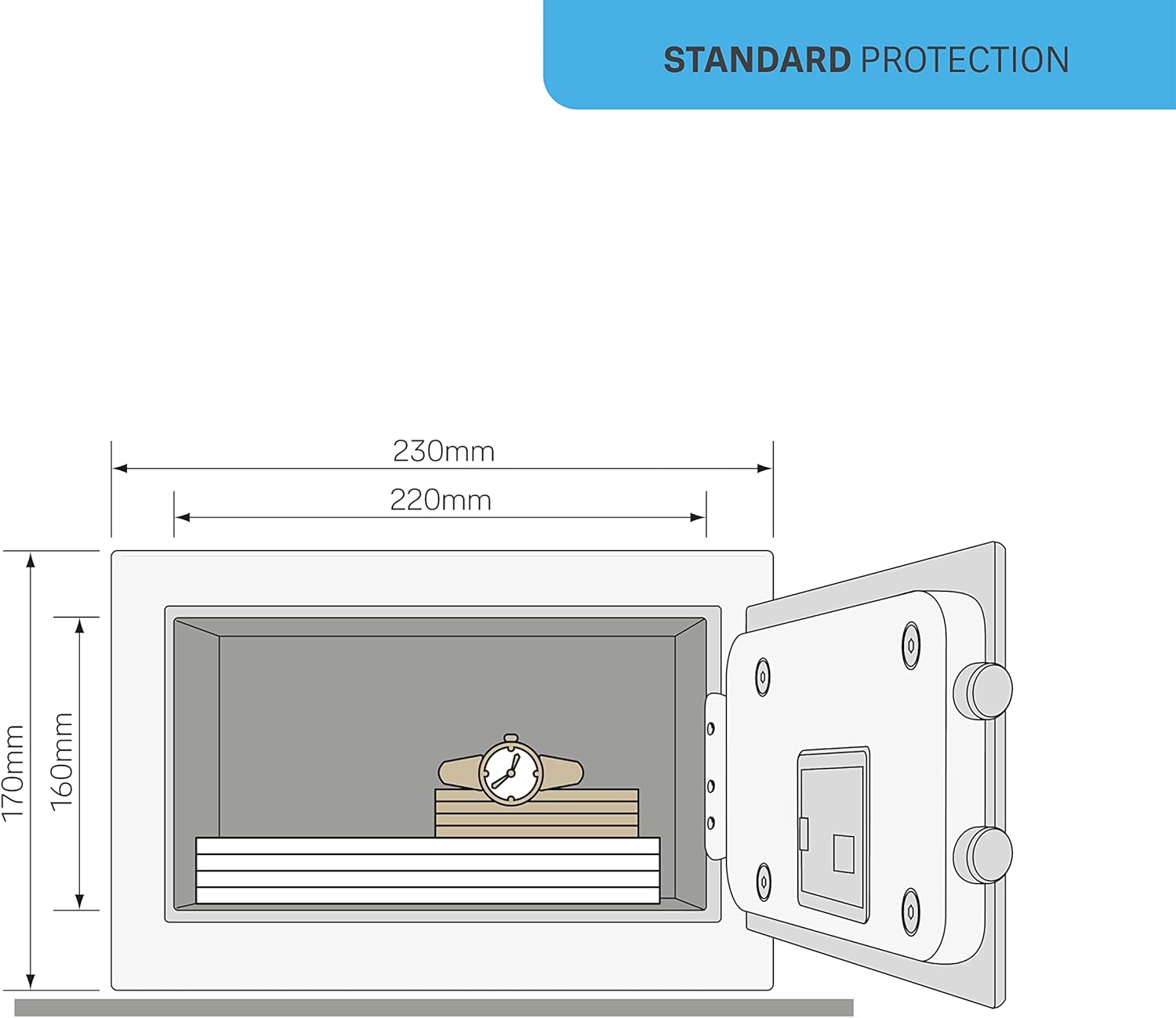
Figure 8.1: Internal dimensions of the Yale MINISAFE Digital Safe.
9. Warranty and Support
For warranty information, technical support, or further assistance, please refer to the official Yale Locks website or contact their customer service department. Keep your purchase receipt as proof of purchase.
You can typically find support contact details on the manufacturer's website: www.yalehome.com