
Product Overview
The uxcell B503 50K Dial Potentiometer is a variable resistor designed for controlling electrical devices, commonly used as volume controls in audio equipment. This package includes five individual potentiometers, each featuring a double linear taper and five pins for connection.

Figure 1: A set of five uxcell B503 50K dial potentiometers. Each potentiometer features a black plastic dial with a serrated edge for grip and five metal pins extending from the base for circuit connection. The top view shows the central shaft and mounting hole.
- Product Name: Dial Potentiometer
- Model: B503 50K
- Material: Constructed from durable plastic and metal components.
- Pin Quantity: 5 pins for versatile circuit integration.
- Dial Diameter: Approximately 16mm (0.63 inches).
- Dial Thickness: Approximately 2mm (0.08 inches).
Installation and Setup
Proper installation is crucial for the optimal performance and longevity of the potentiometer. Ensure all power is disconnected from the circuit before beginning installation.
- Identify Connection Points: Locate the five pins on the potentiometer. These typically include two input/output pins for the resistive track, a wiper pin, and potentially ground or additional connection points depending on the specific application (e.g., dual-gang for stereo audio). Refer to your circuit diagram for precise pin assignments.
- Mounting: The potentiometer features a central shaft designed for panel mounting. Insert the shaft through a pre-drilled hole in your device's enclosure. Secure it with a nut and washer (not included) if required by your design.
- Soldering Connections: Carefully solder the appropriate wires from your circuit to the five pins of the potentiometer. Use a low-wattage soldering iron to prevent heat damage to the component. Ensure strong, clean solder joints.
- Verify Connections: After soldering, visually inspect all connections for shorts or cold solder joints. It is recommended to use a multimeter to verify continuity and resistance values before applying power.
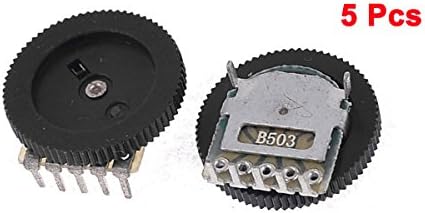
Figure 2: Close-up view of two potentiometers, highlighting the B503 model designation on the back of one unit and the five connection pins. This view is helpful for identifying the component and its pin layout during installation.
Operating Instructions
Once installed, the potentiometer functions by rotating its dial to vary resistance within a circuit. This change in resistance can control various parameters, such as volume, brightness, or motor speed, depending on the circuit design.
- Rotation: The dial can be rotated clockwise or counter-clockwise to adjust the resistance. The specific range of adjustment (e.g., minimum to maximum volume) will depend on the circuit it is integrated into.
- Linear Taper: The B503 model features a linear taper, meaning the resistance changes proportionally to the degree of rotation. This is suitable for applications where a consistent rate of change is desired.
- Dual Gang (Double Linear): As a "double linear" potentiometer, it contains two independent resistive elements operated by a single shaft. This is commonly used in stereo audio applications to control left and right channels simultaneously.
Maintenance
Potentiometers are generally low-maintenance components. However, occasional issues can arise from dust or wear.
- Cleaning: If the potentiometer develops a "scratchy" sound or intermittent operation, it may be due to dust or debris inside. In such cases, a small amount of electronic contact cleaner can be sprayed into the potentiometer's opening (if accessible) while rotating the shaft. Ensure the device is powered off during this process.
- Avoid Excessive Force: Do not apply excessive force when rotating the dial, as this can damage the internal mechanism or the shaft.
- Environmental Conditions: Store and operate the potentiometers within their specified temperature and humidity ranges to prevent premature wear or failure.
Troubleshooting
| Problem | Possible Cause | Solution |
|---|---|---|
| Intermittent or "scratchy" sound (in audio applications) | Dust, dirt, or wear on the resistive track/wiper. | Clean the potentiometer with electronic contact cleaner. If the issue persists, the component may need replacement. |
| No change in output when rotating dial | Broken internal connection, faulty wiring, or incorrect installation. | Check solder joints and wiring for continuity. Test the potentiometer's resistance range with a multimeter. Replace if faulty. |
| Resistance value does not match specifications | Component defect or incorrect part used. | Verify the model number (B503 50K) and test with a multimeter. Replace if out of tolerance. |
Specifications
| Attribute | Value |
|---|---|
| Product Name | Dial Potentiometer |
| Model | B503 50K |
| Material | Plastic, Metal |
| Pin Quantity | 5 |
| Dial Diameter | 16mm (0.63") |
| Dial Thickness | 2mm (0.08") |
| Working Temperature | -30°C to +70°C |
| Contact Resistance | ≤ 0.03Ω |
| Insulation Resistance | ≥ 100Ω |
| Rated Voltage, Current | DC12V, 0.5A |
| Lifespan | 100,000 Times |
| Item Weight | 0.01 ounces (per piece) |
| Package Dimensions | 5 x 4 x 0.3 inches (for the 5-pack) |
| Manufacturer | Sourcingmap (uxcell brand) |
| Part Number | a13100700ux0457 |
| Date First Available | December 11, 2013 |
Warranty and Support
For product support, technical assistance, or warranty inquiries, please contact the manufacturer, Sourcingmap, or the uxcell brand directly through their official channels. Information regarding specific warranty periods and return policies may be available at the point of purchase or on the seller's platform.
As per the purchase information, the buybox winner offers a return policy with a duration of 30 days for refund/replacement. Please refer to your purchase receipt or the retailer's website for the most accurate and up-to-date policy details.