
1. Product Overview
Welcome to the user manual for the Comelit 2410W/2B Digital Door Intercom. This device is designed for wall-mounted installation and features a privacy function, operating within the Simpllebus 1E2 system. It provides reliable communication and access control for residential and commercial applications.
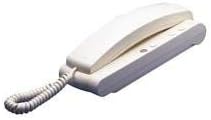
Figure 1: The Comelit 2410W/2B Digital Door Intercom unit. This image displays the white, wall-mounted intercom handset with its coiled cord and base unit, featuring several small buttons.
2. Important Safety Instructions
- Professional Installation: Installation should only be performed by qualified personnel in accordance with local electrical codes and regulations.
- Power Disconnection: Always disconnect power to the system before performing any installation, wiring, or maintenance.
- Environmental Conditions: Do not expose the device to rain, moisture, direct sunlight, or extreme temperatures. Ensure proper ventilation.
- Cleaning: Use a soft, dry cloth for cleaning. Do not use abrasive cleaners or solvents.
- Modifications: Do not attempt to modify or repair the device. Refer all servicing to qualified service personnel.
3. Package Contents
Please verify that all items are present in the package before proceeding with installation:
- Comelit 2410W/2B Digital Door Intercom Unit
- Wall Mounting Bracket
- Mounting Screws and Wall Plugs
- User Manual (this document)
4. Installation Guide
4.1 Mounting the Intercom
- Select Location: Choose a suitable indoor location for the intercom unit, typically near the entrance or in a central living area. Ensure it is within reach of the Simpllebus 1E2 wiring.
- Mark Drilling Points: Use the mounting bracket as a template to mark the drilling points on the wall.
- Drill Holes: Drill holes at the marked points using an appropriate drill bit for your wall type. Insert wall plugs if necessary.
- Secure Bracket: Attach the mounting bracket to the wall using the provided screws.
4.2 Wiring Connections
The Comelit 2410W/2B operates on the Simpllebus 1E2 system. Refer to your system's main control unit manual for specific wiring diagrams. General steps include:
- Disconnect Power: Ensure the main power to the intercom system is OFF before making any connections.
- Connect Bus Wires: Connect the Simpllebus 1E2 data and power wires to the designated terminals on the intercom unit. Pay close attention to polarity.
- Secure Wiring: Ensure all wire connections are secure and properly insulated.
- Attach Intercom Unit: Carefully attach the intercom unit to the mounted bracket, ensuring it clicks securely into place.
- Restore Power: Once all connections are made and secured, restore power to the system.
5. Operating Instructions
5.1 Answering a Call
When a visitor presses the call button at the outdoor station, the intercom unit will ring. To answer the call:
- Lift the handset from the base.
- Speak into the microphone and listen for the visitor's response.
- To end the call, replace the handset on the base.
5.2 Opening the Door
During an active call, or after answering, you can open the door (if connected to an electric lock):
- Press the dedicated door release button (often marked with a key symbol) on the intercom unit.
- The door will unlock for a short period.
5.3 Privacy Function
The Comelit 2410W/2B includes a privacy function to prevent incoming calls from ringing the unit. To activate or deactivate:
- Locate the privacy button on the intercom unit.
- Press the button to toggle the privacy function ON or OFF. An indicator light (if present) may show the status.
- When privacy is ON, the unit will not ring for incoming calls.
6. Maintenance
6.1 Cleaning
To maintain the appearance and functionality of your intercom unit:
- Wipe the exterior surfaces with a soft, dry, lint-free cloth.
- For stubborn marks, slightly dampen the cloth with water. Do not use harsh chemicals, abrasive cleaners, or solvents.
- Ensure no liquid enters the unit's openings.
6.2 General Care
Avoid dropping the unit or subjecting it to strong impacts. Keep it away from sources of excessive heat or cold.
7. Troubleshooting
If you encounter issues with your Comelit 2410W/2B intercom, refer to the table below for common problems and solutions.
| Problem | Possible Cause | Solution |
|---|---|---|
| No ring tone when visitor calls. | Privacy function is active. No power to the unit. Wiring issue. | Deactivate the privacy function. Check power supply to the system. Verify all wiring connections are secure. |
| Cannot hear visitor / Visitor cannot hear me. | Handset not properly seated. Wiring issue. Faulty outdoor station. | Ensure handset is correctly placed on the base. Check audio wiring connections. Consult outdoor station manual or professional. |
| Door release button does not work. | No power to the electric lock. Wiring issue to the lock. Lock mechanism fault. | Check power supply to the electric lock. Verify door release wiring. Consult a locksmith or professional installer. |
| Unit is completely unresponsive. | No power to the system. Major wiring fault. | Check main power supply to the Simpllebus 1E2 system. Contact a qualified technician for inspection. |
If the problem persists after attempting these solutions, please contact qualified technical support.
8. Technical Specifications
- Brand: Comelit
- Model: 2410W/2B
- Part Number: COE2410W-2B
- System Compatibility: Simpllebus 1E2
- Mounting Type: Wall-mounted
- Features: Digital communication, Privacy function
- Item Weight: 4.54 g
- ASIN: B00GZJ5578
- First Available Date: February 21, 2020
9. Warranty and Support
Comelit products are manufactured to high-quality standards. For specific warranty terms and conditions, please refer to the warranty card included with your product or visit the official Comelit website. Keep your proof of purchase for warranty claims.
For technical assistance, troubleshooting beyond this manual, or service inquiries, please contact your authorized Comelit dealer or the Comelit customer support department. Contact details can typically be found on the official Comelit website or in your product documentation.


