
1. Introduction
Thank you for choosing the FONESTAR MA-66 Monozone Public Address Amplifier. This amplifier is designed for professional audio installations requiring a reliable solution for sound distribution in a single zone. It features multiple input options for microphones and line-level sources, along with versatile speaker outputs including low impedance and 70V/100V line options. Please read this manual thoroughly before operating the device to ensure proper setup, optimal performance, and safety.
2. Safety Instructions
- Power Supply: Connect the unit only to an AC power outlet with the specified voltage and frequency. Ensure the power cord is securely connected and not damaged.
- Grounding: This appliance must be grounded. Do not defeat the safety purpose of the polarized or grounding-type plug.
- Ventilation: Ensure adequate ventilation around the unit. Do not block ventilation openings. Avoid placing the amplifier in enclosed spaces or on soft surfaces that may obstruct airflow.
- Moisture and Liquids: Do not expose the unit to rain, moisture, or dripping/splashing liquids. Do not place objects filled with liquids, such as vases, on the apparatus.
- Heat Sources: Keep the unit away from heat sources such as radiators, heat registers, stoves, or other apparatus (including amplifiers) that produce heat.
- Servicing: Do not attempt to service this product yourself. Refer all servicing to qualified service personnel. Opening the unit may expose you to dangerous voltage or other hazards.
- Cleaning: Unplug the unit from the power outlet before cleaning. Use a dry cloth only.
3. Product Overview
The FONESTAR MA-66 amplifier features a robust design with comprehensive connectivity options on its rear panel for various audio sources and speaker configurations.
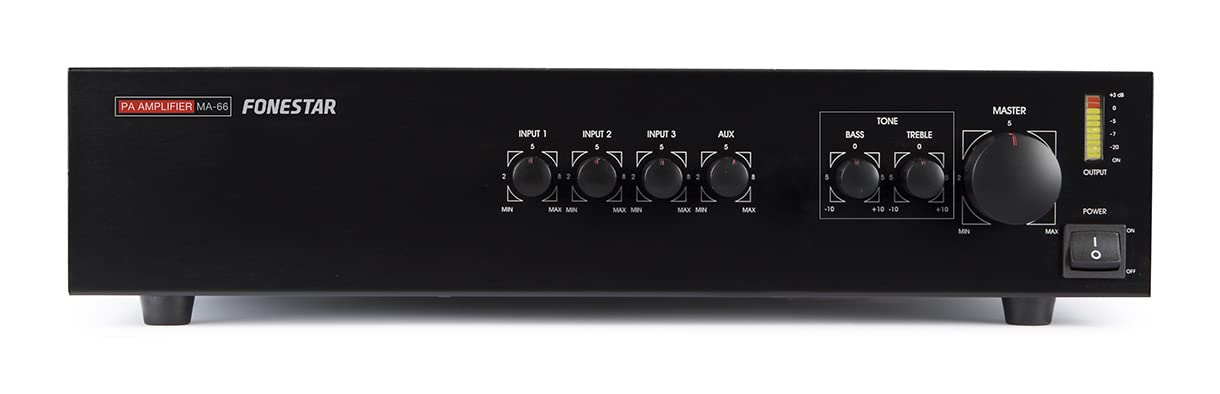
Figure 1: Rear Panel of the FONESTAR MA-66 Amplifier. This image displays the various input and output terminals, including the power input, cooling fan, speaker output terminals (COM, 4Ω, 8Ω, 16Ω, 70V, 100V), RCA line inputs, and three XLR/TRS combo microphone/line inputs with individual gain controls and phantom power switches.
Rear Panel Components:
- Cooling Fan: Ensures proper heat dissipation for stable operation.
- AC Power Input: Standard IEC C14 connector for power cord connection.
- Speaker Output Terminals: Screw terminals for connecting speakers. Includes common (COM), low impedance outputs (4Ω, 8Ω, 16Ω), and high impedance outputs (70V, 100V) for constant voltage speaker systems.
- RCA Line Inputs: Stereo pair of RCA jacks for connecting line-level audio sources such as CD players, tuners, or media players.
- XLR/TRS Combo Inputs (INPUT 1, 2, 3): Three versatile inputs that accept both XLR (for microphones) and 1/4" TRS (for line-level or balanced microphone signals) connectors. Each input has its own gain control and phantom power switch.
- Ground Terminal: For connecting an external ground wire if necessary to reduce hum or noise.
4. Setup
4.1 Unpacking and Inspection
Carefully remove the amplifier from its packaging. Inspect the unit for any signs of damage that may have occurred during transit. Retain the original packaging for future transport or storage.
4.2 Placement and Ventilation
Place the amplifier on a stable, flat surface. Ensure there is sufficient space (at least 10 cm or 4 inches) around the unit, especially at the rear where the cooling fan is located, to allow for proper airflow and prevent overheating. Avoid placing the unit near direct sunlight, heat sources, or in areas with high humidity or dust.
4.3 Power Connection
- Ensure the amplifier's power switch is in the OFF position.
- Connect the supplied AC power cord to the AC Power Input on the rear panel of the amplifier.
- Plug the other end of the power cord into a suitable grounded electrical outlet.
4.4 Speaker Connection
The MA-66 offers both low impedance (4Ω, 8Ω, 16Ω) and high impedance (70V, 100V) speaker outputs. It is crucial to connect speakers to only ONE type of output at a time. Do not mix low impedance and high impedance connections simultaneously.
- Low Impedance Speakers: Connect the positive (+) terminal of your speaker to the corresponding impedance terminal (4Ω, 8Ω, or 16Ω) on the amplifier that matches your speaker's impedance. Connect the negative (-) terminal of your speaker to the COM (Common) terminal on the amplifier. Ensure the total impedance of all connected speakers (if wired in parallel) does not fall below the selected impedance output.
- 70V/100V Line Speakers: For constant voltage systems, connect the positive (+) terminal of your 70V or 100V line speaker to the 70V or 100V terminal on the amplifier, respectively. Connect the negative (-) terminal of your speaker to the COM (Common) terminal. Ensure the total wattage of all connected speakers does not exceed the amplifier's output power.
4.5 Input Connections
- Microphones: Connect dynamic or condenser microphones to the XLR/TRS Combo Inputs (INPUT 1, 2, or 3) using XLR cables. If using condenser microphones requiring phantom power, ensure the corresponding phantom power switch for that input is engaged (refer to section 5.4).
- Line-Level Sources: Connect devices such as CD players, media players, or mixers to the RCA Line Inputs using RCA cables. Alternatively, line-level sources can also be connected to the XLR/TRS Combo Inputs using 1/4" TRS cables.
5. Operating Instructions
5.1 Powering On/Off
- Before powering on, ensure all volume controls are set to their minimum position.
- Flip the main power switch to the ON position. The power indicator light should illuminate.
- To power off, first reduce all volume controls to minimum, then flip the main power switch to the OFF position.
5.2 Adjusting Input Levels (Gain)
Each XLR/TRS Combo Input (1, 2, 3) has an individual gain control knob. Adjust these knobs to set the input level for each connected microphone or line source. Start with the gain at minimum and slowly increase it until the desired signal level is achieved without distortion. Avoid setting the gain too high, which can lead to clipping and poor sound quality.
5.3 Master Volume Control
The master volume control adjusts the overall output level of the amplifier. After setting individual input gains, use the master volume to control the final sound level delivered to the speakers.
5.4 Using Phantom Power
If you are using condenser microphones that require phantom power, locate the corresponding phantom power switch for the input channel you are using. Engage this switch to supply 48V phantom power to the connected microphone. Ensure dynamic microphones or other devices not requiring phantom power do not have this feature enabled, as it could potentially damage them.
6. Maintenance
6.1 Cleaning
To clean the amplifier, first disconnect it from the power supply. Use a soft, dry cloth to wipe down the exterior surfaces. Do not use liquid cleaners, aerosols, or solvents, as these can damage the finish or internal components.
6.2 Ventilation
Regularly check that the ventilation openings and the cooling fan are free from dust and debris. Accumulated dust can impede airflow and lead to overheating. Use a soft brush or compressed air to gently clear any obstructions.
7. Troubleshooting
- No Power:
- Check if the power cord is securely connected to both the amplifier and the wall outlet.
- Verify that the wall outlet is functional by plugging in another device.
- Check the amplifier's fuse (if accessible and user-replaceable, consult a technician if unsure).
- No Sound Output:
- Ensure the amplifier is powered on and the power indicator is lit.
- Check all speaker connections for proper wiring and secure contact.
- Verify that the correct input source is selected and its gain control is adequately set.
- Ensure the master volume control is turned up.
- Test the audio source by connecting it to another device if possible.
- Distorted Sound:
- Reduce the input gain levels for individual channels and the master volume.
- Check speaker impedance/voltage matching. Incorrect matching can cause distortion or damage.
- Ensure speaker cables are not damaged or short-circuited.
- Hum or Noise:
- Ensure all audio cables are properly shielded and securely connected.
- Check for ground loops. Try connecting the amplifier to a different electrical outlet or using the ground terminal if available.
- Keep audio cables away from power cables.
If the problem persists after attempting these troubleshooting steps, please contact qualified service personnel.
8. Specifications
| Model Number | MA-66 |
| Output Power | 90W RMS at 8 Ohms (typical) |
| Dimensions (W x D x H) | 42.01 x 30 x 8.89 cm (16.54 x 11.81 x 3.5 inches) |
| Weight | 9.79 kg (21.58 lbs) |
| Input Sensitivity (Mic) | Adjustable via gain control |
| Input Sensitivity (Line) | Adjustable via gain control |
| Speaker Outputs | COM, 4Ω, 8Ω, 16Ω, 70V, 100V |
| Phantom Power | 48V (switchable per input) |
9. Warranty and Support
This FONESTAR product is covered by a manufacturer's warranty. For specific warranty terms and conditions, please refer to the warranty card included with your product or visit the official FONESTAR website. For technical support, service, or spare parts, please contact your authorized FONESTAR dealer or the customer support department. Please have your model number (MA-66) and purchase information ready when contacting support.


