
SOL REPUBLIC 1430-00
SOL REPUBLIC Tracks Air Wireless On-Ear Headphones User Manual
Model: 1430-00
Introduction
The SOL REPUBLIC Tracks Air Wireless On-Ear Headphones combine the sound and style of SOL REPUBLIC with advanced wireless technology. Designed for an immersive audio experience, these headphones offer extended wireless range, powerful sound, and convenient features for everyday use. This manual provides detailed instructions for setting up, operating, maintaining, and troubleshooting your Tracks Air headphones.

Image: SOL REPUBLIC Tracks Air Wireless On-Ear Headphones in Gunmetal, showcasing their sleek design.
Product Overview Video
Video: This video provides an overview of the SOL REPUBLIC Tracks Air Wireless Headphones, highlighting key features such as wireless freedom, A2 Sound Engines, extended range, dual microphones, EasyPair Bluetooth, simultaneous device connection, and interchangeable headbands.
What's in the Box
- SOL REPUBLIC Tracks Air Wireless On-Ear Headphones
- USB Charging Cable
- Quick Start Guide (not included in data, but typical)
Setup
1. Charging the Headphones
Before first use, fully charge your Tracks Air headphones. Connect the supplied USB charging cable to the charging port on the headphones and to a USB power source. The LED indicator will show charging status and turn off when fully charged. A full charge provides approximately 15 hours of playtime.
2. Pairing with Devices
The Tracks Air headphones support both Bluetooth 4.2 and NFC (Near Field Communication) for easy pairing.
Bluetooth Pairing:
- Ensure the headphones are powered off.
- Press and hold the power button until the LED indicator flashes blue and red, indicating pairing mode.
- On your device (smartphone, tablet, computer), enable Bluetooth and search for available devices.
- Select "SOL REPUBLIC Tracks Air" from the list.
- Once connected, the LED indicator will turn solid blue.
NFC Pairing:
- Ensure NFC is enabled on your compatible device.
- Tap your NFC-enabled device to the NFC area on the left earcup of the headphones.
- Follow the on-screen prompts on your device to complete the pairing.

Image: A close-up view of the earcup highlighting the NFC/Bluetooth pairing area, indicated by a blue light.
Operating Instructions
1. Basic Controls
The headphones feature integrated controls for managing your audio and calls:
- Power Button: Press and hold to power on/off.
- Volume Controls: Use the dedicated buttons to adjust volume up or down.
- Play/Pause: Press the multi-function button once to play or pause music.
- Track Skip: Double-press the multi-function button to skip to the next track. Triple-press to go to the previous track.
- Call Management: Press the multi-function button once to answer or end a call. Press and hold to reject a call.
2. Multi-Device Connectivity
The Tracks Air headphones can connect to two devices simultaneously, such as your phone and tablet or computer. This allows for seamless switching between audio sources. For example, you can be watching a movie on your tablet and instantly answer an incoming call on your phone without re-pairing.

Image: A user holding a smartphone while wearing the headphones, illustrating the multi-device connectivity feature.
3. Interchangeable PowerTrack Headbands
Customize the look of your Tracks Air headphones with interchangeable PowerTrack headbands. Simply slide the earcups off the current headband and onto a new one to change the color and style.
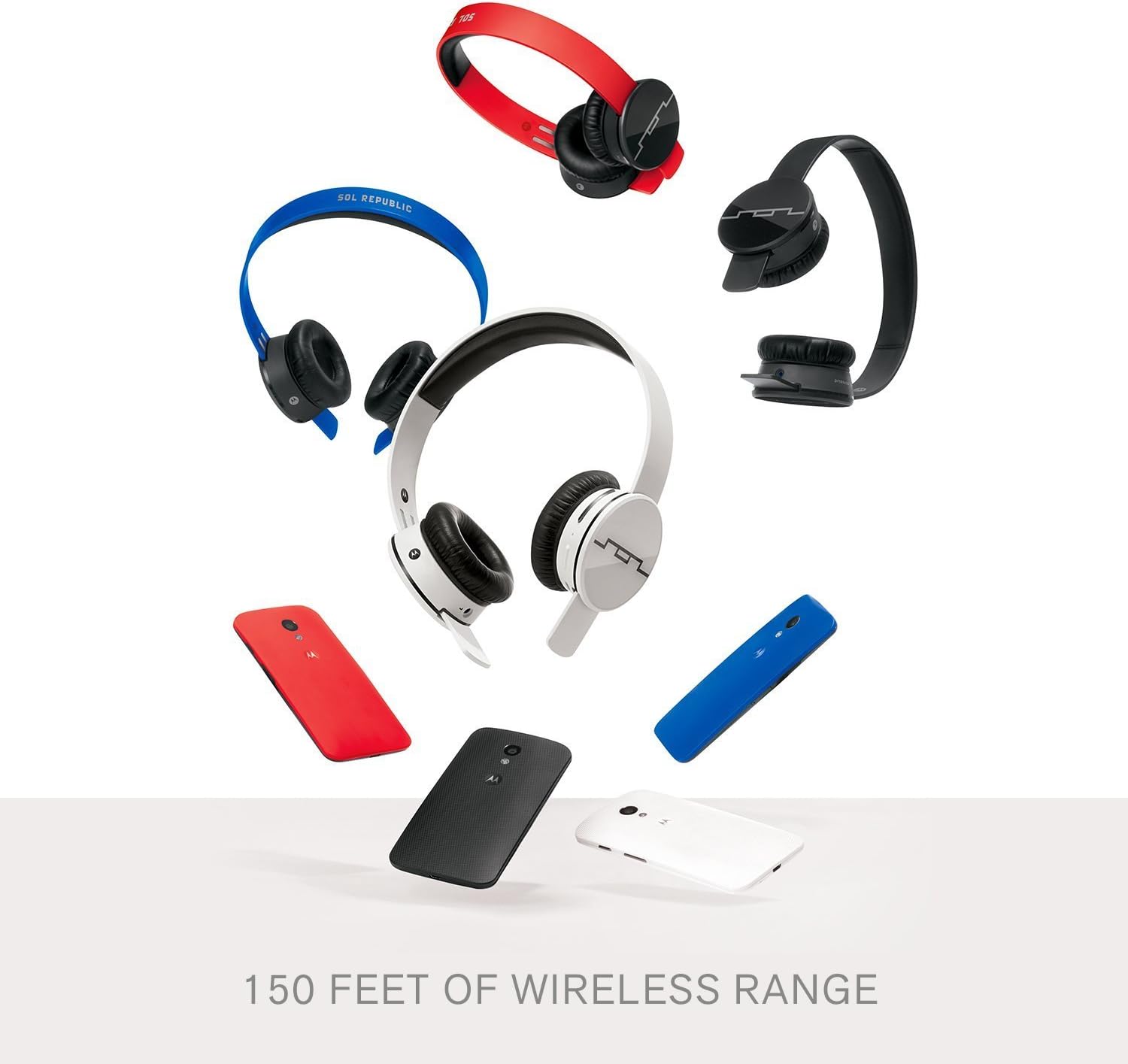
Image: An array of SOL REPUBLIC Tracks Air headphones in different headband colors, demonstrating the interchangeable design and highlighting the 150 feet wireless range.
4. Wireless Range
Enjoy wireless freedom with a control range of up to 150 feet from your connected device, allowing you to move freely without losing connection quality.
5. Battery Life
The Tracks Air headphones provide up to 15 hours of continuous playtime on a single charge, ensuring extended listening sessions.

Image: A person wearing the headphones while using a smartphone, emphasizing the long 15-hour battery life.
Maintenance
1. Cleaning
To maintain the condition of your headphones, wipe them regularly with a soft, dry cloth. Do not use abrasive cleaners or solvents. For ear cushions, gently wipe with a damp cloth and allow to air dry completely.
2. Storage
When not in use, store your headphones in a cool, dry place away from direct sunlight and extreme temperatures. Avoid placing heavy objects on top of the headphones to prevent damage.
Troubleshooting
If you encounter issues with your SOL REPUBLIC Tracks Air headphones, try the following steps:
- No Power: Ensure the headphones are fully charged.
- Cannot Pair: Make sure the headphones are in pairing mode (flashing blue/red LED). Check that Bluetooth is enabled on your device and that the headphones are within range. Try unpairing and re-pairing the headphones.
- No Sound: Check the volume levels on both the headphones and your connected device. Ensure the headphones are properly paired.
- Intermittent Connection: Move closer to your connected device. Avoid obstacles that may interfere with the wireless signal.
- Microphone Issues: Ensure the microphone is not obstructed. Check settings on your connected device to ensure the correct microphone input is selected.
If problems persist, refer to the official SOL REPUBLIC support resources or contact customer service.
Specifications
| Feature | Detail |
|---|---|
| Model Name | 1430-00 |
| Brand | SOL REPUBLIC |
| Connectivity Technology | Bluetooth, NFC |
| Wireless Communication Technology | Bluetooth 4.2 |
| Ear Placement | On Ear |
| Form Factor | On Ear |
| Noise Control | Sound Isolation |
| Item Weight | 1.4 Pounds (approx. 0.64 kg) |
| Product Dimensions | 9.8 x 2.9 x 7.3 inches (approx. 24.9 x 7.4 x 18.5 cm) |
| Battery | 1 Lithium Ion battery required (15 hours playtime) |
| Compatible Devices | Android Phones, Other Bluetooth/NFC Devices |
| Microphone | Built-in for hands-free calling |
| Water Resistance Level | Water Resistant |
| Frequency Range | 20 Hz - 20,000 Hz |
| UPC | 817210017458 |
Warranty and Support
For information regarding product warranty, technical support, or service, please refer to the warranty card included with your product or visit the official SOL REPUBLIC website. Keep your proof of purchase for warranty claims.
Related documents1430-00


Ask a question about this manual
Ask about setup, troubleshooting, compatibility, parts, safety, or missing instructions. Manuals+ will review the question and use this page’s manual context to help answer it.