
groov e GV-CH2200
Groov-e Power Stick 2200mAh Portable Charger User Manual
Model: GV-CH2200
Introduction
This user manual provides essential information for the safe and efficient operation of your Groov-e Power Stick 2200mAh Portable Power Bank. Please read this manual thoroughly before using the device to ensure proper functionality and to prevent damage.
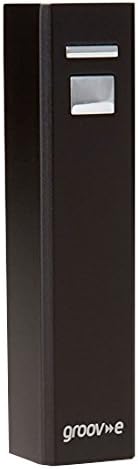
Figure 1: Groov-e Power Stick 2200mAh Portable Charger (Black)
The Groov-e Power Stick is a compact and lightweight portable power bank designed to provide instant power for your mobile devices while on the move. Its sleek design allows it to fit easily into a pocket, handbag, or rucksack.
Package Contents
Upon opening the package, please ensure all items listed below are present and in good condition:
- 1 x Groov-e Power Stick (2200mAh)
- 1 x USB Cable
- 1 x Micro USB Tip
- 1 x Mini USB Tip
- 1 x Nokia Tip
- 1 x Travel Pouch

Figure 2: Groov-e Power Stick packaging, showing the power bank and included accessories.
The image above displays the retail packaging and the various components included with your Groov-e Power Stick, ensuring you have all necessary cables and accessories for immediate use.
Setup and Charging the Power Bank
Your Groov-e Power Stick comes pre-charged and ready to use. However, for optimal performance and to ensure a full charge, it is recommended to fully charge the power bank before its first use.
- Connect the USB Cable: Insert the standard USB end of the included USB cable into a USB wall adapter (not included) or a computer's USB port.
- Connect to Power Stick: Insert the Micro USB end of the cable into the input port of the Groov-e Power Stick.
- Charging Indication: The power stick will indicate charging status (e.g., via an LED indicator, if present).
- Full Charge: A full self-charge via USB takes approximately 3 hours.
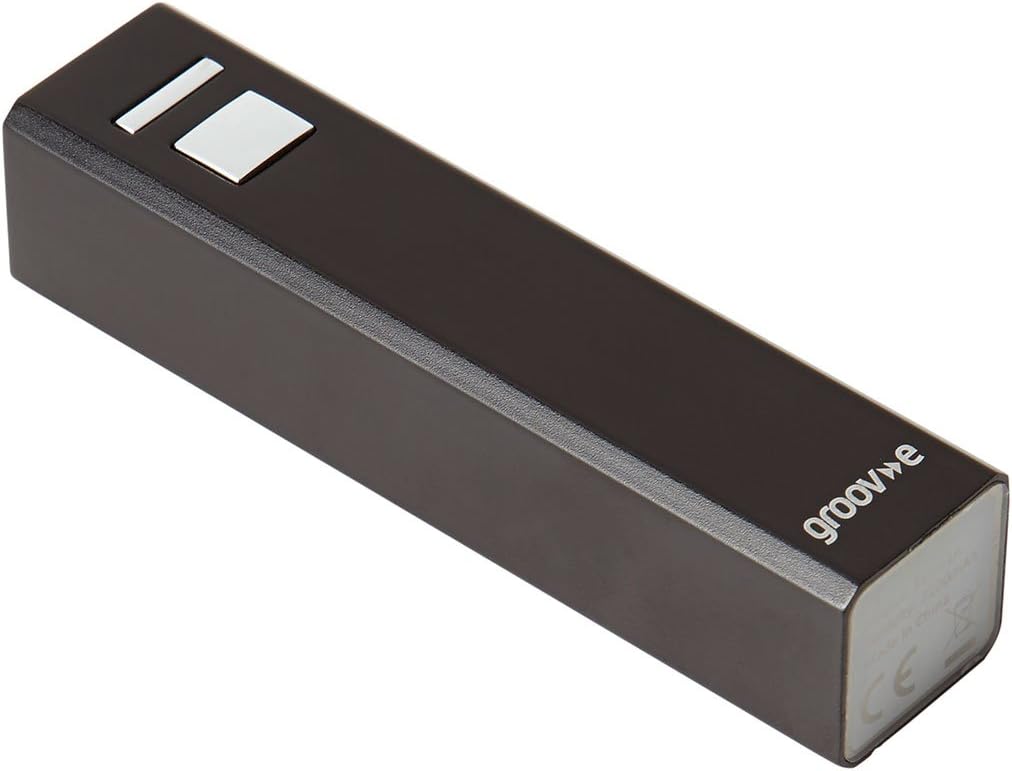
Figure 3: Top view of the Groov-e Power Stick, highlighting the input/output ports and power button.
This image illustrates the top surface of the power bank, where the USB input/output port and the power indicator/button are located, crucial for both charging the device and using it to charge others.
Operating Instructions
Charging Your Devices
The Groov-e Power Stick is compatible with a wide range of devices, including mobile phones, smartphones, tablets, e-readers, GPS devices, and cameras.
- Connect Your Device: Use the appropriate cable (Micro USB, Mini USB, Nokia Tip, or your device's original USB cable) to connect your device to the USB output port of the Groov-e Power Stick.
- Initiate Charging: Charging should begin automatically. If not, press the power button on the power stick to activate charging.
- Intelligent Charging: The power stick features intelligent charging with an auto safety cut-off to protect your devices from overcharging.
- Charging Time: Device charging time typically ranges from 1.5 to 2 hours, depending on the device's battery capacity.
Estimated Charges per Device Type (2200mAh capacity)
- iPad/Tablet: Up to 1 time
- iPhone/Smart Phone: 1-2 times
- GPS: 1-2 times
- Mobile Phone: 2-3 times
- e-Reader: 1 time
- iPod/MP3 player: 2-3 times
Maintenance and Care
To ensure the longevity and optimal performance of your Groov-e Power Stick, follow these maintenance guidelines:
- Storage: Store the power bank in a cool, dry place away from direct sunlight and extreme temperatures.
- Cleaning: Use a soft, dry cloth to clean the exterior of the power stick. Do not use liquid cleaners or abrasive materials.
- Avoid Drops: Protect the device from drops, impacts, and excessive vibration.
- Water Exposure: Keep the power stick away from water and high humidity. It is not waterproof.
- Battery Health: For best battery health, fully charge and discharge the power bank at least once every three months if not in regular use.
Troubleshooting
If you encounter issues with your Groov-e Power Stick, please refer to the following common problems and solutions:
| Problem | Possible Cause | Solution |
|---|---|---|
| Power Stick not charging | Cable not connected properly; faulty cable; power source issue. | Ensure USB cable is securely connected. Try a different USB cable or power source (e.g., another USB port or wall adapter). |
| Device not charging from Power Stick | Power Stick battery depleted; incorrect cable; device not compatible; Power Stick not activated. | Recharge the Power Stick. Ensure you are using the correct cable for your device. Press the power button on the Power Stick to initiate charging. |
| Slow charging | Cable quality; device's charging input limit. | Use the original or a high-quality USB cable. Ensure the Power Stick is fully charged. |
If the problem persists after trying these solutions, please contact Groov-e customer support.
Specifications
| Feature | Detail |
|---|---|
| Model Number | GV-CH2200 |
| Battery Capacity | 2200mAh (Milliamp Hours) |
| Input Rate | 4.5V-5.8V/1A |
| Output Rate | 5V/1A |
| Self-Charging Time (via USB) | Approx. 3 hours |
| Device Charging Time | Approx. 1.5-2 hours |
| Dimensions (Package) | 15.2 x 9.6 x 3.2 cm |
| Weight (Package) | 149.69 g |
| Connector Type | USB |
| Special Feature | Travel, Intelligent charging with auto safety cut-off |
Warranty and Support
Groov-e products are designed for quality and reliability. For information regarding warranty coverage and customer support, please refer to the warranty card included with your product or visit the official Groov-e website.
For further assistance or technical support, you may contact Groov-e directly through their official channels. Please have your product model number (GV-CH2200) and purchase details ready when contacting support.
You can find more information about Groov-e and their product range by visiting their store on Amazon: Groov-e Amazon Store.
Related documentsGV-CH2200


Ask a question about this manual
Ask about setup, troubleshooting, compatibility, parts, safety, or missing instructions. Manuals+ will review the question and use this page’s manual context to help answer it.