
1. Introduction
This manual provides detailed instructions for the installation, operation, and maintenance of your XTRONS CAM009S Car Rear View Reversing Backup Parking Camera. Please read this manual thoroughly before installation and use to ensure proper function and safety.

Figure 1: XTRONS CAM009S Rear View Camera, front view with illuminated LEDs.
The XTRONS CAM009S is designed to assist drivers with reversing and parking by providing a clear, wide-angle view of the area behind the vehicle. It features a high-definition CMOS imaging sensor, a 120-degree wide viewing angle, and four white LED lights for enhanced visibility in low-light conditions. The camera is also dustproof and waterproof (IP68 rated) for reliable performance in various environmental conditions.
2. Safety Information
- Always ensure the vehicle's ignition is off and the battery is disconnected before beginning any electrical installation.
- Improper installation can lead to vehicle damage or electrical malfunction. If you are unsure about the installation process, seek professional assistance.
- This camera is an aid for reversing and parking. It does not replace the driver's responsibility to check surroundings manually.
- Ensure all wiring is properly insulated and secured to prevent short circuits or damage from vehicle vibration.
- Do not obstruct the camera's view once installed.
3. Package Contents
Verify that all items listed below are present in your package:

Figure 2: Included accessories with the XTRONS CAM009S camera.
- 1 x XTRONS CAM009S Rear View Camera
- 1 x 6m Video Cable (RCA connector)
- 1 x Power Cable
- 4 x Mounting Screws
- 1 x Mounting Plate
- 1 x User Manual (this document)
4. Installation
The XTRONS CAM009S camera offers flexible installation options to suit various vehicle types. It is designed for surface mounting.
4.1 Mounting the Camera

Figure 3: Installation angle options and basic wiring diagram.
- Choose a Location: Select a suitable location at the rear of your vehicle, typically above the license plate or near the trunk handle, ensuring a clear view and minimal obstruction. The camera's design allows for three installation angles to optimize the field of view.
- Secure the Mounting Plate: Use the provided screws to securely attach the mounting plate to the chosen location.
- Attach the Camera: Mount the camera onto the secured mounting plate. Adjust the camera angle as needed to achieve the desired viewing perspective.
4.2 Wiring Connections
The camera requires power and a video signal connection to a compatible monitor or head unit. Refer to Figure 3 for a general wiring overview.
- Power Connection:
- Connect the red wire of the camera's power cable to the vehicle's reverse light positive (+) wire. This ensures the camera powers on automatically when the vehicle is put into reverse.
- Connect the black wire of the camera's power cable to a suitable vehicle ground point (-).
- The camera operates on a 12V DC power supply.
- Video Signal Connection:
- Connect the yellow RCA connector from the camera's video cable to the "Camera In" or "Reverse Camera" RCA input on your car's monitor or head unit.
- Ensure the head unit supports AHD format if you are using an XTRONS IQ, MA, PMA, PME, PN, PQ, PQS, QP, PSN, PBX, or PSF series head unit. For other head units, verify AHD compatibility.
- Cable Routing: Carefully route all cables through the vehicle, ensuring they are protected from sharp edges, heat, and moving parts. Secure cables with zip ties or clips to prevent rattling or damage.
Note: Some vehicle installations may require a noise filter to prevent interference with the video signal. If you experience flickering or distorted images, consider installing a dedicated noise filter (not included).
5. Operation
Once properly installed and connected, the XTRONS CAM009S camera operates automatically.
- Turn on your vehicle's ignition.
- Shift the vehicle into reverse gear.
- The camera will automatically activate, and the video feed will display on your connected monitor or head unit.
- The integrated white LED lights will illuminate automatically in low-light conditions to provide improved visibility.

Figure 4: Day and Night Vision comparison of AHD camera technology.
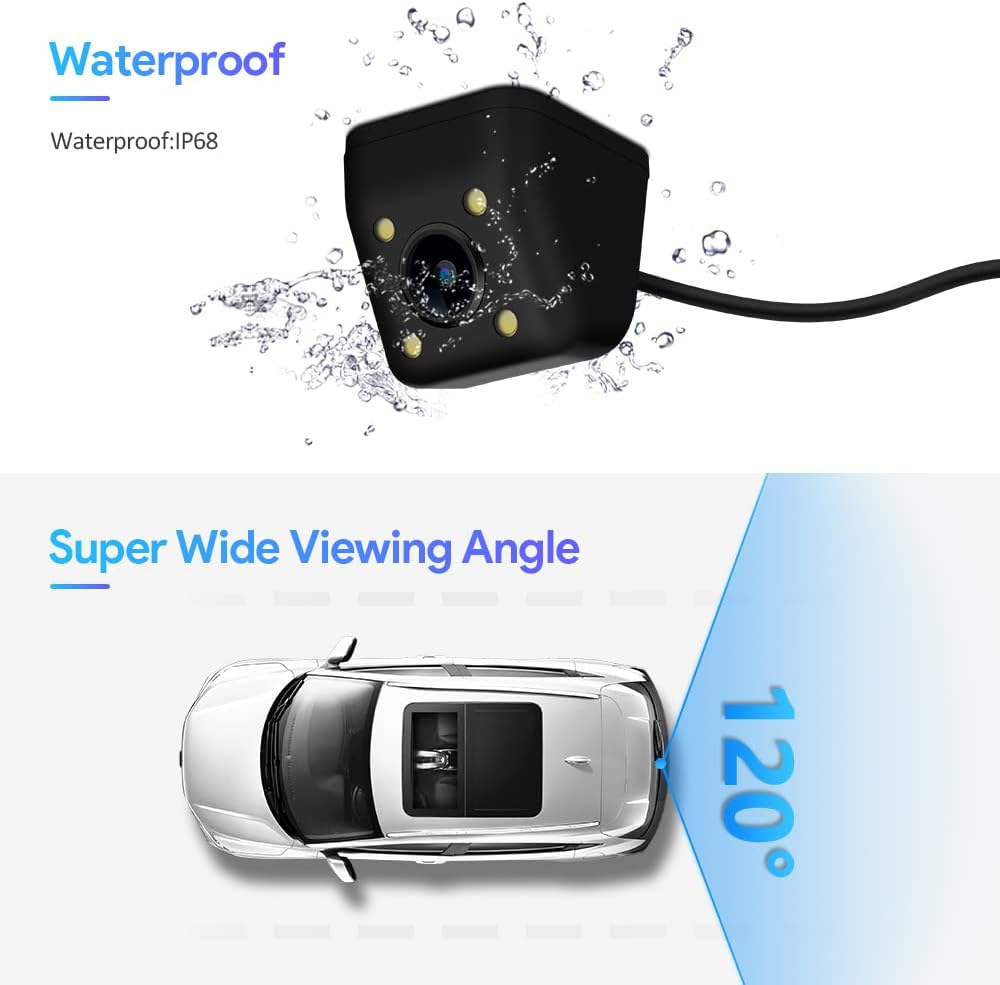
Figure 5: Waterproof IP68 rating and 120-degree super wide viewing angle.
6. Maintenance
To ensure optimal performance and longevity of your XTRONS CAM009S camera, follow these simple maintenance guidelines:
- Cleaning: Regularly clean the camera lens with a soft, damp cloth to remove dirt, dust, or water spots that may obstruct the view. Avoid using abrasive cleaners or solvents.
- Inspection: Periodically check the camera's mounting and wiring connections to ensure they remain secure and free from damage.
- Environmental Protection: While the camera is waterproof (IP68), extreme temperatures or prolonged exposure to harsh chemicals should be avoided.
7. Troubleshooting
If you encounter issues with your XTRONS CAM009S camera, refer to the following troubleshooting steps:
- No Image on Monitor:
- Check all power connections to ensure the camera is receiving 12V DC power when the vehicle is in reverse.
- Verify the video cable (RCA) is securely connected to both the camera and the monitor/head unit.
- Ensure your monitor/head unit is set to the correct video input source for the camera.
- Confirm that your head unit supports AHD format if applicable.
- Flickering or Distorted Image:
- Check for loose or damaged video cable connections.
- Ensure power and ground connections are solid and free from interference.
- Electrical noise from the vehicle's system can cause interference. Installing a noise filter on the power line may resolve this issue.
- Poor Image Quality (Day or Night):
- Clean the camera lens to remove any dirt or smudges.
- Ensure the LED lights are functioning correctly in low-light conditions.
- Verify the camera is securely mounted and its view is not obstructed.
8. Specifications
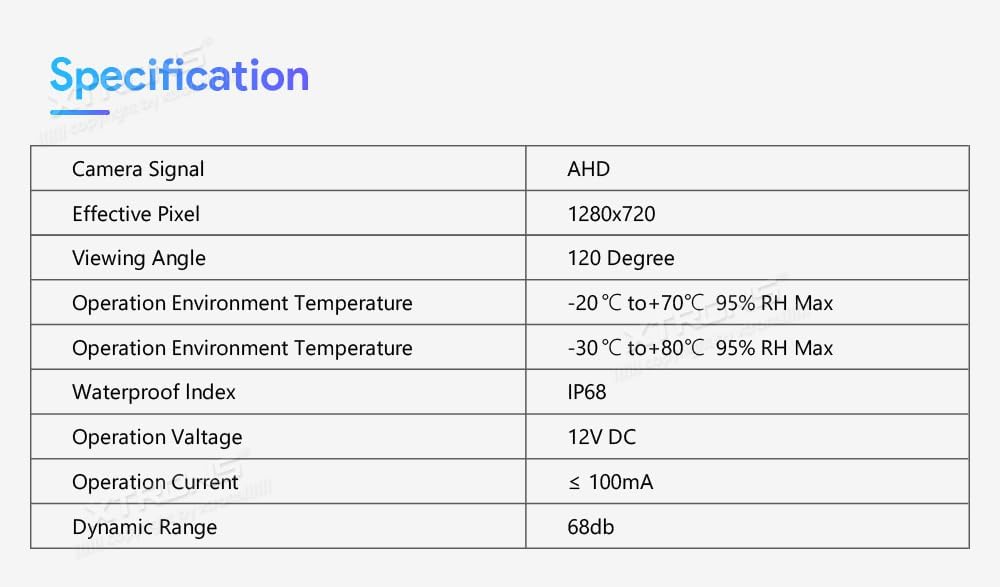
Figure 6: Detailed specifications of the XTRONS CAM009S camera.
| Feature | Specification |
|---|---|
| Camera Signal | AHD |
| Effective Pixel | 1280x720 |
| Viewing Angle | 120 Degrees (Real Angle of View: 170 Degrees) |
| Operation Environment Temperature | -20°C to +70°C (95% RH Max) / -30°C to +80°C (95% RH Max) |
| Waterproof Index | IP68 |
| Operation Voltage | 12V DC |
| Operation Current | ≤ 100mA |
| Dynamic Range | 68db |
| Optical Sensor Technology | CMOS |
| Lens Type | Wide Angle |
| Connector Type | RCA |
| Product Dimensions | 6.97"L x 6.97"W x 6.97"H |
| Item Weight | 5.6 ounces |

Figure 7: Key features of the XTRONS CAM009S camera.
9. Warranty and Support
XTRONS products are designed for reliability and performance. For warranty information and technical support, please refer to the official XTRONS website or contact your retailer.
Official XTRONS Website: www.xtrons.com
For specific product inquiries, please have your model number (CAM009S) and serial number (if applicable, found on packaging) ready.

Figure 8: Product packaging with regulatory marks and manufacturer information.

Figure 9: Product identification details on packaging.
