
1. Introduction
The Minolta Freedom Zoom 90 is a versatile 35mm film camera designed for ease of use, featuring auto focus, an integrated film winder, built-in flash, and automatic exposure control. This manual provides essential information for setting up, operating, and maintaining your camera to ensure optimal performance and longevity.
2. What's in the Box
- Minolta Freedom Zoom 90 Camera Body
- Integrated Film Winder
Note: Additional accessories such as batteries, film, or a camera strap may be sold separately.
3. Setup
3.1. Battery Installation
Locate the battery compartment, typically on the bottom or side of the camera. Insert the required batteries (refer to the camera's battery type indicator, usually on the compartment cover) ensuring correct polarity (+/-). Close the compartment securely.
3.2. Loading Film
Open the film compartment door, usually located on the back of the camera. Insert a 35mm film cartridge into the film chamber. Pull the film leader across to the take-up spool, aligning it with the red or orange mark. Close the film compartment door firmly until it clicks into place. The camera will automatically advance the film to the first frame.

Figure 3.2.1: Front view of the Minolta Freedom Zoom 90 camera, illustrating its compact design with the lens and flash visible.
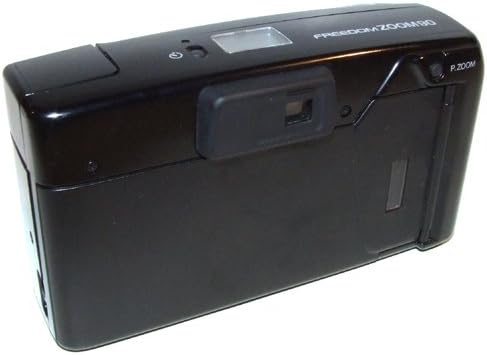
Figure 3.2.2: Rear view of the Minolta Freedom Zoom 90 camera, highlighting the film compartment door and viewfinder.
4. Operating the Camera
4.1. Powering On/Off
To power on the camera, slide the power switch (usually located near the shutter button) to the 'ON' position. To power off, slide it back to 'OFF'.
4.2. Taking a Photograph
- Frame your shot: Look through the viewfinder to compose your image.
- Focus: Gently press the shutter button halfway down. The camera's autofocus system will engage, and a focus indicator (often a green light or beep) will confirm focus.
- Shoot: Press the shutter button all the way down to take the picture. The film will automatically advance to the next frame.
4.3. Using the Zoom
The Minolta Freedom Zoom 90 features a zoom lens. Use the zoom buttons (typically marked 'W' for wide and 'T' for telephoto, or '+' and '-') to adjust the focal length and magnify or widen your view before taking a picture.
4.4. Flash Operation
The built-in flash will automatically activate in low-light conditions. Some models may offer flash modes (e.g., fill-flash, red-eye reduction) accessible via dedicated buttons or menu options. Consult the camera's specific markings for flash control.
4.5. Rewinding Film
Once all exposures on the film roll have been used, the camera will typically rewind the film automatically. If manual rewind is necessary, locate the rewind button (often recessed to prevent accidental activation) and press it until the film is fully rewound into the cartridge. Do not open the film compartment door until the film is completely rewound.
5. Maintenance
5.1. Cleaning the Camera
- Lens: Use a soft, lint-free microfiber cloth specifically designed for optical surfaces. For stubborn smudges, a small amount of lens cleaning fluid can be applied to the cloth (never directly to the lens).
- Camera Body: Wipe the camera body with a soft, dry cloth. Avoid using harsh chemicals or abrasive materials.
- Film Compartment: Periodically inspect the film compartment for dust or debris. Use a soft brush or air blower to gently remove any particles.
5.2. Storage
When not in use, store the camera in a cool, dry place away from direct sunlight, extreme temperatures, and high humidity. It is advisable to remove batteries if the camera will not be used for an extended period to prevent leakage.
6. Troubleshooting
| Problem | Possible Cause | Solution |
|---|---|---|
| Camera does not power on. | Dead or incorrectly inserted batteries. | Replace batteries with fresh ones, ensuring correct polarity. |
| Film does not advance. | Film not loaded correctly; end of roll. | Re-load film carefully, ensuring leader is engaged. If at end of roll, rewind and replace. |
| Flash does not fire. | Insufficient battery power; flash charging; flash mode disabled. | Check batteries. Wait for flash charge indicator. Ensure flash mode is set to auto or forced flash. |
| Light leaks on developed film. | Improperly sealed film compartment door; damaged light seals. | Ensure film door is fully closed. Inspect light seals around the door for damage. If seals are damaged, professional repair may be required to prevent light from reaching the film. |
7. Specifications
- Brand: Minolta
- Model Name: Minolta Freedom Zoom 90
- Film Format Type: 35mm
- Special Feature: Built In Flash, Auto Exposure
- Exposure Control Type: Automatic
- Shutter Type: Focal Plane Shutter
- Item Weight: 8 ounces
- Package Dimensions: 6 x 4 x 4 inches
- Manufacturer: Minolta Camera Co.
- Date First Available: December 10, 2013
8. Warranty and Support
Specific warranty details for the Minolta Freedom Zoom 90 are not provided within the available product data. For information regarding warranty coverage, repairs, or technical support, please refer to the original purchase documentation or contact Minolta customer service directly.