
Ledlenser LED9421
Ledlenser X21.2 Xtreme Torch User Manual
Model: LED9421
Introduction
Thank you for choosing the Ledlenser X21.2 Xtreme Torch. This high-performance LED flashlight is engineered for extreme brightness and durability, making it an ideal tool for various demanding applications. This manual provides essential information for the safe and effective operation, maintenance, and troubleshooting of your X21.2 torch.

Image: The Ledlenser X21.2 Xtreme Torch, showcasing its robust design and multi-LED head.
Safety Information
Please read all safety warnings and instructions carefully before using this product. Failure to follow these instructions may result in electric shock, fire, or serious injury.
- Do Not Stare into Beam: The X21.2 produces an extremely bright light. Avoid direct eye exposure to the light beam, as it can cause temporary vision impairment or permanent eye damage.
- Battery Safety:
- Use only the specified battery type (D-cell alkaline batteries).
- Do not mix old and new batteries, or different types of batteries.
- Ensure correct polarity when inserting batteries.
- Remove batteries if the torch will not be used for an extended period to prevent leakage.
- Dispose of used batteries responsibly according to local regulations.
- Heat Warning: The torch head may become warm during prolonged use, especially on high settings. This is normal. Handle with care.
- Children: Keep out of reach of children. This is not a toy.
Package Contents
Verify that all items listed below are included in your package:
- Ledlenser X21.2 Xtreme Torch
- Hard Case
- 4 x D-cell Alkaline Batteries
- Shoulder Strap
- Mounting Rings (2)
- User Manual

Image: All components of the Ledlenser X21.2 package laid out, including the torch, hard case, batteries, strap, and manual.
Setup
Battery Installation
- Unscrew the tail cap of the torch by turning it counter-clockwise.
- Insert four (4) D-cell alkaline batteries, ensuring the correct polarity (+/-) as indicated inside the battery compartment.
- Screw the tail cap back on clockwise until it is securely tightened. Do not overtighten.
Attaching the Shoulder Strap
The included shoulder strap can be attached to the torch for easier carrying, especially during extended use.
- Locate the two attachment points on the torch body.
- Thread the strap's clips through the attachment points and secure them.
Operating Instructions
Power On/Off
Press the power button located on the side of the torch body to turn the light on or off.

Image: Close-up view of the power button on the body of the Ledlenser X21.2 torch.
Adjusting Brightness Modes
The X21.2 features multiple brightness modes. With the torch on, press the power button repeatedly to cycle through the available modes (e.g., High, Low, Strobe, SOS, etc., depending on the specific model's programming). The torch will remember the last used mode when turned off and on again.
Advanced Focus System
The Ledlenser X21.2 utilizes an Advanced Focus System, allowing seamless transition from a broad floodlight to a sharply focused long-distance beam.
- To adjust the focus, slide the head of the torch forward or backward.
- Sliding the head forward will narrow the beam for long-distance illumination.
- Sliding the head backward will widen the beam for broad area lighting.
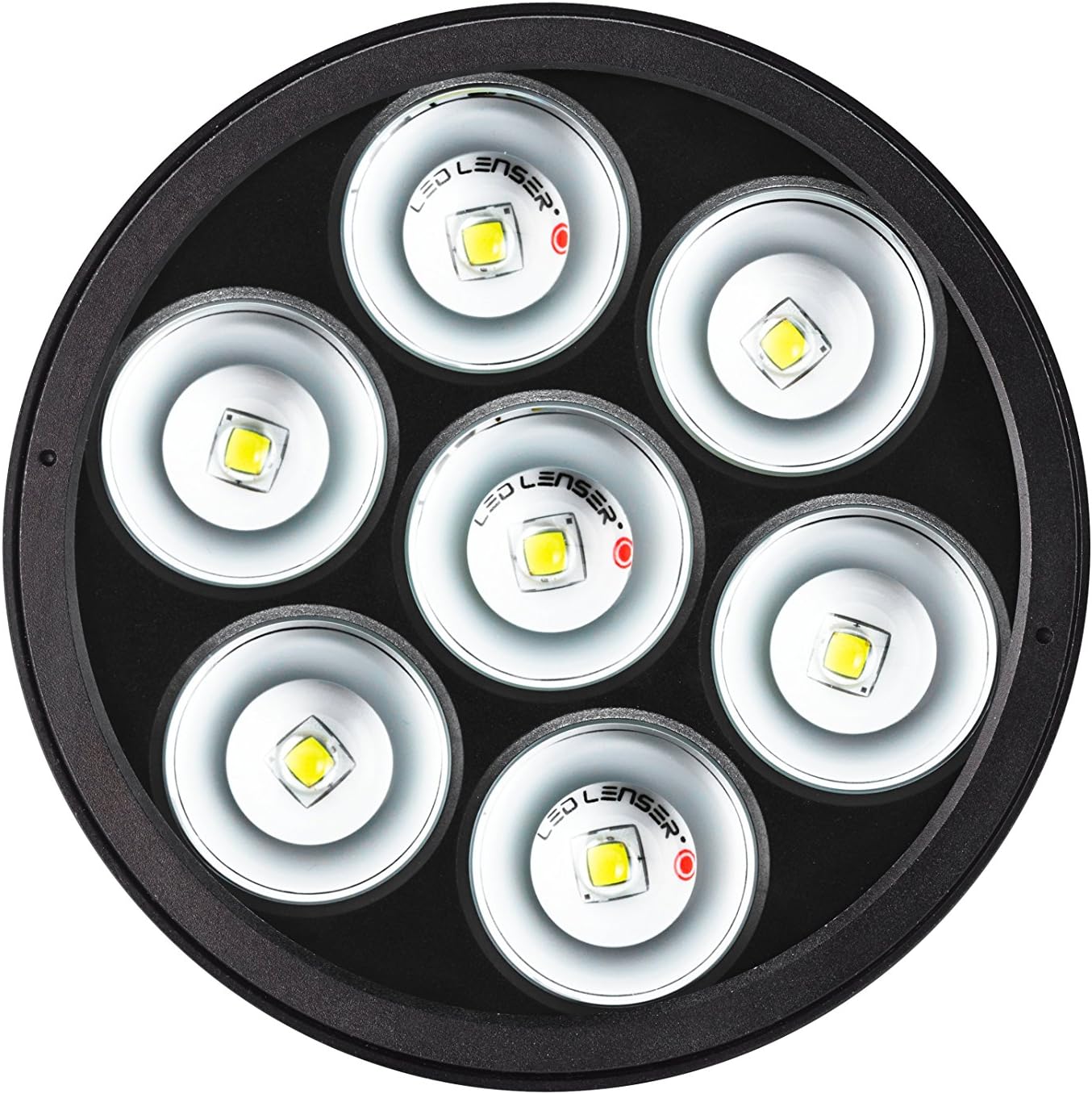
Image: Detailed view of the multi-LED head of the Ledlenser X21.2, highlighting the individual LED lenses.
Maintenance
Cleaning
- Wipe the torch body with a soft, damp cloth. Do not use abrasive cleaners or solvents.
- Clean the lens gently with a lens cloth to maintain optimal light output.
Battery Care
- Replace all batteries simultaneously when they are depleted.
- If the torch will not be used for an extended period (more than one month), remove the batteries to prevent potential leakage and damage to the torch.
Storage
Store the Ledlenser X21.2 in its hard case in a cool, dry place, away from direct sunlight and extreme temperatures.

Image: The Ledlenser X21.2 Xtreme Torch securely stored within its durable hard case, ready for transport or storage.
Troubleshooting
| Problem | Possible Cause | Solution |
|---|---|---|
| Torch does not turn on. |
|
|
| Light is dim or flickers. |
|
|
| Focus mechanism is stiff. |
|
|
Specifications
| Feature | Detail |
|---|---|
| Model Number | LED9421 |
| Brand | Ledlenser |
| Light Source Type | LED |
| Power Source | Battery Powered |
| Battery Type | 4 x D-cell Alkaline Batteries (included) |
| Special Feature | Durable |
| Color | Black |
| Included Components | Case |
| Item Weight | 3.18 Kilograms (7 pounds) |
| Product Dimensions | 17.32 x 8.86 x 4.76 inches |
| Manufacturer | LED Lenser |
| UPC | 785497724492 |
| Date First Available | November 19, 2013 |
Warranty and Support
For warranty information and customer support, please refer to the official Ledlenser website or contact their customer service directly. Keep your proof of purchase for any warranty claims.

Image: A person using the Ledlenser X21.2 torch to illuminate a beach scene at night, demonstrating its powerful beam.
Ask a question about this manual
Ask about setup, troubleshooting, compatibility, parts, safety, or missing instructions. Manuals+ will review the question and use this page’s manual context to help answer it.