Product Overview
The Panasonic HC-VX1 camcorder delivers a 4K recording experience with advanced in-camera options. It features a LEICA DICOMAR 24X optical zoom lens (25-600mm) with a bright aperture range from F1.8 wide to F4.0 telephoto, paired with a large 1/2.5" BSI MOS Sensor for impressive low-light performance. To ensure stable footage, the camcorder incorporates three optical image stabilization technologies: 5-Axis HYBRID O.I.S.+, Ball O.I.S., and Adaptive O.I.S.
Key Features
- 4K Cinema-Like recording with advanced in-camera capture options.
- LEICA DICOMAR 24X optical zoom lens (25-600mm, F1.8-4.0) and 1/2.5" BSI MOS Sensor for superior low-light performance.
- Three Optical Image Stabilization (O.I.S.) technologies: 5-Axis Hybrid O.I.S. Plus, Ball O.I.S., and Adaptive O.I.S.
- Wireless Multi-Camera feature allows simultaneous capture from up to two connected smartphones.
- Active Contrast feature equalizes contrast for natural-looking images.
- HDR Movie mode provides a wider dynamic range between dark and bright areas.
What's in the Box
- Panasonic HC-VX1 Camcorder
- AC Adaptor
- DC Cable
- Battery
- HDMI Cable
- Lens Hood
- USB Cable
Setup
Battery Installation and Charging
Insert the included battery into the battery compartment located at the rear of the camcorder. Ensure it clicks securely into place. Connect the AC adaptor to the camcorder's DC input and then to a power outlet to charge the battery. The camcorder charges the battery while it is installed.

Image: Rear view of the Panasonic HC-VX1 camcorder with the battery installed.
SD Card Installation
Open the SD card slot cover, typically found on the side of the camcorder. Insert a compatible SDXC memory card until it clicks. Close the cover securely. Ensure the card is formatted by the camcorder before first use to prevent data loss.

Image: Side view of the Panasonic HC-VX1 camcorder, highlighting the SD card slot.
Power On/Off
To power on the camcorder, open the LCD screen. The camcorder will automatically power on. To power off, close the LCD screen. A dedicated power switch may also be available for manual control.
Operating the Camcorder
Touchscreen Interface
The camcorder features a primary touchscreen interface for navigating menus and adjusting settings. Tap on icons and options displayed on the LCD screen to control various functions.
Shooting Modes
Select from various shooting modes to suit your recording environment:
- Intelligent Auto (iA): Automatically optimizes settings for the scene.
- Scene (SCN): Provides preset scene modes for specific situations (e.g., sports, portrait).
- Manual (MNL): Allows full manual control over exposure settings.
- HDR Mode: Enhances dynamic range for scenes with high contrast.
Video Recording Settings
The HC-VX1 supports various recording resolutions and frame rates:
- 4K UHD (3840x2160): Record at up to 30 frames per second (30p) or 24 frames per second (24p). The highest bitrate for 4K is 72 Mbps.
- Full HD (1920x1080): Record at up to 60 frames per second (60p). Bitrates for HD can be 50 Mbps or 28 Mbps.
Note: For optimal image quality, especially when shooting in 4K, it is recommended to use 4K recording settings. HD recording on this model may exhibit different focal lengths and reduced quality compared to 4K.
Manual Controls
In Manual mode, you can precisely adjust key exposure parameters:
- Gain (ISO): Controls the sensor's sensitivity to light.
- Shutter Speed: Determines the duration the sensor is exposed to light.
- Iris (Aperture): Controls the amount of light entering the lens and affects depth of field.
These settings can be adjusted simultaneously to achieve desired exposure and creative effects.
Lens Features
The camcorder is equipped with a high-quality LEICA DICOMAR lens:
- Zoom: 24X optical zoom, providing a focal length range of 25mm to 600mm in 4K UHD.
- Wide Angle: Features a 25mm wide-angle capability, ideal for capturing expansive scenes.
- Built-in Lens Protector: The lens cover automatically opens when the camcorder is powered on, protecting the lens when not in use.

Image: Front view of the Panasonic HC-VX1 camcorder, showcasing the LEICA DICOMAR lens.
Connectivity and Audio Ports
The camcorder offers various ports for connectivity and audio:
- HDMI Out: For connecting to external displays or recorders.
- Wi-Fi: Enables wireless connectivity for features like Wireless Multi-Camera.
- USB: For data transfer and charging.
- DC Power Input: For connecting the AC adaptor.
- Headphone Jack: 3.5mm jack for audio monitoring.
- Microphone Jack: 3.5mm jack for connecting an external microphone.
- Cold Shoe: Located on top, for mounting accessories like lights or external microphones (no electronic components).
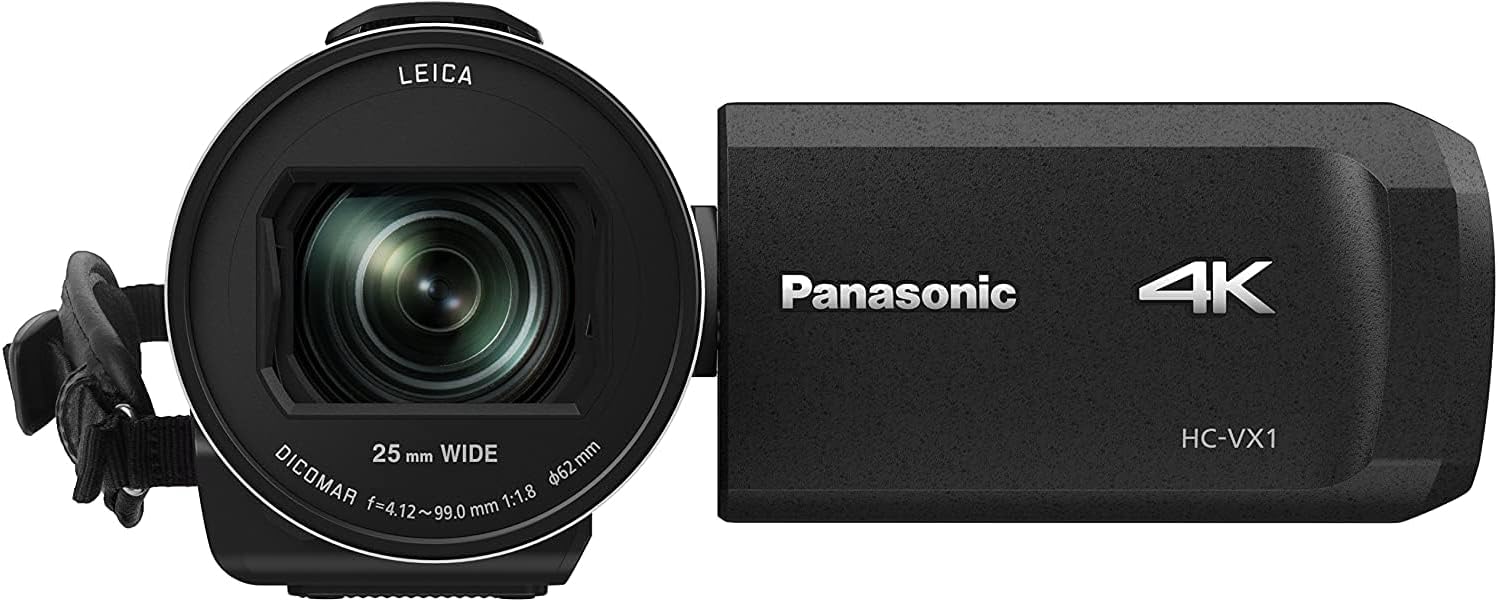
Image: Top view of the Panasonic HC-VX1 camcorder, showing the cold shoe mount for accessories.
Maintenance
Proper maintenance ensures the longevity and performance of your camcorder:
- Cleaning the Lens: Use a soft, lint-free cloth specifically designed for optical lenses. Avoid harsh chemicals.
- Cleaning the Body: Wipe the camcorder body with a soft, dry cloth. For stubborn dirt, use a slightly damp cloth and then dry thoroughly.
- Storage: Store the camcorder in a cool, dry place away from direct sunlight and extreme temperatures. Remove the battery if storing for extended periods.
- Battery Care: Avoid fully discharging the battery frequently. Charge it regularly, even if not in use, to maintain battery health.
Troubleshooting
If you encounter issues with your camcorder, consider the following common solutions:
- Camcorder Not Powering On: Check if the battery is properly installed and charged. Ensure the AC adaptor is connected correctly if using external power.
- Recording Issues: Verify that an SD card is inserted and has sufficient free space. Check the selected recording mode and settings.
- Poor Image Quality: Ensure the lens is clean. Adjust exposure settings (Gain, Shutter Speed, Iris) for current lighting conditions. Consider using 4K recording for superior detail.
- No Audio Recording: Check if an external microphone is properly connected to the microphone jack. Ensure internal microphone settings are enabled.
- Connectivity Problems: For Wi-Fi, ensure the camcorder is within range of a compatible network. For wired connections (HDMI, USB), check cable integrity and port connections.
For persistent issues, consult the full user manual or contact Panasonic customer support.
Specifications
| Product Dimensions | 5.59 x 2.68 x 3.03 inches |
| Item Weight | 15 ounces |
| Item Model Number | HC-VX1K |
| Batteries | 1 Lithium Ion batteries required. (included) |
| Date First Available | January 8, 2018 |
| Manufacturer | Panasonic |
| Brand | Panasonic |
| Photo Sensor Technology | CMOS |
| Video Capture Resolution | 4K |
| Maximum Focal Length | 0.1 (Note: This value may represent a minimum or internal lens specification. The effective optical zoom is 24X, covering 25-600mm in 4K.) |
| Maximum Aperture | 1.8 f |
| Flash Memory Type | SDXC |
| Video Capture Format | ASF |
| Supported Audio Format | Dolby Audio, AAC |
| Screen Size | 3 Inches |
| Connectivity Technology | Wi-Fi |
Warranty and Support
For warranty information, product registration, and technical support, please refer to the official Panasonic website or contact their customer service department. Keep your proof of purchase for warranty claims.


