
1. Introduction
The RME HDSP 9632 is a high-performance 32-channel PCI sound card designed for professional audio applications. It offers versatile analog and digital interfaces, supporting sample rates up to 192 kHz. This manual provides detailed instructions for installing, operating, and maintaining your HDSP 9632 sound card to ensure optimal performance.
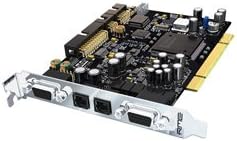
Figure 1: The RME HDSP 9632 PCI Sound Card. This image shows the sound card with its PCI connector, various input/output ports including analog, digital (optical and coaxial), and MIDI connectors on the bracket.
2. Setup
2.1 Physical Installation
- Power Off: Ensure your computer is completely powered off and unplugged from the mains.
- Open Case: Carefully open your computer's case.
- Locate PCI Slot: Identify an available PCI slot on your motherboard.
- Insert Card: Gently but firmly insert the HDSP 9632 card into the PCI slot until it is securely seated.
- Secure Card: Fasten the card's bracket to the computer case using the provided screw.
- Close Case: Close the computer case and reconnect all cables.
2.2 Driver Installation
After physical installation, power on your computer. The operating system (e.g., Windows 10) may attempt to install generic drivers. For optimal performance, it is crucial to install the latest drivers from the official RME website.
- Download Drivers: Visit the official RME website and navigate to the support section for the HDSP 9632. Download the latest drivers compatible with your operating system.
- Install Drivers: Run the downloaded installer and follow the on-screen instructions. You may be prompted to restart your computer.
- Verify Installation: After restarting, check your operating system's Device Manager to ensure the RME HDSP 9632 is recognized and functioning correctly.
2.3 Connecting Peripherals
The HDSP 9632 offers a variety of input/output options:
- Analog I/O: Connect analog audio devices using the appropriate breakout cables (not included, typically).
- Digital I/O: Utilize the optical (ADAT/SPDIF) and coaxial (SPDIF) ports for digital audio connections.
- MIDI I/O: Connect MIDI devices (keyboards, controllers) via the MIDI In/Out ports.
- Headphone Output: A dedicated stereo DA converter is available for headphone monitoring. Connect your headphones directly to the designated jack.
3. Operating Instructions
3.1 Basic Functionality
The RME HDSP 9632 provides 32 digital channels and supports sample rates up to 192 kHz. All input and output channels can be used simultaneously, offering maximum flexibility for complex audio setups.
3.2 RME Control Panel
After driver installation, the RME Control Panel software will be available. This application allows you to configure various settings, including:
- Sample Rate: Adjust the audio sample rate (e.g., 44.1 kHz, 48 kHz, 96 kHz, 192 kHz).
- Buffer Size/Latency: Optimize buffer settings for desired latency performance. RME's "Zero CPU Load" technology ensures high performance with minimal CPU usage.
- Input/Output Routing: Configure how audio signals are routed between physical inputs, software applications, and physical outputs.
- Monitoring: Manage the dedicated stereo DA converter for headphones and create custom submixes.
- Digital Format: Select between ADAT and SPDIF formats for optical and coaxial digital connections.
Refer to the RME software manual (available on the RME website) for detailed instructions on using the Control Panel and its advanced features.
4. Maintenance
- Dust Removal: Periodically open your computer case and gently clean the sound card and surrounding components with compressed air to prevent dust buildup, which can lead to overheating.
- Driver Updates: Regularly check the RME website for updated drivers to ensure compatibility and access to the latest features and bug fixes.
- Physical Handling: When handling the card, always hold it by its edges and avoid touching the components or connectors to prevent electrostatic discharge (ESD) damage.
5. Troubleshooting
- No Sound Output:
Ensure all audio cables are securely connected. Verify that the correct playback device is selected in your operating system's sound settings and in your audio software. Check the RME Control Panel for correct routing and sample rate settings.
- Driver Not Recognized:
Reinstall the latest drivers from the RME website. Ensure the card is properly seated in the PCI slot. Check Device Manager for any error codes.
- Intermittent Audio/Crackling:
Increase the buffer size in the RME Control Panel. Ensure your computer meets the minimum system requirements. Check for other background processes consuming significant CPU resources. Update motherboard chipset drivers.
- MIDI Not Working:
Verify MIDI cable connections. Ensure MIDI input/output is enabled in your software and the RME Control Panel. Check Device Manager for MIDI device recognition.
6. Specifications
| Feature | Detail |
|---|---|
| Product Type | PCI Sound Card |
| Channels | 32 Digital Channels |
| Max Sample Rate | 192 kHz |
| Interfaces | Analog I/O, Digital I/O (Optical, Coaxial), MIDI I/O, Headphone Output |
| Technology | RME "Zero CPU Load" Hammerfall DSP |
| Audio Output Mode | Stereo |
| Compatible Devices | Headphone (for direct monitoring) |
| Platform | Windows 10 (and earlier compatible versions) |
| Manufacturer | RME |
7. Support and Warranty
For technical support, driver downloads, and further documentation, please visit the official RME website. Information regarding product warranty is typically provided with your purchase documentation or can be found on the RME website.


