
Introduction
This manual provides essential instructions for the proper use, programming, and maintenance of your Python EZSDEI475 476P Keyless Entry Remote Alarm Fob. Please read this manual thoroughly before attempting to program or use the device.
Product Overview
The Python EZSDEI475 476P is a replacement keyless entry remote designed to operate with compatible vehicle alarm and keyless entry systems. It allows for remote locking, unlocking, and alarm arming/disarming functions.
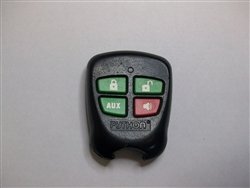
Image 1: Front view of the Python EZSDEI475 476P keyless entry remote fob, showing its buttons and casing.
Compatibility
This key fob is compatible with vehicles that originally used the Python EZSDEI475 or 476P remote. To ensure compatibility, verify that the part number and FCC ID on your existing remote match the specifications of this product. If your original remote has a metal key, it will need to be cut by a locksmith to match your vehicle's ignition.
Setup and Programming
Programming this key fob to your vehicle is required for functionality. This process typically involves placing your vehicle's system into a programming mode and then synchronizing the new remote. Specific programming instructions vary by vehicle make and model.
General Programming Steps (Consult Vehicle Manual for Specifics):
- Locate Programming Instructions: Refer to your vehicle's owner's manual or search online for "[Your Vehicle Make/Model/Year] key fob programming instructions".
- Enter Programming Mode: This often involves a sequence of turning the ignition on/off, pressing a button on the vehicle's alarm system, or a combination of actions.
- Program the Remote: Once in programming mode, press a button on the new key fob (e.g., lock or unlock button) to register it with the vehicle's system.
- Exit Programming Mode: Follow your vehicle's specific instructions to exit programming mode.
- Test Functionality: Test all buttons on the new key fob to ensure proper operation.
Note: If you encounter difficulties, it is recommended to consult a professional automotive locksmith or your dealership for assistance with programming.
Operating Instructions
Once programmed, the key fob provides the following functions:
- Lock Button: Press to lock all vehicle doors and arm the alarm system (if equipped).
- Unlock Button: Press to unlock all vehicle doors and disarm the alarm system (if equipped).
- Panic Button (if present): Press and hold to activate the vehicle's panic alarm. Press again to deactivate.
- Trunk Release Button (if present): Press to open the vehicle's trunk or liftgate.
Ensure you are within range of your vehicle for the remote to function correctly. Obstructions or interference may reduce the effective range.
Maintenance
Battery Replacement:
The key fob is powered by a small coin-cell battery. If the remote's range decreases significantly or it stops responding, the battery may need replacement.
- Open the Fob Casing: Carefully pry open the key fob casing using a small flat-head screwdriver or a specialized tool.
- Identify Battery Type: Note the type of battery (e.g., CR2032) and its orientation.
- Replace Battery: Remove the old battery and insert a new one, ensuring correct polarity.
- Close Casing: Snap the casing back together securely.
Caution: Handle the circuit board with care to avoid damage. Dispose of old batteries responsibly.
General Care:
- Keep the key fob dry and away from extreme temperatures.
- Avoid dropping the key fob or subjecting it to strong impacts.
- Clean the exterior with a soft, dry cloth if necessary.
Troubleshooting
| Problem | Possible Cause | Solution |
|---|---|---|
| Remote not working after programming. | Incorrect programming procedure; dead battery; remote not compatible. | Re-attempt programming carefully following vehicle-specific instructions. Replace battery. Verify compatibility (part number/FCC ID). |
| Reduced operating range. | Low battery; signal interference; physical obstruction. | Replace battery. Move away from sources of strong radio interference. Ensure clear line of sight to vehicle. |
| Buttons unresponsive. | Dead battery; internal damage; remote out of sync. | Replace battery. If damaged, consider replacement. Re-program the remote. |
Specifications
- Model: EZSDEI475 476P
- Brand: Aftermarket (Compatible with Python systems)
- Part Number: PYTHON EZSDEI475 476P
- GTIN: 015568105807
- ASIN: B00GMOGKP2
- Power Source: Coin-cell battery (type may vary, typically CR2032)
- Functions: Lock, Unlock, Alarm Arm/Disarm (additional functions may vary by vehicle)
Warranty and Support
This product is an aftermarket replacement part. Specific warranty terms are typically provided by the seller at the time of purchase. For support regarding programming or functionality, please refer to your vehicle's manufacturer documentation or contact a qualified automotive technician or locksmith.
For issues related to the purchase or condition of the remote, please contact your retailer directly.