
Introduction
Thank you for choosing the NIXON Lodown II Watch. This digital watch is designed to provide essential timekeeping functions along with advanced tide information for over 270 beaches worldwide, pre-programmed until 2020. This manual will guide you through the setup, operation, and maintenance of your watch to ensure optimal performance and longevity.
The Lodown II features a durable polycarbonate case and a comfortable strap, making it suitable for various activities, including water sports, with a water resistance depth of 100 meters.
Watch Overview
The NIXON Lodown II watch features multiple buttons for navigation and setting. Familiarize yourself with their locations and functions:
- MODE Button: Cycles through different watch modes (Time, Tide, Chronograph, Countdown, Alarm).
- SET/LIGHT Button: Used to enter setting modes and activate the backlight.
- UP Button: Adjusts values upwards during setting, or navigates options.
- DOWN Button: Adjusts values downwards during setting, or navigates options.
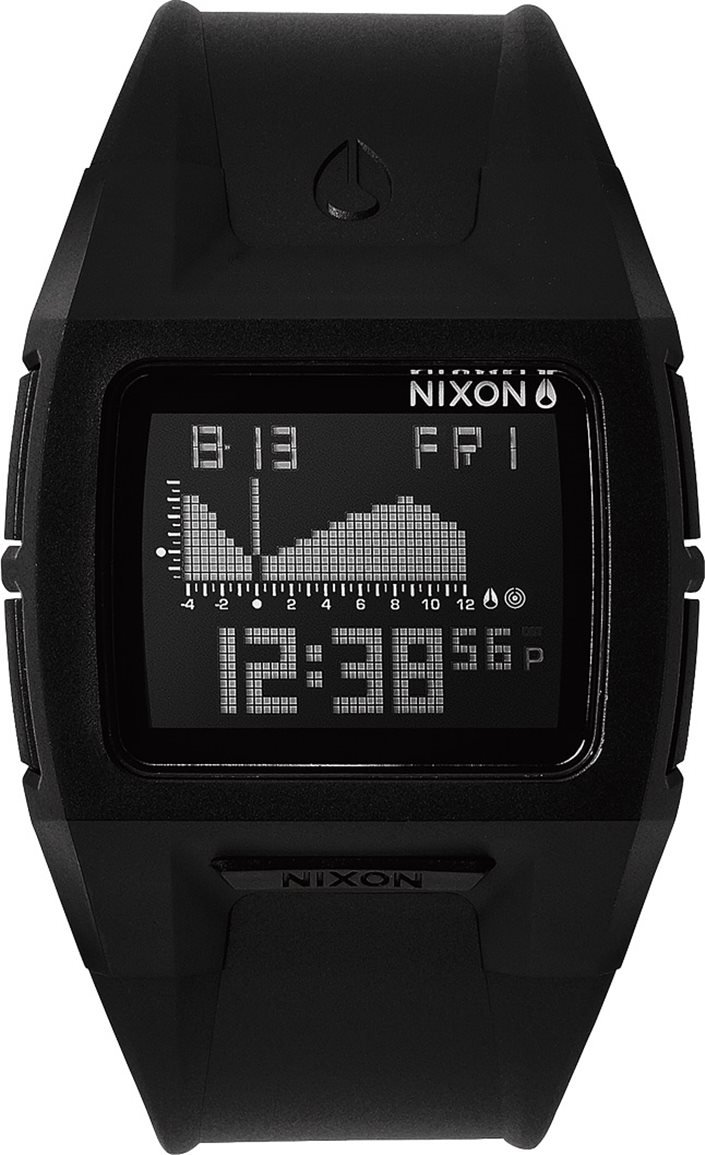
Front view of the NIXON Lodown II Watch, showing the digital display with time and a tide graph.
Setup
Before using your watch, it is recommended to set the current time, date, and your preferred tide location.
- Initial Power On: If the display is blank, press any button to activate the watch.
- Setting Time and Date:
- From Time Mode, press and hold the SET/LIGHT button until the display flashes.
- Use the MODE button to cycle through hours, minutes, year, month, and day.
- Use the UP and DOWN buttons to adjust the flashing value.
- Press SET/LIGHT again to confirm and exit the setting mode.
- Setting Tide Location:
- From Tide Mode, press and hold the SET/LIGHT button until the display flashes.
- Use the UP and DOWN buttons to scroll through the pre-programmed beach locations.
- Press SET/LIGHT again to confirm your selection and exit.
Operating Modes
The Lodown II watch features several operating modes accessible via the MODE button.
1. Time Mode
Displays the current time, day of the week, and date. You can switch between 12-hour and 24-hour formats during time setting.
2. Tide Mode
Provides a graphical representation of the tide cycle for your selected beach. The graph shows high and low tides over a 24-hour period. Use the UP and DOWN buttons to view future or past tide data for the selected location.
3. Chronograph Mode (Stopwatch)
To use the stopwatch function:
- Press UP to start the stopwatch.
- Press UP again to pause.
- Press DOWN to reset the stopwatch to zero.
4. Countdown Timer Mode
To set and use the countdown timer:
- From Countdown Mode, press and hold SET/LIGHT to enter setting mode.
- Use MODE to select hours, minutes, or seconds.
- Use UP and DOWN to adjust the values.
- Press SET/LIGHT to confirm.
- Press UP to start the countdown. An alarm will sound when the timer reaches zero.
5. Alarm Mode
The watch features a daily alarm. To set and activate:
- From Alarm Mode, press and hold SET/LIGHT to enter setting mode.
- Use MODE to select hours or minutes.
- Use UP and DOWN to adjust the values.
- Press SET/LIGHT to confirm.
- Press UP to toggle the alarm ON/OFF. An alarm icon will appear on the display when active.
Maintenance
Proper care will extend the life and appearance of your NIXON Lodown II Watch.
- Cleaning: Wipe the watch case and strap with a soft, damp cloth. Avoid harsh chemicals or abrasive materials.
- Water Resistance: The watch is water resistant up to 100 meters (10 ATM). It is suitable for swimming, snorkeling, and surfing. Do not press buttons underwater to maintain water resistance.
- Battery: The watch uses a standard watch battery. When the display dims or functions become erratic, it may be time for a battery replacement. It is recommended to have the battery replaced by a qualified watch technician to ensure proper sealing and water resistance.
- Storage: Store your watch in a cool, dry place away from direct sunlight and extreme temperatures.

Side view of the NIXON Lodown II Watch, highlighting its profile and the strap with buckle closure.
Troubleshooting
If you encounter issues with your watch, refer to the following common solutions:
| Problem | Possible Solution |
|---|---|
| Watch display is blank or dim. | The battery may be low or depleted. Replace the battery. |
| Time or date is incorrect. | Enter Time Mode and follow the instructions in the 'Setting Time and Date' section to reset. |
| Tide data is inaccurate. | Ensure the correct beach location is selected in Tide Mode. Verify your current location's time zone settings. |
| Buttons are unresponsive. | Ensure the watch is not in a locked mode (if applicable, refer to specific model features). If issue persists, a soft reset (removing and reinserting battery) may be required by a technician. |
Specifications
- Model Number: A289000
- Water Resistance Depth: 100 Meters (10 ATM)
- Case Diameter: 42 Millimeters
- Band Width: 25 Millimeters
- Case Thickness: 14 Millimeters
- Case Material: Polycarbonate
- Strap Material: Durable Strap (e.g., Silicone/Polyurethane)
- Functions: Time, Date, Dual Time, Tide Graph (270+ pre-programmed beaches), Alarm, Chronograph, Countdown Timer, Backlight.
- Closure Type: Buckle
Warranty and Support
NIXON products are manufactured to high-quality standards. For information regarding warranty coverage, service, or replacement parts, please visit the official NIXON website or contact their customer support directly. Keep your proof of purchase for any warranty claims.
Official NIXON Website: www.nixon.com