
Makita 193522-8
Instruction Manual for Makita 4-1/2" x 9" Backing Pad
Model: 193522-8
Introduction
This manual provides essential information for the proper use, maintenance, and care of your Makita 4-1/2" x 9" Backing Pad. Designed for durability and efficient dust extraction, this backing pad features a hook & loop design for quick abrasive paper changes. It is intended for use with the Makita Finishing Sander model BO4900V.
Safety Information
Always observe basic safety precautions when using power tools and their accessories. This backing pad is an accessory and should be used in conjunction with a compatible power sander. Refer to the power sander's instruction manual for comprehensive safety guidelines.
- Ensure the power tool is disconnected from the power source before attaching or removing the backing pad or abrasive paper.
- Always wear appropriate personal protective equipment (PPE), including eye protection, dust mask, and hearing protection, when operating sanding equipment.
- Inspect the backing pad for any damage or wear before each use. Do not use a damaged pad.
- Use only abrasive paper designed for hook & loop systems and compatible with the backing pad's dimensions (4-1/2" x 9").
- Keep work area clean and well-lit. Cluttered or dark areas invite accidents.
Product Overview
The Makita 4-1/2" x 9" Backing Pad is a crucial component for your finishing sander, providing the surface for abrasive paper attachment and facilitating dust extraction.
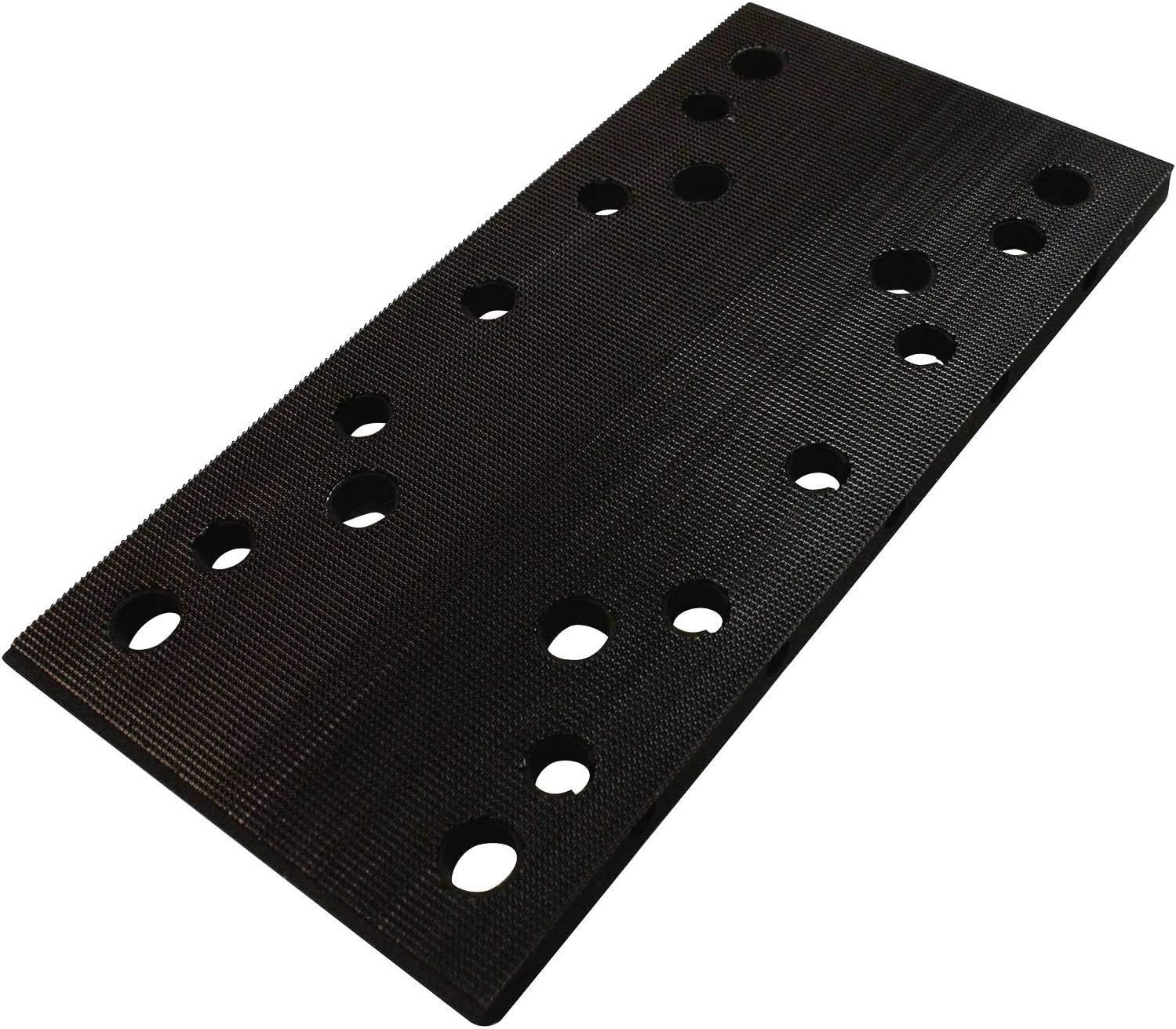
Figure 1: Makita 4-1/2" x 9" Hook & Loop Backing Pad. This image shows the rectangular backing pad with multiple holes for dust extraction and a textured surface for hook & loop abrasive paper attachment.
Key Features:
- Hook & Loop Surface: Allows for quick and easy attachment and removal of abrasive paper.
- Dust Extraction Holes: Multiple perforations align with compatible abrasive paper and sander base to efficiently remove sanding dust.
- Durable Construction: Engineered for longevity and consistent performance.
- Compatibility: Specifically designed for use with the Makita Finishing Sander model BO4900V.
Setup
Follow these steps to properly install the backing pad and abrasive paper on your compatible Makita finishing sander.
- Ensure Power Tool is Off and Unplugged: Before any installation or removal, always disconnect the sander from its power source to prevent accidental startup.
- Remove Old Pad (if applicable): If replacing an existing backing pad, carefully peel it off the sander's base. Clean any residue from the sander's base if necessary.
- Attach New Backing Pad: Align the new Makita 4-1/2" x 9" Backing Pad (Model 193522-8) with the base of your Makita Finishing Sander model BO4900V. Press firmly to ensure the hook & loop surfaces engage securely. Ensure the dust extraction holes on the pad align with those on the sander's base.
- Attach Abrasive Paper: Select the appropriate 4-1/2" x 9" hook & loop abrasive paper for your task. Align the holes on the abrasive paper with the holes on the backing pad. Press the abrasive paper firmly onto the backing pad, ensuring it is flat and securely attached across the entire surface.
Operating
Once the backing pad and abrasive paper are securely installed, you can proceed with sanding operations according to your sander's instructions.
- Always ensure the abrasive paper is clean and free of debris before starting.
- Apply even, moderate pressure during sanding. Excessive pressure can reduce sanding efficiency and damage the pad or sander.
- Regularly check the abrasive paper for wear. Replace it when it becomes dull or clogged to maintain optimal performance and prevent damage to the workpiece.
- Utilize the dust extraction system of your sander to minimize airborne dust and maintain a cleaner work environment.
Maintenance
Proper maintenance extends the life of your backing pad and ensures consistent performance.
- Cleaning: After each use, remove the abrasive paper and gently brush off any accumulated dust or debris from the hook & loop surface of the backing pad. A soft brush or compressed air can be used. Do not use harsh chemicals or abrasive cleaners.
- Inspection: Regularly inspect the hook & loop surface for wear, damage, or loss of adhesion. If the hooks are flattened or damaged, the pad may not hold abrasive paper securely, leading to poor sanding results or detachment during operation.
- Storage: Store the backing pad in a clean, dry place, away from direct sunlight and extreme temperatures. Avoid storing it with abrasive paper attached for extended periods, as this can compress the hook & loop fibers.
- Replacement: Replace the backing pad if it shows significant signs of wear, such as reduced hook & loop adhesion, cracking, or deformation, as this can affect sanding quality and safety.
Troubleshooting
This section addresses common issues related to the backing pad.
| Problem | Possible Cause | Solution |
|---|---|---|
| Abrasive paper detaches easily. | Worn or clogged hook & loop surface on the backing pad or abrasive paper. | Clean the backing pad's surface. Replace the abrasive paper. If the pad's hooks are flattened, replace the backing pad. |
| Poor dust extraction. | Dust holes on pad/paper not aligned, or holes are clogged. | Ensure abrasive paper holes align with pad holes. Clean any debris from the holes on the pad. Check sander's dust collection system. |
| Uneven sanding results. | Damaged or deformed backing pad. | Inspect the backing pad for any physical damage or warping. Replace if necessary. |
Specifications
Technical details for the Makita 4-1/2" x 9" Backing Pad.
- Model Number: 193522-8 (Part Number: 193521-0)
- Dimensions: 4-1/2 inches x 9 inches (Product Dimensions: 9"L x 4.5"W)
- Backing Type: Hook & Loop
- Material: Paper (referring to the compatible abrasive paper)
- Item Weight: Approximately 3.52 ounces
- Compatible Tool: Makita Finishing Sander model BO4900V
- Included Components: Backing Pad Only
- UPC: 088381164702
Warranty and Support
For information regarding warranty coverage, service, or technical support for your Makita product, please refer to the official Makita website or contact Makita customer service directly. Keep your purchase receipt as proof of purchase.
Makita Official Website: www.makitatools.com
For specific product inquiries or troubleshooting beyond this manual, professional assistance is recommended.
Related documents193522-8


Ask a question about this manual
Ask about setup, troubleshooting, compatibility, parts, safety, or missing instructions. Manuals+ will review the question and use this page’s manual context to help answer it.