
UEi Test Instruments EM201B
Contents
UEi Test Instruments EM201B Dual Input Differential Manometer
Instruction Manual
Product Overview
The UEi Test Instruments EM201B is a dual input differential manometer designed for precise measurement of pressure. It is a rugged and reliable tool suitable for various industrial and scientific applications, particularly in airflow and air quality testing.

Figure 1: The UEi EM201B Manometer, showing the main unit, clear measurement hose, and brass fittings.
Key Features:
- Dual Input Measurement: Capable of measuring pressure up to 40 inches of water gauge (inWG).
- High Resolution: Offers 0.001 inWG resolution for measurements below 9.999 inWG.
- Multiple Measurement Scales: Supports measurements in inWG, Pascals, mbar, and PSI.
- Dynamic Min/Max: Allows for tracking and resetting of minimum and maximum pressure readings.
- Data Hold Function: Freezes the current display reading for easy recording.
- Auto Power-Off: Conserves battery life by automatically shutting down after a period of inactivity.
- Backlit Display: Ensures readability in low-light conditions.
- Ruggedized Design: Features sturdy metal fittings for durability.
Setup and Initial Use
1. Battery Installation
The EM201B requires one 9V battery for operation, which is typically included with the unit. To install or replace the battery:
- Locate the battery compartment on the rear of the unit.
- Open the battery compartment cover.
- Insert a new 9V battery, ensuring correct polarity (+/-).
- Close the battery compartment cover securely.
2. Connecting Hoses
Connect the provided clear measurement hoses to the brass fittings. The EM201B features dual inputs, labeled with a minus (-) and a plus (+) sign, indicating the differential pressure measurement points.

Figure 2: The EM201B unit alongside its measurement hose and a 9V battery, illustrating the components included.
Operating Instructions
Power On/Off
Press the Power button (usually marked with a circle and line icon) to turn the unit on or off. The unit will automatically power off after a period of inactivity to conserve battery life.
Display and Controls
The EM201B features a clear digital display and several control buttons:
- ZERO Button: Used to zero out the current pressure reading before taking a measurement. Ensure no pressure is applied when zeroing.
- MIN/MAX Button: Toggles between current, minimum, and maximum pressure readings. Press and hold to reset the Min/Max values.
- HOLD Button: Freezes the current reading on the display. Press again to release.
- Backlight Button: Activates or deactivates the display backlight for improved visibility.
- SCALE Button: Cycles through the available measurement units: inWG, Pascals, mbar, and PSI.
Taking a Measurement
- Power on the EM201B.
- Ensure the hoses are connected correctly to the pressure source. The (+) input measures positive pressure relative to the (-) input.
- With no pressure applied, press the ZERO button to calibrate the display to zero.
- Select the desired measurement unit using the SCALE button.
- Apply pressure to the inputs. The reading will be displayed on the screen.
- Use the MIN/MAX or HOLD functions as needed.
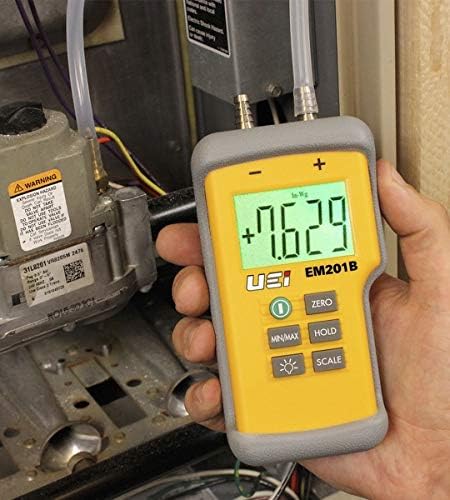
Figure 3: The EM201B Manometer actively measuring pressure on a heating system, demonstrating its practical application.
Maintenance
Cleaning
Wipe the unit with a damp cloth. Do not use abrasive cleaners or solvents. Ensure the unit is dry before storage.
Battery Replacement
Replace the 9V battery when the low battery indicator appears on the display. Refer to the "Battery Installation" section for instructions.
Storage
Store the EM201B in a cool, dry place away from direct sunlight and extreme temperatures. If storing for extended periods, remove the battery to prevent leakage.
Troubleshooting
If you encounter issues with your EM201B, consider the following common solutions:
- No Display/Unit Not Turning On: Check battery installation and replace with a fresh 9V battery if necessary.
- Inaccurate Readings: Ensure the unit is zeroed before measurement. Check for any blockages or leaks in the measurement hoses. Verify correct unit selection.
- Display Freezes: Check if the HOLD function is active. Press the HOLD button to release.
For persistent issues, contact UEi Test Instruments customer support.
Specifications

Figure 4: Physical dimensions of the EM201B Manometer, indicating a height of 6.6 inches (16 cm).
| Specification | Detail |
|---|---|
| Brand | UEi Test Instruments |
| Model Number | EM201B (Part Number), EM201 (Item Model Number) |
| Material | Plastic |
| Dimensions (L x W x H) | 6.18 x 1.77 x 3.06 inches |
| Item Weight | 0.55 Ounces |
| Power Source | Crank (Note: This specification from the source data may be an error, as the unit uses a 9V battery.) |
| Battery Type | 1 x 9V (Zinc Carbon, included) |
| Country of Origin | Taiwan |
| UPC | 053533506907, 733353277408 |
Warranty and Support
For warranty information, technical support, or service inquiries regarding your UEi Test Instruments EM201B Manometer, please contact UEi Test Instruments directly.
You can also refer to the official User Manual PDF for more detailed information: Download User Manual (PDF)
Documents and downloads
Ask a question about this manual
Ask about setup, troubleshooting, compatibility, parts, safety, or missing instructions. Manuals+ will review the question and use this page’s manual context to help answer it.