
1. Introduction
The CoolStream Go is a versatile Bluetooth adapter designed to bring wireless audio streaming capabilities to your existing 30-pin docking stations and select motorcycle audio systems. This device allows you to stream music from your Bluetooth-enabled smartphone or tablet to compatible audio equipment, revitalizing older systems with modern connectivity. It is important to note that the CoolStream Go is NOT compatible with all car models, specifically 2009 to Present Models of Mercedes and Audi when using the 30-pin iPod cable, and is NOT for Harley Davidson motorcycles.
2. Product Features
- 30-Pin Connector: Designed to seamlessly integrate with 30-pin Bose SoundDock systems (Original, I, II, Portable, 10) and compatible motorcycle iPod cables.
- AUX Jack: Features a built-in 3.5mm AUX jack for connecting to wired headphones or stereo receivers, enabling Bluetooth functionality for these devices.
- Rechargeable Battery: Provides up to 5 hours of continuous music streaming on a single charge.
- Wide Compatibility: Works with iPhone (including iPhone 7, iPhone 6), Android phones, and any other Bluetooth-enabled devices. Compatible with Victory Motorcycle iPod cables.
- Bluetooth 5.0: Utilizes Bluetooth 5.0 technology for stable and efficient wireless connections.
3. Package Contents
- CoolStream Go Bluetooth Adapter
- 3.5mm Audio Cable (for AUX connection)
4. Setup Instructions
4.1 Connecting to a 30-Pin Docking Station (e.g., Bose SoundDock)
- Ensure your 30-pin docking station is powered on.
- Carefully insert the CoolStream Go Bluetooth Adapter into the 30-pin connector on your docking station. Ensure it is firmly seated.

Image: The CoolStream Go Bluetooth Adapter being inserted into a Bose SoundDock.

Image: The CoolStream Go Bluetooth Adapter properly installed in a white Bose SoundDock.
4.2 Connecting via 3.5mm AUX Jack
If your audio system does not have a 30-pin dock but features a 3.5mm AUX input, you can use the included audio cable to connect the CoolStream Go.
- Plug one end of the 3.5mm audio cable into the AUX jack on the CoolStream Go.
- Plug the other end of the audio cable into the 3.5mm AUX input on your stereo receiver or wired headphones.
- Ensure the CoolStream Go is charged or connected to a power source if not docked.

Image: The CoolStream Go Bluetooth Adapter connected to an Amazon Echo via its AUX port.
5. Operating Instructions
5.1 Pairing Your Device
- Once the CoolStream Go is powered on (either by docking or internal battery), its LED indicator will flash, indicating it is in pairing mode.
- On your smartphone or tablet, navigate to the Bluetooth settings.
- Search for available devices. You should see "CoolStream Go" or "CoolStream Duo" in the list.
- Select the CoolStream device to pair. The LED indicator on the CoolStream Go will become solid once successfully paired.
5.2 Streaming Music
After successful pairing, open your preferred music application (e.g., Spotify, Apple Music, Pandora) on your smartphone or tablet and begin playing audio. The sound will be wirelessly transmitted to your connected audio system via the CoolStream Go.
Video: This video demonstrates the process of adding Bluetooth functionality to a Bose SoundDock using the CoolStream Go adapter, including pairing with a smartphone.
6. Compatibility Information
The CoolStream Go is designed for broad compatibility with many 30-pin docking stations. However, specific models may vary. Please review the following information carefully.
6.1 Compatible Devices
The CoolStream Go is compatible with various Bose SoundDock models (Original, I, II, Portable, 10), iPhone, Android phones, and Victory Motorcycle iPod cables. For a detailed list of compatible iPod docks, refer to the image below.

Image: Table of iPod Docks Compatible with CoolStream Go.
6.2 Incompatible Devices
The CoolStream Go is NOT compatible with all 2009 to Present Models of Mercedes and Audi when using the 30-pin iPod cable. It is also NOT for Harley Davidson motorcycles. For a detailed list of incompatible iPod docks, refer to the image below.
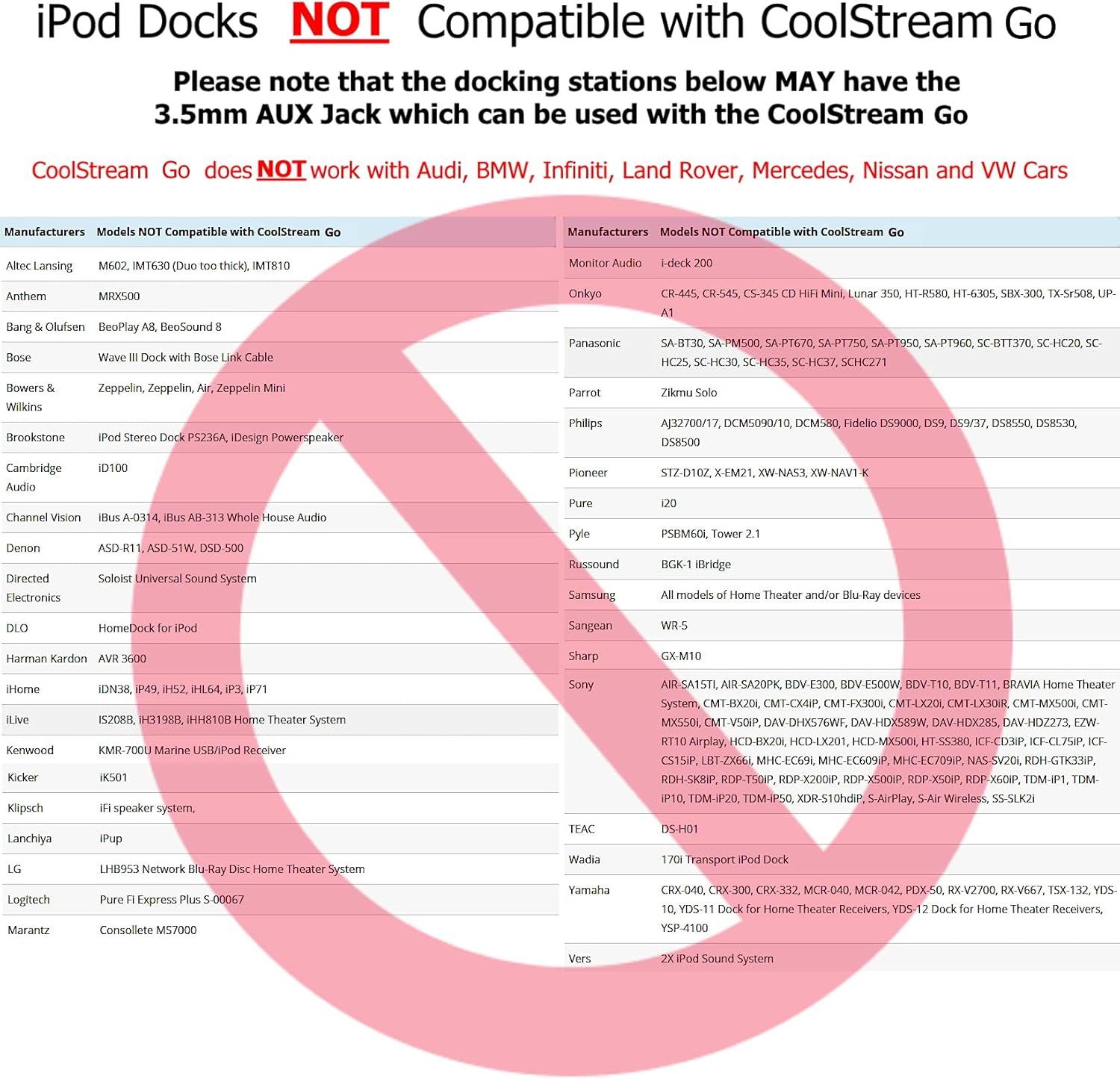
Image: Table of iPod Docks NOT Compatible with CoolStream Go.
7. Troubleshooting
- No Sound/Connection Issues: Ensure the CoolStream Go is fully inserted into the 30-pin dock or securely connected via the AUX cable. Verify that your audio system is set to the correct input (e.g., iPod, AUX). Try resetting the CoolStream Go by unplugging and re-plugging it, then re-attempt pairing.
- Bluetooth Disconnects: Ensure your streaming device is within the Bluetooth range of the CoolStream Go. Obstacles or other wireless devices can interfere with the signal. Try moving your device closer to the adapter.
- Poor Audio Quality: Check the volume levels on both your streaming device and the audio system. Ensure there are no other devices interfering with the Bluetooth signal.
8. Specifications
| Model Name | CoolStream Go |
| Brand | CoolStream |
| Connectivity Technology | Bluetooth, Auxiliary |
| Bluetooth Version | 5.0 |
| Supported Standards | Bluetooth 5.0, A2DP |
| Power Source | 30 Pin Connector for 5V and 12V Firewire Docks, Rechargeable Battery |
| Battery Type | Lithium-Polymer |
| Battery Charge Time | 5 Hours |
| Audio Input | 3.5mm auxiliary jack, 30 pin connector |
| Audio Output Mode | Stereo |
| Supported Media Type | MP3, WAV, AAC |
| Material | Plastic |
9. Safety Information
The CoolStream Go contains a battery. Use with caution, keep away from water, and dispose of properly according to local regulations.
10. Warranty and Support
The CoolStream Go comes with a ONE YEAR WARRANTY. For technical support or warranty claims, please contact CoolStream directly.
- Technical Support Email: contact-us@coolstreamrocks.com
- Technical Support Telephone: 603-421-6515


