
1. Introduction
This manual provides detailed instructions for the Certina DS-2 C024.447.11.051.02 Chronograph watch. Please read this manual carefully to understand the functions and proper care of your timepiece. Proper use and maintenance will ensure the longevity and optimal performance of your watch.
2. Product Overview
The Certina DS-2 C024.447.11.051.02 is a high-precision quartz chronograph watch featuring a robust stainless steel case and bracelet, sapphire crystal, and a tachymeter bezel. It is designed for accurate timekeeping and advanced stopwatch functions.
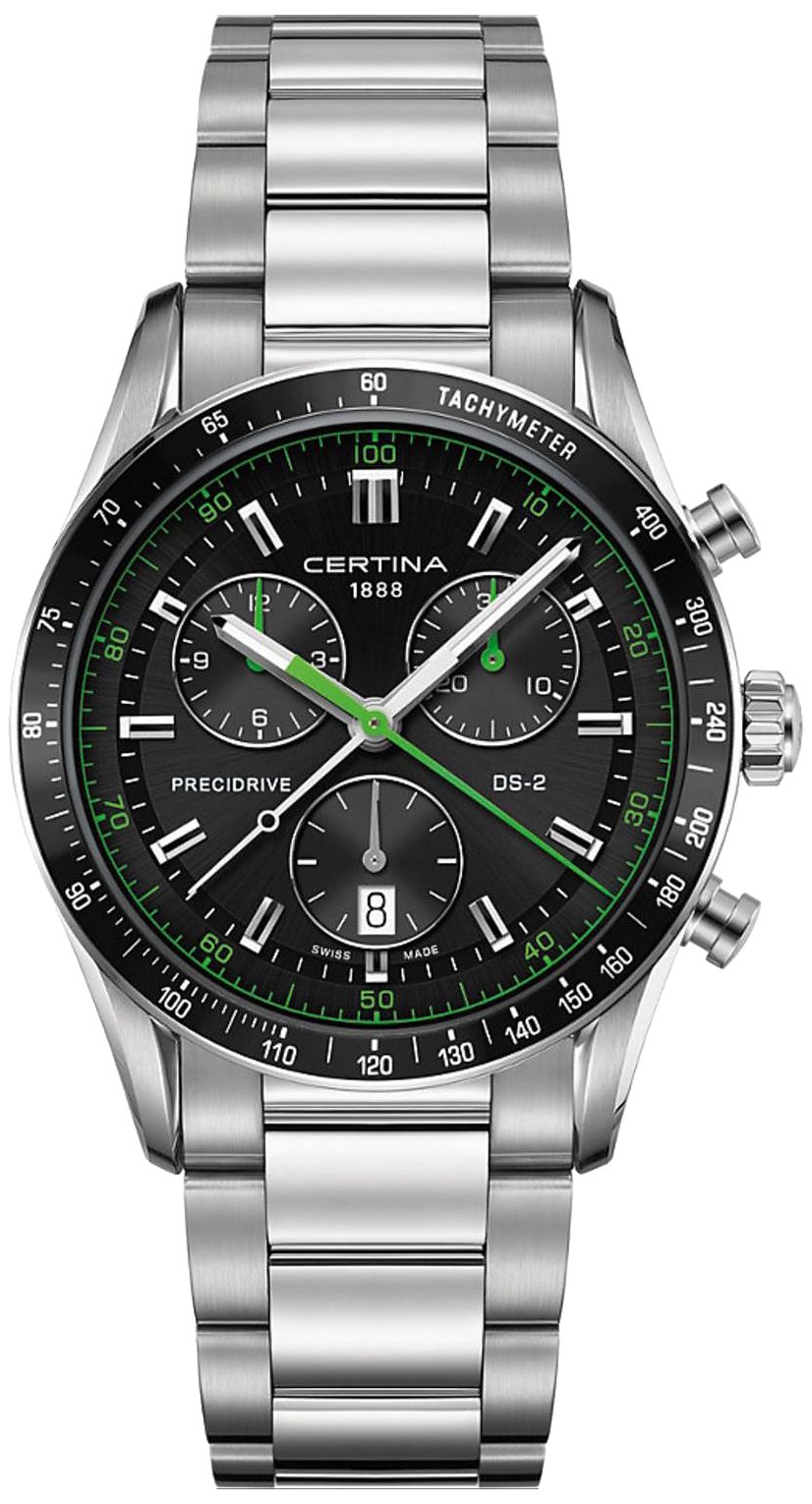
Image 1: Front view of the Certina DS-2 C024.447.11.051.02 Chronograph watch, showcasing its black dial, silver stainless steel case, and bracelet.
Key Components:
- Case: Stainless steel (brushed/polished), circular shape, 41mm diameter.
- Glass: Sapphire crystal, anti-reflective for enhanced readability.
- Movement: High-precision Quartz movement.
- Display: Analog chronograph with sub-dials for 11 hours, 59 minutes, 59 seconds, and 1/100 seconds.
- Bracelet: Stainless steel (brushed/polished) with a folding clasp.
- Water Resistance: Rated for 100 meters (10 ATM).
- Special Features: Chronograph function, fixed Tachymeter bezel.
3. Setup
3.1 Setting the Time
- Pull the crown: Gently pull the crown out to position 2 (the furthest out position). The second hand will stop, indicating the watch is in time-setting mode.
- Set the time: Turn the crown in either direction to set the hour and minute hands to the correct time. If your watch has a date function, ensure AM/PM is correctly set by observing when the date changes.
- Push the crown back: Once the time is set, push the crown back into position 1 (normal operating position). The second hand will resume movement.
3.2 Resetting the Chronograph Hands
If the chronograph hands (central second hand, minute counter, hour counter) are not aligned to their zero positions when the chronograph is stopped, follow these steps:
- Pull the crown: Pull the crown out to position 2.
- Adjust hands: Use the chronograph pushers (typically pusher A at 2 o'clock and pusher B at 4 o'clock) to adjust each chronograph hand to its zero position. Refer to your watch's specific pusher functions for individual hand adjustments.
- Push the crown back: Once all chronograph hands are aligned to zero, push the crown back into position 1.
4. Operating
4.1 Using the Chronograph Function
The chronograph allows for precise measurement of elapsed time.
- Start: Press pusher A (top pusher) to start the chronograph. The central chronograph second hand and sub-dials will begin to measure elapsed time.
- Stop: Press pusher A again to stop the chronograph. The elapsed time will be displayed.
- Reset: While the chronograph is stopped, press pusher B (bottom pusher) to reset all chronograph hands to their zero positions.
- 1/100 Second Measurement: Your watch features a 1/100 second measurement capability, typically displayed on a dedicated sub-dial or through the central second hand in specific modes. Consult the detailed movement instructions for precise operation of this feature.
4.2 Water Resistance (100 Meters / 10 ATM)
Your Certina DS-2 watch is water-resistant to 100 meters (10 ATM). This rating indicates that the watch is suitable for swimming, snorkeling, and showering. It is not suitable for high-impact water sports, diving, or prolonged submersion at depths beyond its rating.
Important: To maintain water resistance, ensure the crown is fully pushed in before any contact with water. Do not operate the crown or pushers while the watch is wet or submerged, as this can compromise the water resistance and lead to internal damage.
4.3 Tachymeter Function
The tachymeter scale on the bezel can be used to measure speed over a known distance (e.g., 1 kilometer or 1 mile). To use it:
- Start the chronograph at the beginning of the measured distance.
- Stop the chronograph at the end of the measured distance.
- The number on the tachymeter scale corresponding to the chronograph second hand's position indicates the average speed in units per hour (e.g., km/h or mph).
5. Maintenance
5.1 Cleaning
Regularly clean your watch with a soft, dry cloth to remove dust and fingerprints. For the stainless steel case and bracelet, a slightly damp cloth can be used, followed by thorough drying. Avoid using harsh chemicals, solvents, or abrasive materials, as these can damage the watch's finish or seals.
5.2 Battery Replacement
Your watch is powered by a high-quality quartz movement, which requires a battery. The typical battery life is several years, but this can vary depending on usage (e.g., frequent chronograph use). When the battery needs replacement, it is highly recommended to have it done by an authorized Certina service center. This ensures that the correct battery type is used and that the watch's water resistance is properly re-sealed and tested.
5.3 Water Resistance Check
To maintain the water resistance of your watch, it is advisable to have it checked periodically (e.g., every 2-3 years) by an authorized service center. This is especially important after battery replacement or if the watch has been subjected to impacts or extreme temperature changes, which can affect the integrity of the gaskets.
6. Troubleshooting
6.1 Watch Not Running
- Check Crown Position: Ensure the crown is fully pushed in to position 1.
- Battery Depletion: If the watch still does not run, the battery may need replacement. Consult an authorized service center.
6.2 Chronograph Hands Not Resetting to Zero
- Reset Procedure: Follow the chronograph hand resetting procedure described in section 3.2.
- Professional Service: If the issue persists after attempting the reset procedure, professional service may be required to recalibrate the movement.
6.3 Condensation Under Crystal
If you notice condensation under the sapphire crystal, this indicates a loss of water resistance. Immediately take the watch to an authorized service center to prevent further damage to the movement from moisture.
7. Specifications
| Model Number | C024.447.11.051.02 |
| Brand | Certina |
| Case Material | Stainless steel |
| Case Shape | Circular |
| Case Diameter | 41 mm |
| Case Thickness | 14 mm |
| Case Color | Silver |
| Bezel Function | Tachymeter, fixed |
| Glass Material | Sapphire crystal, anti-reflective |
| Movement Type | Quartz |
| Display Type | Analog Chronograph (11 hours, 59 minutes, 59 seconds, 1/100 seconds) |
| Power Source | Battery |
| Water Resistance | 100 Meters (10 ATM) |
| Sport Type | Swimming |
| Bracelet Material | Stainless steel |
| Bracelet Color | Silver |
| Bracelet Width | 20 mm |
| Clasp Type | Folding clasp |
| Dial Color | Black |
| Product Dimensions | 12 x 12 x 12 cm |
| Product Weight | 149.69 grams |
| Manufacturer | Certina |
8. Warranty and Support
Your Certina DS-2 watch is covered by a manufacturer's warranty. Please refer to the warranty card included with your purchase for specific terms and conditions, including duration and coverage details. It is important to retain your proof of purchase for warranty claims.
For service, repairs, or technical support, please contact an authorized Certina service center or your original point of purchase. Using unauthorized service providers may void your warranty and compromise the watch's integrity.
Amazon's general return policy allows for returns within 30 days for many products. For exceptions and conditions, please consult Amazon's return policies directly on their website.