
1. Introduction
Thank you for choosing the Forza Power CL-750B Uninterruptible Power Supply (UPS). This device is designed to provide reliable power protection for your electronic equipment, safeguarding it against power outages, surges, and voltage fluctuations. The CL-750B offers intelligent voltage stabilization and battery backup, ensuring continuous operation and protection for connected devices. Please read this manual carefully before installation and operation to ensure optimal performance and safety.
2. Safety Instructions
Observe the following safety precautions to prevent injury and damage to the UPS or connected equipment:
- Electrical Safety: Connect the UPS to a grounded AC power outlet only. Do not remove the grounding prong.
- Indoor Use Only: This UPS is intended for indoor use in a controlled environment. Avoid exposure to direct sunlight, excessive moisture, or extreme temperatures.
- Ventilation: Ensure adequate airflow around the UPS. Do not block ventilation openings. Maintain at least 10 cm (4 inches) of space around the unit.
- Battery Handling: The UPS contains a sealed, non-spillable lead-acid battery. Do not attempt to open or service the battery yourself. Refer to qualified service personnel for battery replacement.
- Liquid and Foreign Objects: Do not allow liquids or foreign objects to enter the UPS. In case of accidental spillage, immediately disconnect the UPS from the power source and contact support.
- Overload: Do not overload the UPS. Ensure the total power consumption of connected devices does not exceed the UPS's rated capacity (375W).
3. Product Overview
The Forza Power CL-750B is a compact and efficient UPS designed for home and office use. It features multiple outlets for comprehensive protection.
Key Features:
- 750VA / 375W capacity.
- 5 outlets with battery backup and voltage regulation.
- 5 outlets with surge protection only.
- RJ45/11 ports for network/telephone line protection.
- USB communication port for monitoring.
- Innovative 45° angled outlets for easy connection of various plugs.
Physical Components:
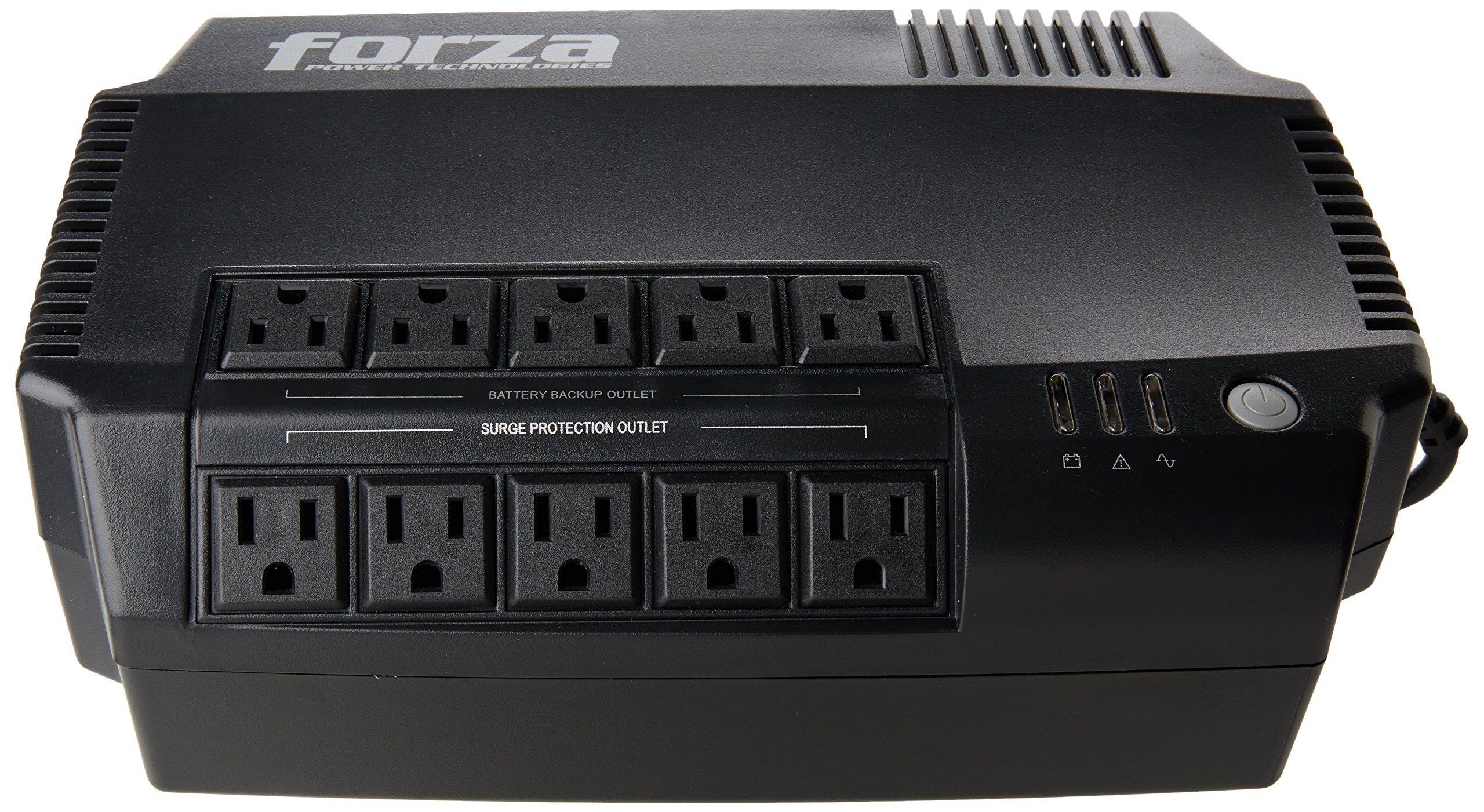
Figure 3.1: Front and top view of the Forza Power CL-750B UPS, showing the angled outlets and power button.

Figure 3.2: Rear view of the Forza Power CL-750B UPS, highlighting the RJ45/11, USB ports, and power input.

Figure 3.3: Illustrative diagram showing the approximate dimensions of the Forza Power CL-750B UPS (12.1 inches / 30 cm width) in a typical setting.
4. Setup
- Unpack the UPS: Carefully remove the UPS from its packaging. Inspect for any shipping damage.
- Placement: Place the UPS on a flat, stable surface in a well-ventilated area. Avoid placing it near heat sources, direct sunlight, or excessive moisture. Ensure the ambient temperature is between 0°C and 40°C (32°F and 104°F).
- Initial Charging: Connect the UPS power cord to a grounded wall outlet. Allow the UPS to charge for at least 8 hours before connecting any equipment to ensure full battery capacity. The UPS will charge whether it is turned on or off.
- Connect Equipment:
- Battery Backup & Surge Protection Outlets: Connect critical equipment such as computers, monitors, and network devices to these outlets. These devices will receive power during an outage.
- Surge Protection Only Outlets: Connect non-critical equipment like printers, scanners, or lamps to these outlets. These outlets provide surge protection but will not supply power during an outage.
- Connect Data Lines (Optional): For network or telephone line protection, connect your incoming RJ45/11 line to the 'IN' port and your device to the 'OUT' port on the UPS.
- Connect USB (Optional): Use the provided USB cable to connect the UPS to your computer for power management software monitoring (software not included, typically available from manufacturer's website).
5. Operating Instructions
Turning the UPS On/Off:
- To Turn On: Press and hold the power button for approximately 2 seconds until you hear a beep and the indicator lights illuminate.
- To Turn Off: Press and hold the power button for approximately 2 seconds until you hear a beep and the indicator lights turn off.
Indicator Lights:
The UPS features indicator lights (typically on the front panel) that provide status information:
- Green Light (Solid): UPS is operating normally, providing AC power to connected devices.
- Yellow/Amber Light (Flashing): UPS is operating on battery power during an outage.
- Red Light (Solid) / Audible Alarm: Indicates a fault, overload, or low battery condition. Refer to the Troubleshooting section.
Battery Backup Function:
During a power outage, the UPS will automatically switch to battery power, providing continuous power to devices connected to the battery backup outlets. An audible alarm will typically sound to indicate battery operation. The duration of battery backup depends on the load connected. Save your work and shut down your equipment properly during extended outages.
Voltage Stabilization:
The CL-750B continuously monitors incoming AC power and automatically corrects minor voltage fluctuations (brownouts and overvoltages) without switching to battery power, thus preserving battery life and ensuring stable power delivery to your devices.
6. Maintenance
- Battery Care: To maximize battery life, avoid frequent deep discharges. Perform a full discharge/recharge cycle every 3-6 months if the UPS is not frequently used on battery power.
- Battery Replacement: The battery is not user-replaceable. Contact qualified service personnel or the manufacturer for battery replacement. Attempting to replace the battery yourself may void the warranty and pose a safety risk.
- Cleaning: Disconnect the UPS from the wall outlet and all connected devices before cleaning. Use a soft, dry cloth to wipe the exterior. Do not use liquid or aerosol cleaners.
- Storage: If storing the UPS for an extended period, ensure the battery is fully charged. Recharge the battery every 3 months to prevent permanent damage. Store in a cool, dry place.
7. Troubleshooting
If the UPS is not operating correctly, consult the following table for common issues and solutions:
| Problem | Possible Cause | Solution |
|---|---|---|
| UPS does not turn on. | No AC input power; Low battery. | Ensure the UPS is plugged into a live wall outlet. Allow the UPS to charge for at least 8 hours. |
| UPS beeps continuously or red light is on. | Overload; Low battery; Internal fault. | Disconnect non-essential equipment to reduce load. Allow battery to recharge. If problem persists, contact support. |
| Short battery backup time. | Battery not fully charged; Battery nearing end of life; Excessive load. | Ensure initial 8-hour charge. Reduce connected load. Consider battery replacement if battery is old. |
| No power to connected devices. | UPS is off; Circuit breaker tripped; Devices connected to surge-only outlets during outage. | Turn on the UPS. Check and reset the circuit breaker on the UPS (if applicable). Ensure critical devices are connected to battery backup outlets. |
If the problem persists after trying these solutions, please contact Forza Power Technologies customer support.
8. Specifications
| Feature | Specification |
|---|---|
| Model | CL-750B |
| Brand | Forza Power Technologies |
| Capacity | 750VA / 375W |
| Color | Black |
| Total Outlets | 10 (5 Battery Backup & Surge, 5 Surge Only) |
| Connector Types | RJ45, USB |
| Dimensions (L x W x H) | Approximately 3.06 x 1.95 x 0.69 meters (Note: This dimension seems unusually large for a UPS, please verify with product packaging if exact dimensions are critical.) |
| UPC | 798302140325 |
9. Warranty and Support
Warranty Information:
This Forza Power CL-750B UPS comes with a 2-year manufacturer's warranty. This warranty covers physical exchange even without the original packaging, subject to the manufacturer's terms and conditions. Please retain your proof of purchase for warranty claims.
Customer Support:
For technical assistance, troubleshooting, or warranty inquiries, please contact Forza Power Technologies customer support. Refer to the product packaging or the official Forza Power Technologies website for the most current contact information.