
SIEMENS ET645HN17E
Siemens ET645HN17E Electric Hob User Manual
Model: ET645HN17E | Part Number: 4242003612316
1. Product Overview
This manual provides essential information for the safe and efficient use of your Siemens ET645HN17E Electric Hob. Please read it thoroughly before installation and operation to ensure proper functionality and longevity of the appliance.

Figure 1: Siemens ET645HN17E Electric Hob
The Siemens ET645HN17E is a modern electric hob designed for seamless integration into your kitchen. Featuring a sleek glass-ceramic surface and intuitive touch controls, it offers efficient and precise cooking for a variety of dishes. Its durable construction and user-friendly features make it a reliable addition to any home.
2. Safety Information
Always adhere to the following safety guidelines to prevent injury or damage to the appliance.
- Electrical Connection: Ensure the hob is connected to a properly grounded electrical supply by a qualified electrician. Do not use extension cords or adapters.
- Heat Warning: The hob surface and surrounding areas become hot during use. Exercise caution to avoid burns. Allow the hob to cool completely before cleaning.
- Child Safety: Keep children away from the hob during operation and when it is cooling down. Utilize the integrated child lock function to prevent accidental activation.
- Ventilation: Ensure adequate ventilation around the hob as specified in the installation instructions. Blocked vents can lead to overheating.
- Cookware: Use only flat-bottomed cookware appropriate for electric hobs. Overhanging handles can cause instability or burns.
- Spills: Immediately clean up any spills to prevent damage to the hob and to maintain safe operation.
- Supervision: Never leave the hob unattended while cooking, especially when using high heat settings or oil/fat.
3. Installation
Proper installation is crucial for the safe and optimal performance of your electric hob. Installation must be carried out by a qualified professional in accordance with local electrical and building regulations.
3.1. Pre-Installation Checks
- Verify that the power supply voltage and frequency match the specifications of the hob.
- Ensure the countertop material is heat-resistant and suitable for hob installation.
- Confirm that there is sufficient clearance for ventilation beneath and around the hob.
3.2. Dimensions and Cut-out
Refer to the diagram below for precise dimensions and the required countertop cut-out for installation.

Figure 2: Installation Dimensions
| Measurement | Value |
|---|---|
| Appliance Dimensions (H x W x D) | 48 x 583 x 513 mm |
| Width | 60 cm |
| Min. Niche Dimensions for Installation (H x W x D) | 48 x 560-560 x 490-500 mm |
| Minimum Worktop Height | 16 mm |
Ensure that the minimum distance from the hob cut-out to the wall is 90mm and minimum distance to the front edge is 50mm. If installing above an oven, ensure adequate space for ventilation.
4. Operation
The Siemens ET645HN17E Electric Hob features intuitive touch controls for easy and precise cooking.
4.1. Basic Controls (touchControl)
The hob is operated using the touchControl panel located at the front. To activate a cooking zone, simply touch the corresponding sensor. Use the '+' and '-' symbols to adjust the heat level from 1 (lowest) to 9 (highest).
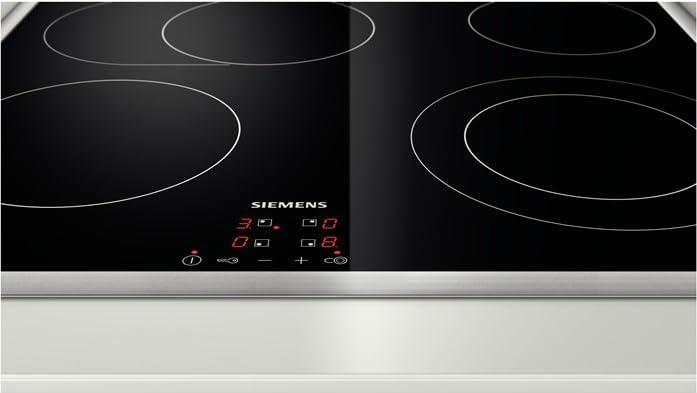
Figure 3: Touch Control Panel
4.2. Cooking Zones
The hob is equipped with four high-speed cooking zones. The front left zone features a selectable roaster zone for larger cookware.
- Front Left: Dual-circuit zone with selectable roaster area. Ideal for oval or larger pots and pans.
- Rear Left: Standard cooking zone.
- Front Right: Standard cooking zone.
- Rear Right: Standard cooking zone.
4.3. Special Functions
- ReStart Function: In case of accidental switch-off or if liquid boils over onto the control panel, the hob automatically switches off and saves the last selected settings for a short period. You can reactivate the hob and resume cooking by touching the main switch within a few seconds.
- Child Lock: To prevent unintended operation, especially by children, activate the child lock. Press and hold the key symbol until the indicator lights up. To deactivate, repeat the process.
- Residual Heat Indicator: After switching off a cooking zone, an 'H' (Hot) indicator will appear in the display if the zone is still hot enough to cause burns. Use residual heat for warming food or energy saving.
- Automatic Switch-off: For safety, cooking zones will automatically switch off after a certain period if no changes are made to the heat setting.
5. Features
The Siemens ET645HN17E Electric Hob is equipped with several features designed to enhance your cooking experience and ensure safety.
- Electric Ceramic Hob: Provides fast and efficient heating with a smooth, easy-to-clean glass-ceramic surface.
- touchControl Operation: Effortless and precise control of all cooking zones with a simple touch.
- Roaster Zone: An expandable cooking zone specifically designed to accommodate large roasting pans or fish kettles, ensuring even heat distribution.
- ReStart Function: Automatically saves settings if the hob is accidentally switched off, allowing for quick resumption of cooking.
- Child Lock: Prevents unintended operation, providing peace of mind in busy kitchens.
- Digital Functional Display: Clear and easy-to-read display for heat settings and indicators.
- Flat Frame Design: A sleek, modern design with a flat stainless steel frame that integrates seamlessly into your kitchen countertop.
6. Maintenance and Cleaning
Regular cleaning and proper maintenance will ensure the longevity and optimal performance of your Siemens Electric Hob.
6.1. Daily Cleaning
- Always ensure the hob has cooled down completely before cleaning.
- Wipe the glass-ceramic surface with a soft cloth or sponge and a mild dishwashing liquid.
- Rinse with clean water and dry thoroughly with a clean, soft cloth to prevent water spots.
6.2. Removing Stubborn Stains
- For burnt-on food residues or stubborn stains, use a specialized ceramic hob cleaner. Apply a small amount to the cooled surface and rub gently with a paper towel or soft cloth.
- For very tough stains, a hob scraper (razor blade scraper) can be used at a shallow angle to carefully remove residues. Always follow the scraper manufacturer's instructions.
- Avoid abrasive sponges, scouring pads, or harsh chemical cleaners, as these can scratch or damage the glass surface.
6.3. Frame Maintenance
The flat frame can be cleaned with a damp cloth and mild detergent. Dry immediately to prevent water marks or corrosion.
7. Troubleshooting
This section provides solutions to common issues you might encounter with your hob. If the problem persists, contact a qualified service technician.
| Problem | Possible Cause | Solution |
|---|---|---|
| Hob does not switch on. | No power supply; Child lock activated. | Check circuit breaker; Deactivate child lock by pressing and holding the key symbol. |
| Controls are unresponsive. | Control panel is wet or dirty; Object on control panel. | Clean and dry the control panel; Remove any objects from the control area. |
| Cooking zone not heating. | Incorrect cookware; Zone not activated. | Ensure cookware has a flat base and is suitable for electric hobs; Select the correct cooking zone and heat level. |
| Hob switches off unexpectedly. | Overheating; Automatic safety switch-off. | Allow hob to cool down; Check for proper ventilation; If liquid spilled, clean control panel. |
| Display shows an error code. | Internal fault. | Note the error code and consult the Siemens service center. Do not attempt to repair yourself. |
8. Technical Specifications
Detailed technical data for the Siemens ET645HN17E Electric Hob.
| Specification | Value |
|---|---|
| Brand | SIEMENS |
| Model Number | ET645HN17E (4242003612316) |
| Color | Black (Flat Frame) |
| Product Dimensions (D x W x H) | 51.3 x 58.3 x 4.8 cm |
| Item Weight | 8 Kilograms |
| Power | 2000 Watts |
| Voltage | 240 Volts |
| Material | Glass Ceramic |
| Number of Heating Elements | 4 |
| Special Features | Residual Heat Indicator, Roaster Zone, Flexible Cooking Zone Design, Child Lock, Stop&Go, Touch Control, Automatic Switch-off, Quick Start |
Related Documents - ET645HN17E
 |
Siemens ET6 Series Hob User Manual Comprehensive user manual for Siemens ET6 series hobs, covering essential information on safety, operation, cleaning, troubleshooting, and energy-saving tips for your Siemens appliance. |
 |
Siemens Einbau-Gasherd Bedienungsanleitung (ER6A.PH4.., ER9A.SH4..) Umfassende Bedienungsanleitung für Siemens Einbau-Gasherde, Modelle ER6A.PH4.. und ER9A.SH4.., mit Sicherheitshinweisen, Bedienungsanleitungen, Wartungstipps und Fehlerbehebung auf Deutsch, Französisch und Italienisch. |
 |
Siemens iQ300 Glaskeramik-Kochfeld Montageanleitung Detaillierte Installationsanleitung für das Siemens iQ300 Glaskeramik-Kochfeld (Modell ET645FFP1E), einschließlich Sicherheitshinweisen, Elektroanschluss und Montageverfahren. |
 |
Siemens ER3A6AB70/ER3A6BB70 Gaskochfeld Bedienungsanleitung Umfassende Bedienungsanleitung für das Siemens Gaskochfeld ER3A6AB70 und ER3A6BB70. Enthält detaillierte Informationen zu Sicherheit, Bedienung, Reinigung und Fehlerbehebung für Ihr Kochgerät. |
 |
Siemens Hob User Manual and Installation Guide Comprehensive user manual and installation guide for Siemens Hob models ET6..FEN1., ET6..FFN1., and ET6..FNN1., covering safety, operation, cleaning, troubleshooting, and installation. |
 |
Siemens FlexInduction Hob with Integrated Ventilation System - User Manual Comprehensive user manual for the Siemens FlexInduction hob with integrated ventilation system, covering safety, operation, features like flexInduction and Home Connect, cleaning, and troubleshooting. |
Ask a question about this manual
Ask about setup, troubleshooting, compatibility, parts, safety, or missing instructions. Manuals+ will review the question and use this page’s manual context to help answer it.