
1. Product Overview
The T POWER 9V AC DC Adapter is designed as a replacement power supply for a wide range of Casio electronic keyboards. This adapter provides a stable 9V DC output with positive center polarity, ensuring compatibility and reliable performance for your musical instrument. It is manufactured with high-quality materials and includes built-in safety features to protect against common electrical issues.

Image 1: T POWER 9V AC DC Adapter. This image shows the main adapter unit with its standard US plug, the coiled power cord, and the barrel connector tip.
Key Features:
- Input Voltage Range: AC 100V - 240V
- Output: DC 9V
- Polarity: Positive Center
- Built-in safeguards against incorrect voltage, short circuit, and internal overheating.
- CE/FCC/RoHS certified for safety and quality.
2. Compatibility
This power adapter is compatible with numerous Casio keyboard models. It is crucial to verify your keyboard's model and power specifications before use to ensure proper compatibility. The adapter features a barrel connector with positive center polarity.
Compatible Casio Keyboard Models include:
- SA-46, SA-47, SA-76, SA-77, SA-78
- LK-120, LK-125, LK-127, LK-160, LK-165, LK-240, LK-247, LK-280
- CTK-240, CTK-245, CTK-1100, CTK-1150, CTK-1200, CTK-2080, CTK-2300, CTK-3200, CTK-4200, CTK-2400, CTK-4400, CTK-2090
- WK-220, WK-225
- XW-P1, XW-P1GD, XW-P1CO, XW-G1
- ADE95, ADE95100, AD-E95100, ADE95100L, AD-E95100L, ADE95100LE, AD-E95100LE

Image 2: Connector Compatibility Diagram. This image illustrates the barrel connector and explicitly shows the required positive center polarity for compatible Casio keyboards. It also shows an example of a compatible keyboard's power input jack.

Image 3: Casio SA-46 Keyboard. An example of a compact Casio keyboard model compatible with this power adapter.
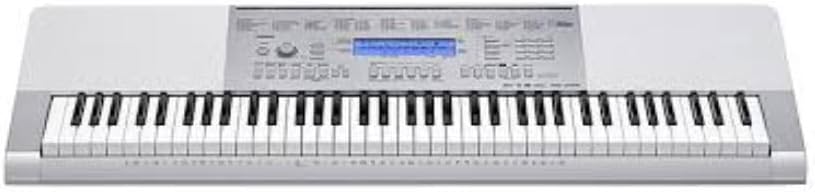
Image 4: Casio CTK-240 Keyboard. An example of a larger Casio keyboard model compatible with this power adapter.
3. Setup Instructions
- Verify Compatibility: Before connecting, ensure your Casio keyboard model is listed as compatible and requires a 9V DC power supply with positive center polarity. Refer to your keyboard's manual for its specific power requirements.
- Connect to Keyboard: Insert the barrel connector end of the T POWER adapter firmly into the DC input jack on your Casio keyboard. Ensure a snug fit.
- Connect to Power Outlet: Plug the AC adapter into a standard AC 100V-240V wall outlet.
- Power On: Turn on your Casio keyboard using its power switch. The keyboard should now receive power from the adapter.
Important: Do not force the connector into the keyboard's power jack. If it does not fit easily, re-check compatibility. Using an incompatible adapter can damage your device.
4. Operating Instructions
Once properly connected, the T POWER adapter provides continuous power to your Casio keyboard. No further operational steps are required for the adapter itself. Simply use your keyboard as intended. The adapter is designed for reliable, long-term power delivery.
If the adapter features an indicator light, it will illuminate when connected to a live power outlet, indicating that power is being supplied.
5. Maintenance
To ensure the longevity and optimal performance of your T POWER adapter, follow these maintenance guidelines:
- Keep Dry: Avoid exposing the adapter to moisture, liquids, or high humidity.
- Temperature: Operate and store the adapter within normal room temperatures. Avoid extreme heat or cold.
- Cable Care: Do not bend, twist, or pull the power cord excessively. Avoid placing heavy objects on the cord.
- Cleaning: Disconnect the adapter from the power outlet before cleaning. Use a soft, dry cloth to wipe the surface. Do not use liquid cleaners.
- Inspection: Periodically inspect the adapter and cable for any signs of damage, such as frayed wires, cracks, or loose connections. Discontinue use if damage is observed.

Image 5: Longer Lifespan Features. This image highlights the durable construction of the adapter, including its high-quality materials and bend-tested cable, designed for extended use.
6. Troubleshooting
If your Casio keyboard is not powering on or functioning correctly when using the T POWER adapter, consider the following:
- No Power:
- Ensure the adapter is fully plugged into a working wall outlet. Test the outlet with another device.
- Verify the adapter's barrel connector is securely inserted into the keyboard's DC input jack.
- Check the keyboard's power switch to ensure it is in the "ON" position.
- Intermittent Power/Flickering:
- Inspect the power cord and adapter for any visible damage.
- Ensure connections are firm at both the wall outlet and the keyboard.
- Confirm the adapter's specifications (9V DC, positive center polarity) match your keyboard's requirements.
- Adapter Overheating:
- Disconnect the adapter immediately.
- Ensure the adapter is not covered or placed in an area with poor ventilation.
- If overheating persists, discontinue use and contact support.
The T POWER adapter includes multiple safety protections:

Image 6: Safety Protection Features. This image displays icons representing various safety features, including short circuit protection, overheating protection, overcurrent protection, electrostatic protection, magnetic field protection, and overvoltage protection.

Image 7: Superior Safety Power Adapter. This image highlights the adapter's superior safety features, including over-current, over-temp, over-voltage, and short circuit protection, along with quality certification and a reinforced power cord.
If troubleshooting steps do not resolve the issue, refer to the Warranty and Support section.
7. Specifications
| Brand | T POWER |
| Model Number | TP- Casio ADE95 AD-E95100L |
| Input Voltage | AC 100V - 240V |
| Output Voltage | DC 9V |
| Output Current | 0.11 Amps |
| Polarity | Positive Center |
| Connector Type | Barrel Connector |
| Wattage | 1 Watt |
| Color | Black |
| Material | Plastic |
| Item Weight | 0.11 Kilograms |
| Certifications | CE/FCC/RoHS |
8. Warranty and Support
T POWER is committed to providing quality products and customer satisfaction.
- 30-Day Return Policy: You may return your undamaged product and packaging within 30 days of purchase for a full refund.
- 1-Year Limited Manufacturer Warranty: The product is covered by a 1-year limited warranty against manufacturing defects. This warranty covers quality-related issues and facilitates easy exchange for a replacement.
- Technical Support: If you encounter any issues, have questions about compatibility, or need assistance, please contact T POWER customer service. They can help with troubleshooting, finding the correct adapter, or addressing any concerns.
For support, please refer to the contact information provided with your purchase or visit the official T POWER website.