
1. Introduction
Thank you for choosing the Eden 522-300W External Thermo Filter. This compact and efficient external filter is designed to provide superior water filtration and consistent temperature control for your aquarium. It features silent operation, a large filtering volume, low energy consumption, and an integrated 300W heater. This manual provides essential information for the safe and effective setup, operation, and maintenance of your filter.
The advanced multi-stage filtration system mechanically pre-filters water and then biologically treats it with ceramic media, ensuring crystal clear water and preserving vital nutrients for a healthy aquatic environment. The integrated heater maintains a uniform water temperature, eliminating the need for separate in-tank heaters and enhancing safety for both users and aquatic life.
2. Safety Information
Please read all safety instructions carefully before installing and operating the Eden 522-300W External Thermo Filter. Failure to follow these instructions may result in electric shock, fire, or serious injury.
- Always disconnect the power supply before performing any maintenance or cleaning.
- Ensure the filter is placed on a stable, level surface below the aquarium water level to facilitate proper operation.
- Do not operate the filter if the power cord or plug is damaged.
- Do not immerse the filter head or electrical components in water.
- Ensure all connections are secure and leak-free before powering on the unit.
- This appliance is intended for indoor use only and for aquariums.
- Keep out of reach of children.
- All assembly and application information is provided in the attached instructions.
3. Product Overview
The Eden 522-300W External Thermo Filter is a comprehensive filtration and heating solution for aquariums up to 300 liters. Key components include:
- Filter Head: Contains the pump and integrated 300W heater with temperature control.
- Filter Canister: Houses multiple baskets for mechanical and biological filter media.
- Inlet/Outlet Connections: For connecting hoses to and from the aquarium.
- Automatic Drain Tube Closure: Simplifies maintenance by sealing tubes when the filter head is removed.
- Self-Priming Function: Assists in initial startup.

Image 1: Overview of the Eden 522-300W External Thermo Filter, showing the filter head, canister, and hose connections.
4. Setup Instructions
- Unpacking: Carefully remove all components from the packaging. Check for any damage.
- Filter Media Installation: Open the filter head by releasing the clamps. Arrange the filter media (mechanical sponges, ceramic rings, etc.) into the designated baskets as per the included diagram. Ensure media is rinsed thoroughly before placement.
- Hose Connection: Connect the inlet and outlet hoses to the appropriate ports on the filter head and to your aquarium. Ensure hoses are cut to the correct length to avoid kinks and provide a smooth flow path. Secure all hose connections with clamps to prevent leaks.
- Placement: Position the filter on a stable surface below the aquarium's water level. This is crucial for the filter to operate correctly and for the self-priming function to work efficiently.
- Priming the Filter:
- After connecting the hoses and ensuring the filter head is securely closed, open the automatic drain tube closure.
- Fill the filter canister completely with water. This can often be done by siphoning water from the aquarium into the inlet hose or by carefully pouring water directly into the filter through the heater opening until the canister is full.
- Once filled, activate the automatic self-priming function (refer to the specific mechanism on your filter head, usually a pump button or lever). This will help remove any remaining air.
- Ensure all air is expelled from the system before connecting to power. Air trapped in the filter can cause noise and reduce performance.
- Power Connection: Once the filter is primed and all connections are secure and leak-free, connect the power plug to a suitable electrical outlet.
5. Operating Instructions
- Starting the Filter: After successful setup and priming, plug the filter into the power outlet. The pump will start, and water circulation will begin.
- Setting the Heater Temperature:
- The integrated 300W heater allows you to set the desired aquarium temperature.
- Locate the temperature adjustment dial on the filter head.
- Rotate the dial to select your desired temperature (e.g., 25°C).
- Monitor the aquarium temperature with a separate thermometer for the first few days to ensure the heater maintains the desired setting accurately.

Image 2: Close-up view of the temperature adjustment dial on the filter head.

Image 3: A hand demonstrating how to adjust the temperature setting on the integrated heater.
- Continuous Operation: The filter is designed for continuous operation to maintain optimal water quality. Only disconnect power for maintenance or if instructed by troubleshooting steps.
6. Maintenance
Regular maintenance is crucial for the longevity and efficient performance of your Eden 522-300W filter.
- Disconnect Power: Always unplug the filter from the power outlet before beginning any maintenance.
- Disconnect Hoses: Close the inlet and outlet valves (if present) and then use the automatic drain tube closure mechanism to disconnect the filter head from the hoses. This prevents water spillage.
- Remove Filter Head: Release the clamps securing the filter head to the canister and carefully lift the head off.
- Clean Filter Media:
- Remove the filter media baskets.
- Rinse mechanical filter media (sponges, pads) in old aquarium water (from a water change) to preserve beneficial bacteria. Replace heavily soiled mechanical media as needed.
- Biological filter media (ceramic rings) should only be gently rinsed in old aquarium water if heavily clogged, to avoid destroying bacterial colonies. Do not clean biological media with tap water.
- Chemical filter media (e.g., activated carbon) should be replaced according to manufacturer recommendations, typically every 2-4 weeks.
- Clean Impeller: Inspect and clean the impeller and its housing in the filter head. Remove any debris or buildup that could impede its rotation.
- Inspect Heater: Carefully remove the integrated heater for inspection and cleaning if necessary. Ensure it is free from algae or mineral deposits.
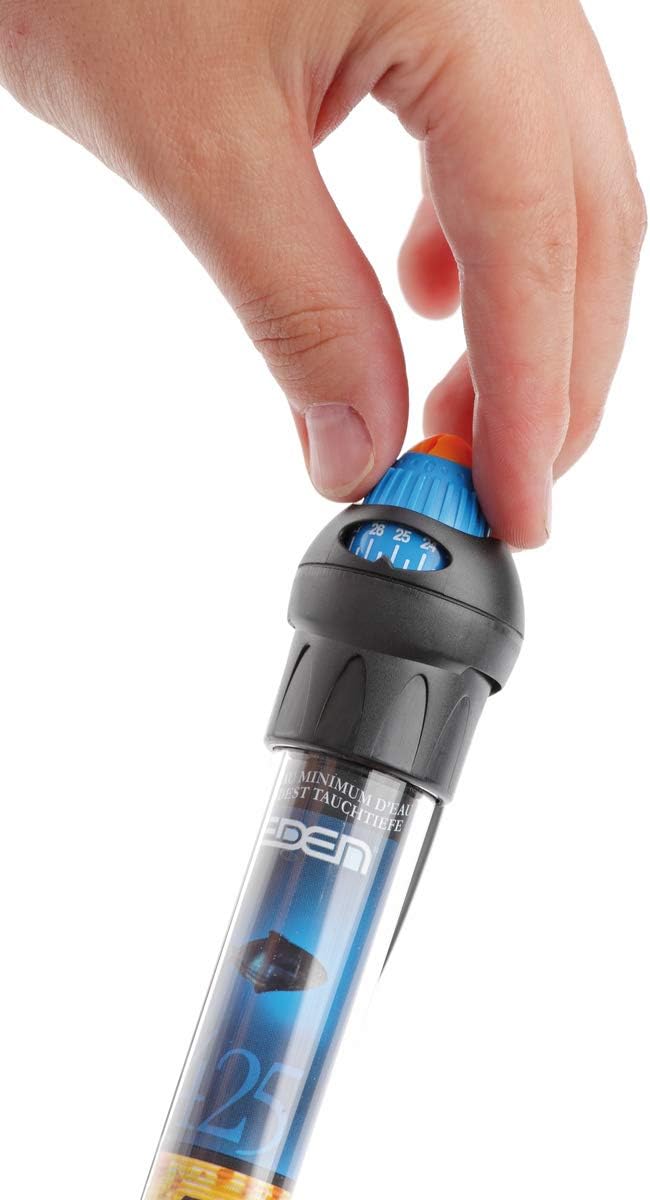
Image 4: A hand holding the integrated heater element, showing its removal from the filter head.

Image 5: A hand demonstrating the process of removing the heater element for cleaning or inspection.
- Reassembly: Reassemble the filter in reverse order, ensuring all seals (O-rings) are clean and properly seated to prevent leaks. Lubricate O-rings with silicone grease if necessary.
- Restart: Reconnect the hoses, prime the filter as described in the Setup section, and then reconnect power.
Frequency: Mechanical media should be cleaned every 2-4 weeks, or when flow rate noticeably decreases. Biological media requires less frequent cleaning, typically every 3-6 months, and only if flow is severely restricted.
7. Troubleshooting
| Problem | Possible Cause | Solution |
|---|---|---|
| Filter not starting / No water flow |
|
|
| Reduced water flow |
|
|
| Filter is noisy |
|
|
| Water leaking |
|
|
| Heater not maintaining temperature |
|
|
8. Specifications
| Model Number | 57293 |
| Product Dimensions (L x W x H) | 24.5 x 28 x 45.5 cm |
| Product Weight | 5.12 kg |
| Heater Power | 300 W |
| Recommended Aquarium Volume | Up to 300 Liters |
| ASIN | B00G9ZTEI4 |
| First Available Date | 13 November 2013 |

Image 6: The Eden 522-300W filter with its key dimensions indicated.
9. Warranty and Support
For warranty information and product support, please refer to the following guidelines:
- Returns: If you wish to return a product within 30 days of receipt because you changed your mind, please consult the retailer's return policy page.
- Defective or Damaged Products: If you have received a defective or damaged product, please consult the retailer's help page for instructions on how to proceed.
- Marketplace Purchases: For specific information regarding purchases made on a marketplace, please refer to the marketplace's dedicated help page.
- Technical Support: For technical assistance, spare parts, or further inquiries regarding your Eden 522-300W External Thermo Filter, please contact Eden customer support directly. Contact details can typically be found on the manufacturer's official website or on the product packaging.