
1. Introduction
Thank you for choosing the Cool-A-Zone CoolBox C100 Portable Evaporative Air Cooler. This manual provides essential information for the safe operation, maintenance, and troubleshooting of your new air cooler. Please read this manual thoroughly before operating the unit and retain it for future reference.
The CoolBox C100 is designed to provide effective cooling for areas up to 1050 square feet by utilizing evaporative cooling technology. It is ideal for various settings, including outdoor spaces, patios, and industrial applications, offering a significant temperature reduction without the need for condensation or exhaust hoses.
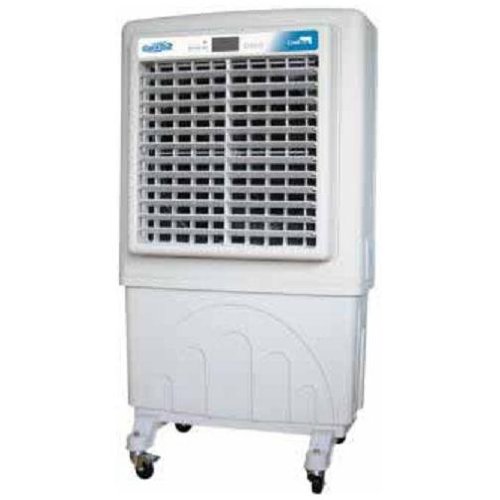
Figure 1: Cool-A-Zone CoolBox C100 Portable Evaporative Air Cooler. This image shows the front view of the white evaporative air cooler with a large grille, digital display, and a water reservoir base with wheels.
2. Safety Instructions
To reduce the risk of fire, electric shock, or injury, always follow these basic safety precautions:
- Read all instructions before using this appliance.
- Ensure the power supply matches the voltage specified on the unit's rating label.
- Do not operate the cooler with a damaged cord or plug. If the cord or plug is damaged, contact qualified service personnel.
- Do not run the power cord under carpeting or cover it with throw rugs, runners, or similar coverings. Arrange the cord away from traffic areas where it will not be tripped over.
- Always unplug the unit before cleaning, servicing, or moving it.
- Do not immerse the unit, plug, or cord in water or other liquids.
- Do not use the cooler in areas where gasoline, paint, or other flammable liquids or vapors are stored.
- Keep the unit away from heat sources such as radiators, heat registers, stoves, or other appliances that produce heat.
- This appliance is not intended for use by persons (including children) with reduced physical, sensory, or mental capabilities, or lack of experience and knowledge, unless they have been given supervision or instruction concerning use of the appliance by a person responsible for their safety.
- Children should be supervised to ensure that they do not play with the appliance.
- Use only on a level surface.
- Do not block air inlets or outlets.
- Do not insert fingers or foreign objects into the air grille.
- Only use clean water in the reservoir.
3. Package Contents
Please check the package contents upon unpacking. The CoolBox C100 package should include:
- Cool-A-Zone CoolBox C100 Portable Evaporative Air Cooler Unit
- Remote Control
- User Manual (this document)
4. Setup
Follow these steps for initial setup of your CoolBox C100:
- Unpacking: Carefully remove the air cooler from its packaging. Retain packaging materials for future storage or transport if needed.
- Positioning: Place the unit on a firm, level surface. Ensure there is adequate space around the unit for proper airflow (at least 12 inches from walls or other obstructions). The unit is equipped with wheels for easy portability.
- Filling the Water Reservoir:
- Locate the water fill inlet, typically at the top or side of the unit.
- Slowly fill the 21-gallon reservoir with clean, cool water. Do not overfill past the maximum fill line indicator.
- For optimal cooling, ensure the cooling pads are adequately saturated.
- Power Connection: Plug the power cord into a grounded electrical outlet. Ensure the outlet meets the power requirements of the unit.
- Remote Control Batteries: Insert the required batteries into the remote control (batteries typically not included). Refer to the remote control section for battery type.
5. Operating Instructions
The CoolBox C100 can be operated using the digital control panel on the unit or the included remote control.
5.1 Digital Control Panel
The digital control panel provides direct access to all functions:
- Power Button: Press to turn the unit ON or OFF.
- Fan Speed Button: Cycle through the 3 available fan speeds (Low, Medium, High).
- Cooling/Evaporative Mode Button: Activates or deactivates the evaporative cooling function. Ensure the water reservoir is filled when this mode is active.
- Timer Button: Set a run-time for automatic shut-off. Refer to the display for timer settings.
- Temperature Control: Adjust the desired temperature output (if applicable, some models may only control fan speed and cooling).
- Ionizer Button: Activates or deactivates the air ionizing function.
5.2 Remote Control
The remote control duplicates the functions of the digital control panel, allowing convenient operation from a distance.
- Point the remote control directly at the unit's receiver.
- Ensure there are no obstructions between the remote and the unit.
- Replace batteries when the remote's range decreases or it stops responding.
6. Maintenance
Regular maintenance ensures optimal performance and extends the lifespan of your CoolBox C100.
6.1 Cleaning the Exterior
- Always unplug the unit before cleaning.
- Use a soft, damp cloth to wipe down the exterior surfaces.
- Do not use abrasive cleaners, waxes, or solvents as they may damage the finish.
- Ensure no water enters the control panel or electrical components.
6.2 Cleaning the Water Reservoir
- Drain any remaining water from the reservoir.
- Periodically clean the reservoir to prevent mold, mildew, and mineral buildup.
- Use a mild detergent and water, then rinse thoroughly.
- Allow the reservoir to air dry completely before refilling or storing the unit.
6.3 Cooling Pad Maintenance
- The cooling pads (evaporative media) should be inspected regularly for mineral buildup or debris.
- Refer to the unit's specific design for instructions on how to remove and clean the cooling pads. They can often be rinsed under running water.
- Replace cooling pads if they become heavily clogged or damaged, as this will affect cooling efficiency.
6.4 Storage
- Before storing, ensure the water reservoir is completely drained and dry.
- Clean the unit thoroughly as per the instructions above.
- Store the unit in a cool, dry place, away from direct sunlight and extreme temperatures.
- Cover the unit to protect it from dust.
7. Troubleshooting
If you experience issues with your CoolBox C100, refer to the following table for common problems and solutions:
| Problem | Possible Cause | Solution |
|---|---|---|
| Unit does not turn on. | No power supply. Power cord not properly plugged in. | Check if the power outlet is working. Ensure the power cord is securely plugged into the unit and the outlet. |
| No cooling effect. | Water reservoir is empty. Cooling pads are dry or clogged. Cooling mode is not activated. | Fill the water reservoir. Check and clean/replace cooling pads. Activate the cooling/evaporative mode. |
| Weak airflow. | Air inlets/outlets are blocked. Fan speed is set too low. | Clear any obstructions around the unit. Increase the fan speed setting. |
| Unpleasant odor. | Stagnant water or mold in reservoir/pads. | Drain and thoroughly clean the water reservoir and cooling pads. Use fresh water. |
| Remote control not working. | Batteries are dead or incorrectly inserted. Obstruction between remote and unit. | Replace batteries and ensure correct polarity. Remove any obstructions. Point directly at the unit. |
8. Specifications
Technical specifications for the Cool-A-Zone CoolBox C100 Portable Evaporative Air Cooler:
| Feature | Detail |
|---|---|
| Model Name | C100 |
| Brand | Cool-A-Zone |
| Mounting Type | Freestanding |
| Special Feature | Portable |
| Colour | White |
| Air Flow Capacity | 4120 Cubic Feet Per Minute (CFM) |
| Controls Type | Remote, Digital Control Panel |
| Reservoir Capacity | 21 Gallons |
| Floor Area Coverage | 1050 Square Feet |
| Number of Speeds | 3 |
| Included Components | Remote Control |
| UPC | 850314004030 |
| Item Model Number | C100 |
9. Warranty and Support
For warranty information and customer support, please refer to the warranty card included with your purchase or visit the official Cool-A-Zone website. Keep your proof of purchase for any warranty claims.
If you require technical assistance or have questions not covered in this manual, please contact Cool-A-Zone customer service.


