
Introduction
The Maretron DCM100-01 DC Monitor is an advanced electronic device designed to accurately measure the voltage and current of any direct current (DC) power source or load. This includes monitoring batteries, alternators, solar panels, wind generators, inverters, windlasses, DC refrigerators, or any DC branch circuit. The DCM100-01 provides precise data for comprehensive power management on your vessel, integrating seamlessly with NMEA 2000 systems.
When used with batteries, the DCM100-01 employs sophisticated algorithms to monitor battery temperature, load current, charging current, and terminal voltage. This allows for precise computation of battery state of charge, state of health, and estimated time remaining. The device utilizes a state-of-the-art Hall effect current sensor for non-intrusive current measurement.
Safety Information
- Always disconnect power before installing or servicing the device.
- Ensure all wiring conforms to applicable electrical codes and standards.
- Do not expose the device to extreme temperatures or moisture beyond its specified operating conditions.
- Only use the included Hall effect current sensor for current measurement.
- Consult a qualified marine electrician if you are unsure about any installation steps.
Setup
1. Unpacking and Inspection
Carefully remove the DCM100-01 from its packaging. Inspect the device and all included components for any signs of damage. The package should contain the DCM100-01 unit and a Hall effect current sensor.
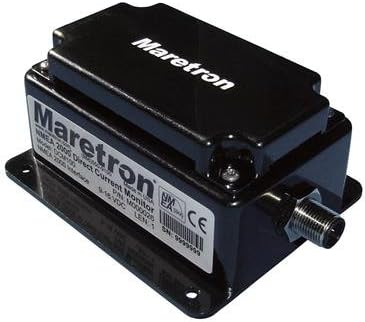
An image showing the Maretron DCM100-01 DC Monitor, a compact black electronic device with the 'Maretron' logo and product information label visible on its top and front surfaces. It features a threaded connector on one side for NMEA 2000 integration.
2. Mounting Location
Select a dry, protected location for mounting the DCM100-01. Ensure the location is easily accessible for wiring and future maintenance. The device should be mounted securely to a flat surface using appropriate fasteners (not included).
3. Wiring and Connections
- NMEA 2000 Connection: Connect the DCM100-01 to your NMEA 2000 network backbone using a standard NMEA 2000 drop cable. The device is NMEA 2000 certified and draws power directly from the network.
- Hall Effect Current Sensor Installation: The Hall effect current sensor should be installed around the positive or negative conductor of the DC circuit you wish to monitor. Ensure the arrow on the sensor points in the direction of current flow (e.g., away from the battery for discharge, towards the battery for charge). No breaking of connections or installation of shunts is required.
- Voltage Sense Connection: Connect the voltage sense wires from the DCM100-01 to the positive and negative terminals of the DC source or load being monitored. Refer to the detailed wiring diagram in the full product manual for specific terminal assignments.
- Temperature Sensor (Optional): If monitoring a battery, connect an optional Maretron temperature sensor to the DCM100-01 for accurate battery state of health calculations.
Operating
1. Power On and Initial Configuration
Once all connections are secure and power is applied to the NMEA 2000 network, the DCM100-01 will power on. It will automatically begin transmitting data onto the NMEA 2000 network. Initial configuration, such as setting battery capacity or type, may be required using a compatible NMEA 2000 display or Maretron's N2KAnalyzer software.
2. Monitoring DC Parameters
View real-time DC voltage, current, and other parameters on any NMEA 2000 compatible display connected to your network. The DCM100-01 provides data for:
- DC Voltage (V)
- DC Current (A)
- Battery State of Charge (%)
- Battery State of Health (%)
- Time Remaining (hours/minutes)
- Battery Temperature (if optional sensor connected)
3. Advanced Features (Battery Monitoring)
For accurate battery monitoring, ensure the DCM100-01 is properly configured with the correct battery bank capacity (Ah) and type (e.g., Lead-Acid, LiFePO4). The device continuously learns and adapts to your battery's characteristics to provide highly accurate state of charge and health estimations.
Maintenance
1. Cleaning
Periodically clean the exterior of the DCM100-01 with a soft, damp cloth. Do not use abrasive cleaners or solvents. Ensure the device is dry before re-applying power.
2. Firmware Updates
Maretron may release firmware updates to improve performance or add new features. Check the Maretron website periodically for the latest firmware. Firmware updates are typically performed using Maretron's N2KAnalyzer software and a USB100 gateway.
Troubleshooting
| Problem | Possible Cause | Solution |
|---|---|---|
| No data from DCM100-01 on NMEA 2000 display. |
|
|
| Inaccurate current readings. |
|
|
| Battery state of charge/health is incorrect. |
|
|
Specifications
| Feature | Detail |
|---|---|
| Model Number | DCM100-01 (or 010-468-DCM100-01) |
| Dimensions (L x W x H) | 10 x 7 x 5 inches (Product Dimensions) |
| Weight | 2.65 pounds |
| Power Source | NMEA 2000 Network (12V DC) |
| Current Measurement | Hall Effect Sensor (non-contact) |
| Connectivity | NMEA 2000 Certified |
| Monitored Parameters | DC Voltage, DC Current, Battery State of Charge, State of Health, Time Remaining, Temperature (with optional sensor) |
Warranty
Maretron products are typically covered by a limited warranty against defects in materials and workmanship. The specific terms and duration of the warranty may vary. Please refer to the official Maretron website or the warranty card included with your product for detailed warranty information and registration procedures.
Support
For technical assistance, troubleshooting, or product inquiries, please contact Maretron customer support:
- Website: www.maretron.com (for FAQs, downloads, and contact information)
- Email: Refer to the official website for support email addresses.
- Phone: Refer to the official website for support phone numbers.
When contacting support, please have your product model number (DCM100-01) and any relevant details about your system configuration ready.


