1. Introduction
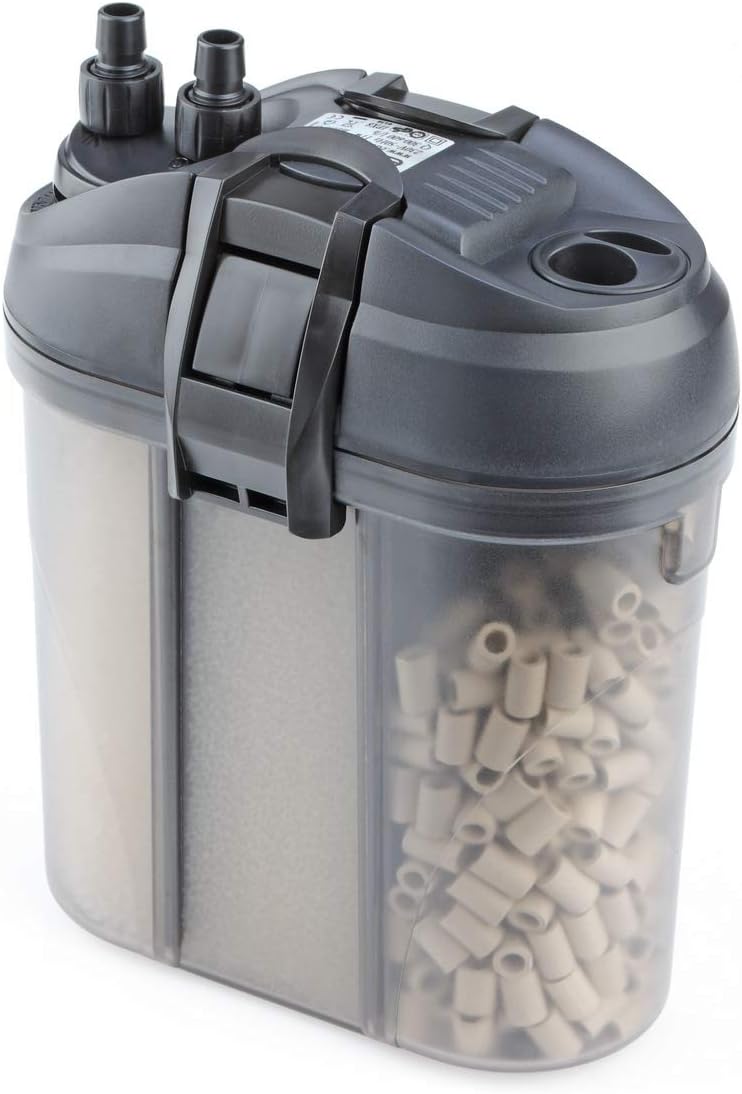
The EDEN 511 External Filter is designed for freshwater and saltwater aquariums up to 120 liters. This quiet and energy-efficient external filter combines a compact design with high filtration performance. It can be optionally equipped with an EDEN heater (sold separately). Various filter media ensure both mechanical and biological filtration. The integrated self-priming system simplifies installation and restarting. An automatic shut-off device in the hose adapter prevents water leakage during cleaning, making maintenance convenient.
2. Safety Information
- Always disconnect the filter from the power supply before performing any maintenance, cleaning, or installation procedures.
- Ensure all electrical connections are dry and away from water.
- Do not operate the filter if the power cord or plug is damaged.
- This appliance is intended for indoor use only.
- Keep out of reach of children.
- Ensure the filter is placed on a stable, level surface below the aquarium water level to allow proper operation.
3. Package Contents
Verify that all components are present before beginning installation:
- EDEN 511 External Filter Unit
- Hoses for inlet and outlet
- Hose adapter with automatic shut-off and flow regulator
- Inlet and outlet pipes with suction cups
- Filter media (mechanical and biological)
- Instruction Manual

4. Setup Instructions
- Prepare the Filter Unit: Open the filter unit and arrange the provided filter media in the designated chambers. Ensure mechanical filtration media (e.g., sponges) are placed before biological media (e.g., ceramic rings).
- Connect Hoses: Attach the inlet and outlet hoses to the hose adapter on the filter head. Ensure a secure connection to prevent leaks.
- Install Inlet/Outlet Pipes: Connect the other ends of the hoses to the respective inlet and outlet pipes. Position the inlet pipe (with strainer) inside the aquarium to draw water, and the outlet pipe (with spray bar or nozzle) to return filtered water. Use suction cups to secure them to the aquarium wall.
- Position the Filter: Place the filter unit on a stable surface below the aquarium's water level. This is crucial for the filter to operate correctly and for the self-priming function.
- Fill the Filter: Before powering on, fill the filter unit with water from the aquarium. The integrated self-priming system will assist, but ensuring the unit is full helps prevent airlocks and ensures immediate operation.
- Connect to Power: Once the filter is filled and all connections are secure, plug the filter into a suitable power outlet. The filter should start operating, drawing water from the aquarium, filtering it, and returning clean water.
- Adjust Flow: Use the integrated flow regulator on the hose adapter to adjust the water flow rate according to your aquarium's needs.

5. Operating Instructions
The EDEN 511 External Filter provides continuous mechanical and biological filtration for your aquarium. Once properly set up and powered on, the filter will draw water from the aquarium, pass it through multiple stages of filtration media, and return clean, oxygenated water.
- Continuous Operation: The filter is designed for continuous operation to maintain water quality.
- Flow Regulation: Adjust the water flow rate using the lever on the hose adapter to suit the specific needs of your aquarium inhabitants and plant life.
- Optional Heater Integration: If you wish to integrate an EDEN heater, follow the heater's specific instructions for installation within the filter system. This allows for uniform water temperature and an optimal aquarium climate.

6. Maintenance
Regular maintenance is essential for the optimal performance and longevity of your EDEN 511 External Filter. The automatic shut-off device in the hose adapter simplifies cleaning by preventing water from escaping.
- Disconnect Power: Always unplug the filter from the power outlet before any maintenance.
- Disconnect Hoses: Use the quick-release mechanism on the hose adapter to detach the hoses from the filter head. The automatic shut-off will prevent water from flowing out of the hoses.
- Clean Filter Media: Remove the filter head and carefully take out the filter media baskets. Rinse mechanical filter media (sponges, pads) in old aquarium water to preserve beneficial bacteria. Replace chemical filter media (e.g., activated carbon) as recommended by the manufacturer, typically every 2-4 weeks. Biological filter media (e.g., ceramic rings) should only be gently rinsed in old aquarium water if heavily clogged, as they house essential bacteria.
- Clean Impeller: Periodically inspect and clean the impeller and its housing to ensure smooth operation and prevent blockages.
- Reassemble: Reassemble the filter in reverse order, ensuring all seals are correctly seated and the filter head is securely latched.
- Restart: Reconnect the hoses, ensure the filter is filled with water, and plug it back into the power outlet. The self-priming system will assist in restarting.
7. Troubleshooting
If you encounter issues with your EDEN 511 External Filter, refer to the following common troubleshooting steps:
- Filter Not Starting:
- Check if the power cord is securely plugged in.
- Ensure the filter is filled with water and there are no airlocks. Use the self-priming function if available.
- Inspect the impeller for any obstructions or damage.
- Reduced Flow Rate:
- Clean the filter media, as they may be clogged.
- Check hoses for kinks or blockages.
- Clean the impeller and its housing.
- Ensure the flow regulator is fully open.
- Excessive Noise:
- Air trapped inside the filter can cause noise. Tilt the filter gently to release air bubbles.
- Clean the impeller; a dirty or damaged impeller can cause rattling.
- Ensure the filter is placed on a stable, level surface.
- Water Leakage:
- Check that the filter head is securely latched and the O-ring seal is properly seated and free of debris.
- Ensure all hose connections are tight.
- Inspect hoses for cracks or damage.
8. Specifications
| Feature | Specification |
|---|---|
| Brand | Eden |
| Model | 57261 (511 External Filter) |
| Color | Black |
| Product Dimensions (L x W x H) | 13 x 21.5 x 24 cm |
| Item Weight | 1.87 Kilograms |
| Material | Ceramic (for filter media) |
| Power Source | Manual Operation (referring to setup/priming) |
| Maximum Flow Rate | 600 Liters per hour |
| Voltage | 230 Volts |
| Included Components | 1 piece (filter unit with accessories) |
| Spare Parts Availability | Information unavailable |
9. Warranty Information
This product is covered by a manufacturer's warranty. Please refer to the warranty card included in your package or contact Eden customer support for specific details regarding warranty duration and terms. Keep your proof of purchase for any warranty claims.
10. Support
For further assistance, technical support, or to inquire about spare parts, please contact Eden customer service. Contact information can typically be found on the product packaging or the official Eden website.
Online Resources: Visit the official Eden website for FAQs, additional product information, and support resources.


