
Blue Wave SA2420DX
Blue Wave 4-Person Corner Carbon Sauna User Manual
Model: SA2420DX
1. Introduction
This manual provides essential information for the safe and effective operation, assembly, and maintenance of your Blue Wave 4-Person Corner Carbon Sauna. Please read this manual thoroughly before installation and use, and retain it for future reference.
The Blue Wave 4-Person Corner Infrared Sauna is designed for relaxation and rejuvenation, fitting conveniently into a room corner. It features advanced infrared heat technology, solid hemlock wood construction, and user-friendly controls.
2. Safety Information
Adherence to the following safety guidelines is crucial for preventing injury and ensuring proper operation of the sauna.
- Ensure the sauna is connected to a dedicated 120V/20A power outlet. Do not use extension cords.
- Consult a physician before using the sauna, especially if you have pre-existing medical conditions.
- Do not consume alcohol or drugs before or during sauna use.
- Limit sauna sessions to recommended durations to avoid overheating or dehydration.
- Keep children and pets away from the sauna during operation.
- Do not place flammable materials inside or near the sauna.
- Always allow the sauna to cool down before cleaning or performing maintenance.
- Ensure proper ventilation in the room where the sauna is installed.
3. Setup and Assembly
The Blue Wave sauna features a buckle construction for straightforward assembly. It is recommended to have at least two people for assembly.
3.1 Unpacking and Inspection
- Carefully unpack all components and verify against the packing list.
- Inspect all parts for any damage during transit. Report any damage immediately to the retailer.
- Ensure all necessary hardware and accessories are present.
3.2 Assembly Steps
While specific steps are detailed in the included assembly guide, the general process involves:
- Positioning the base panel in the desired corner location.
- Attaching the side wall panels using the buckle assembly system. Ensure panels are securely latched.
- Installing the front panel and door.
- Placing the roof panel, ensuring all electrical connections are properly routed and secured.
- Installing interior components such as benches, backrests, and the audio system.
- Connecting the sauna to the dedicated 120V/20A power supply.
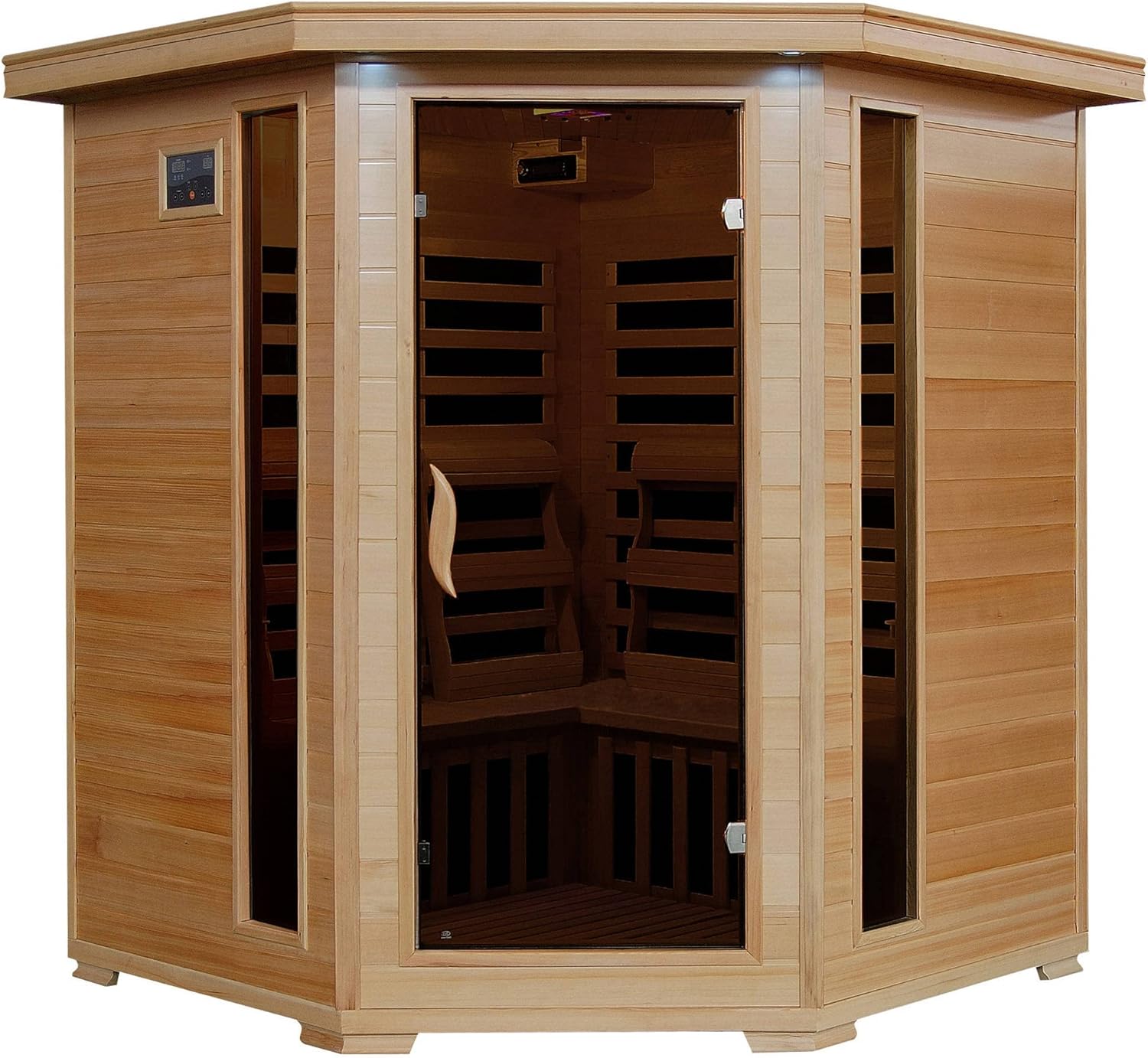
Figure 3.2.1: Exterior view of the assembled Blue Wave Corner Carbon Sauna, showcasing its corner design and hemlock wood finish.

Figure 3.2.2: Detail of the solid hemlock wood construction and corner design, highlighting the quality craftsmanship.
4. Operating Instructions
Familiarize yourself with the sauna's controls and features for optimal use.
4.1 Power and Temperature Control
The sauna is equipped with EZ-Touch dual interior and exterior LED control panels for convenient temperature and time management.
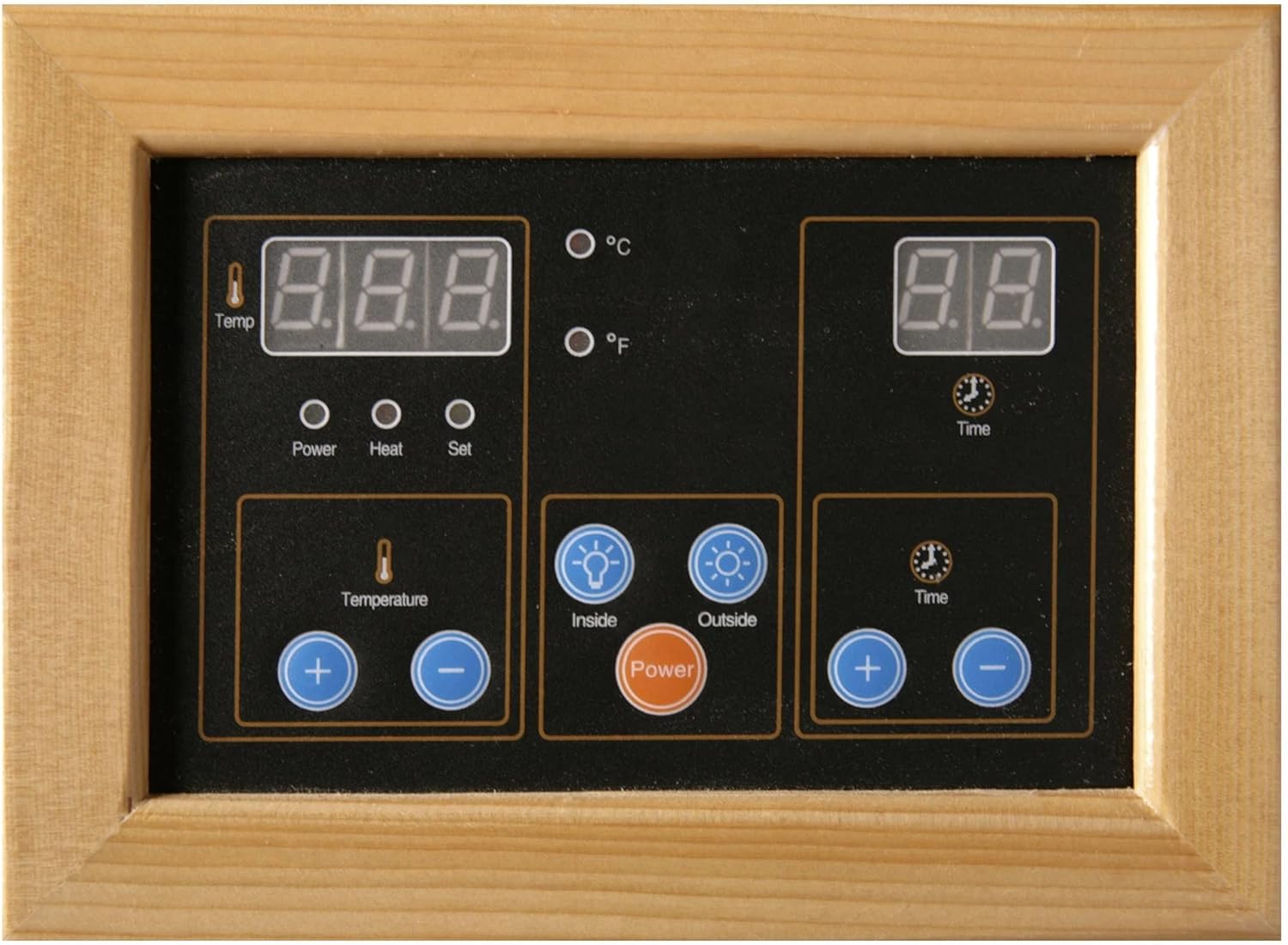
Figure 4.1.1: The EZ-Touch dual LED control panel, showing temperature and time displays, along with control buttons for power, heat, and lighting.
- Power On/Off: Press the 'Power' button on either control panel to activate or deactivate the sauna.
- Temperature Setting: Use the '+' and '-' buttons under 'Temperature' to adjust the desired heat level. The sauna can operate up to 140 degrees F.
- Time Setting: Use the '+' and '-' buttons under 'Time' to set the duration of your sauna session.
- Heating Elements: The sauna utilizes 10 carbon heaters strategically placed to provide efficient and even heat distribution.

Figure 4.1.2: Interior view of the sauna, highlighting the carbon heating panels integrated into the walls.
4.2 Audio System
The sauna includes a stereo sound system with built-in speakers, a CD player, AUX input, and radio functionality.
- CD Player: Insert an audio CD into the slot to play music.
- AUX Input: Connect external audio devices (e.g., smartphone, MP3 player) using a standard 3.5mm audio cable.
- Radio: Tune into your favorite radio stations using the radio controls on the unit.
4.3 Chromotherapy Light
Enhance your sauna experience with the integrated chromotherapy light system.

Figure 4.3.1: The chromotherapy light fixture mounted on the sauna ceiling, emitting various colors.
- Use the dedicated button on the control panel to cycle through different light colors or modes.
4.4 Oxygen Ionizer
The oxygen ionizer helps purify the air within the sauna cabin.

Figure 4.4.1: The Nanbai oxygen ionizer unit, typically mounted on an interior wall, designed to improve air quality.
- Activate the ionizer using its dedicated switch or button, usually located on the unit itself.
5. Maintenance
Regular maintenance ensures the longevity and optimal performance of your sauna.
- Cleaning: Wipe down interior surfaces with a damp cloth after each use. For deeper cleaning, use a mild, non-abrasive cleaner specifically designed for wood. Avoid harsh chemicals.
- Wood Care: The sauna is constructed from hemlock wood. Avoid excessive moisture and direct sunlight to prevent warping or discoloration. Do not apply paints or varnishes to the interior wood.
- Heater Panels: Do not touch the carbon heater panels during operation. Keep them free from obstructions.
- Electrical Components: Regularly inspect power cords and connections for any signs of wear or damage. If damage is found, discontinue use and contact customer support.
6. Troubleshooting
This section addresses common issues you might encounter. For problems not listed here, contact customer support.
| Problem | Possible Cause | Solution |
|---|---|---|
| Sauna does not power on. | No power supply; circuit breaker tripped; loose connection. | Check power outlet and circuit breaker. Ensure all connections are secure. |
| Sauna not heating sufficiently. | Temperature set too low; heater malfunction. | Increase temperature setting. Verify heater panels are clear. If issue persists, contact support. |
| Control panel unresponsive. | Temporary electronic glitch; power interruption. | Turn off and unplug the sauna for 5 minutes, then plug back in and restart. |
| Audio system not working. | Incorrect source selected; volume too low; faulty connection. | Check source selection (CD, AUX, Radio). Adjust volume. Ensure AUX cable is fully inserted. |
7. Specifications
| Feature | Detail |
|---|---|
| Product Name | Blue Wave 4-Person Corner Carbon Sauna |
| Model Number | SA2420DX |
| Brand | Blue Wave |
| Material | Solid Hemlock Wood |
| Heater Type | Carbon Infrared Heaters (10 total) |
| Heating Power | 2270W |
| Max Temperature | Up to 140°F (60°C) |
| Power Requirement | 120V / 20A |
| Control Panels | EZ-Touch Dual Interior and Exterior LED |
| Audio System | Stereo sound system with built-in speakers, CD player, AUX input, and radio |
| Additional Features | Chromotherapy light, Oxygen Ionizer, Towel and Magazine Racks, 4 Backrests |
| Certifications | CE, CETL, RoHS, ISO 9001 |
| Assembly | Buckle construction for quick setup |
| Item Weight | 16 ounces (Note: This value appears to be a placeholder and may not reflect actual product weight.) |
| Item Dimensions (LxWxH) | 1 x 1 x 1 inches (Note: This value appears to be a placeholder and may not reflect actual product dimensions.) |
8. Warranty and Support
Blue Wave Products stands behind the quality of its saunas.
- 5-Year Warranty: Covers wood, structure, heating elements, and electrical components.
- 1-Year Warranty: Covers the radio component.
For warranty claims, technical support, or replacement parts, please contact Blue Wave Products customer service. Refer to your purchase documentation for specific contact details or visit the official Blue Wave website.
Related documentsSA2420DX

Ask a question about this manual
Ask about setup, troubleshooting, compatibility, parts, safety, or missing instructions. Manuals+ will review the question and use this page’s manual context to help answer it.