1. Product Overview
The Telex ST-300 is a base transmitter designed for wireless personal listening systems. It offers robust features for professional audio environments, ensuring clear and reliable transmission. This manual provides detailed instructions for the proper setup, operation, and maintenance of your ST-300 transmitter.
2. Key Features
- Frequency Selection: Features 17 user-selectable frequencies for flexible operation and interference avoidance.
- User Interface: Equipped with front-mounted control buttons and an LCD display for easy configuration and monitoring.
- Audio Monitoring: Includes a headphone jack with adjustable level for real-time input signal monitoring.
- Visual Input Monitoring: A peak reading on the LCD display provides visual feedback on input levels.
- Versatile Audio Inputs: Offers a balanced XLR-3F input with selectable mic, line, and 70-volt input options.
- Additional Input: An unbalanced 1/4-inch input is also available.
- Front Panel Control: All input selection and attenuation are conveniently managed from the front panel, eliminating the need for external tools.
3. Controls and Connections
3.1 Front Panel
The front panel provides all necessary controls for operation and monitoring.
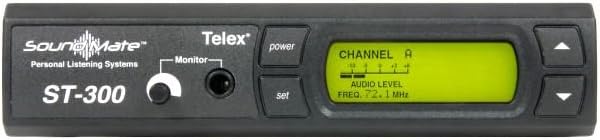
Image 1: Front view of the Telex ST-300 SoundMate Wireless Personal Listening System Transmitter. Visible elements include the 'soundMate' logo, 'Telex' branding, 'ST-300' model number, a 'Monitor' headphone jack with an adjacent level knob, 'power' and 'set' buttons, and a large LCD display showing 'CHANNEL A' and 'AUDIO LEVEL' with a frequency reading.
- Power Button: Toggles the unit on and off.
- Set Button: Used to confirm selections and enter/exit menu options.
- Up/Down Buttons: Navigate through menu options and adjust values (e.g., frequency, input level).
- Monitor Jack: 3.5mm (1/8-inch) stereo headphone output for monitoring the audio input.
- Monitor Level Knob: Adjusts the volume of the headphone output.
- LCD Display: Shows current channel, frequency, audio input level, and menu options.
3.2 Rear Panel
The rear panel houses all audio and power connections.

Image 2: Rear view of the Telex ST-300 SoundMate Wireless Personal Listening System Transmitter. From left to right, connections include a Balanced Audio XLR-3F input, an Unbalanced Audio 1/4-inch input, an Antenna BNC connector, and a 12-15V AC/DC power input jack.
- Balanced Audio (XLR-3F): Professional audio input for balanced signals. Supports mic, line, and 70V input levels, selectable via front panel controls.
- Unbalanced Audio (1/4-inch): Standard 1/4-inch input for unbalanced audio sources.
- Antenna (BNC): Connector for the external antenna, typically a BNC type.
- 12-15V AC/DC: Power input jack for connecting the provided power adapter.
4. Setup
4.1 Unpacking
- Carefully remove the ST-300 transmitter and all accessories from the packaging.
- Verify that all components listed in the packing list are present.
- Retain the original packaging for future storage or shipping.
4.2 Power Connection
- Ensure the ST-300 is powered off.
- Connect the provided power adapter to the 12-15V AC/DC input jack on the rear panel.
- Plug the power adapter into a suitable electrical outlet.
4.3 Antenna Connection
- Screw the supplied antenna onto the BNC connector on the rear panel.
- Position the antenna vertically for optimal signal transmission.
4.4 Audio Input Connection
Choose either the balanced XLR or unbalanced 1/4-inch input based on your audio source.
4.4.1 Balanced XLR Input
- Connect your balanced audio source (e.g., mixer, microphone) to the XLR-3F input on the rear panel.
- On the front panel, use the 'Set' and Up/Down buttons to navigate to the input selection menu.
- Select the appropriate input level: 'Mic', 'Line', or '70V' to match your source.
4.4.2 Unbalanced 1/4-inch Input
- Connect your unbalanced audio source to the 1/4-inch input on the rear panel.
- Ensure the input selection on the front panel is set to the 1/4-inch input.
4.5 Placement
Place the ST-300 on a stable, flat surface, away from direct heat sources, moisture, and strong electromagnetic fields. Ensure adequate ventilation around the unit.
5. Operating Instructions
5.1 Powering On/Off
- To power on, press the 'Power' button on the front panel. The LCD display will illuminate.
- To power off, press the 'Power' button again. The display will turn off.
5.2 Frequency Selection
- With the unit powered on, use the 'Set' button to enter the frequency selection mode.
- Use the Up/Down buttons to cycle through the available 17 frequencies.
- Observe the LCD display for the selected frequency.
- Press 'Set' again to confirm your selection and exit the frequency mode.
5.3 Input Level Adjustment
- Ensure an audio source is connected and active.
- Monitor the 'AUDIO LEVEL' indicator on the LCD display.
- Adjust the input level of your audio source or use the ST-300's internal attenuation (if available via menu) to ensure the audio level is within the optimal range, avoiding clipping (peak indicator).
5.4 Monitoring Audio
- Plug a pair of headphones into the 'Monitor' jack on the front panel.
- Adjust the 'Monitor' level knob to a comfortable listening volume.
- Listen to the audio being transmitted to verify signal presence and quality.
6. Maintenance
6.1 Cleaning
- Disconnect the power before cleaning.
- Use a soft, dry cloth to wipe down the exterior of the unit.
- Do not use liquid cleaners, aerosols, or solvents, as these may damage the finish or internal components.
6.2 Storage
- If storing the unit for an extended period, disconnect all cables.
- Store in a cool, dry place, away from extreme temperatures and humidity.
- It is recommended to use the original packaging for protection during storage.
7. Troubleshooting
This section addresses common issues you might encounter with your ST-300 transmitter.
| Problem | Possible Cause | Solution |
|---|---|---|
| Unit does not power on | No power to outlet; Power adapter faulty; Power button not pressed correctly. | Check power outlet with another device; Try a different power adapter (if compatible); Press the power button firmly. |
| No audio output from transmitter | Audio input cable disconnected; Incorrect input selected; Input level too low; Receiver not tuned to correct frequency. | Verify audio input cable connection; Ensure correct input (XLR/1/4") is selected on front panel; Increase input level from source or on ST-300; Confirm receiver is on the same frequency as the transmitter. |
| Poor audio quality / Static | Interference from other devices; Antenna not properly connected or positioned; Input level too high (clipping); Incorrect frequency selected. | Try a different operating frequency; Ensure antenna is securely connected and vertical; Reduce input level to prevent clipping; Verify frequency matches receiver. |
| LCD display not working | Unit not powered on; Display fault. | Ensure unit is powered on; If still not working, contact customer support. |
8. Specifications
The following specifications apply to the Telex ST-300 SoundMate Wireless Personal Listening System Transmitter:
- Item Weight: 6 pounds (approx. 2.72 kg)
- Product Dimensions: 7.6 x 5.9 x 1.8 inches (approx. 19.3 x 15.0 x 4.6 cm)
- Model Number: ST-300
- Voltage: 70 Volts (input options for balanced XLR)
- First Available Date: October 9, 2013
- Input Options: Balanced XLR-3F (Mic, Line, 70V selectable), Unbalanced 1/4-inch
- Frequency Selection: 17 user-selectable frequencies
- Display: LCD with audio level and frequency indication
- Monitoring: Headphone jack with adjustable level
9. Warranty and Support
Specific warranty details and direct support contact information are not available in the provided product data. For comprehensive warranty information, technical support, and service inquiries, please refer to the official Telex website or contact your authorized Telex dealer. It is recommended to register your product upon purchase to ensure access to all available support resources.


