
Introduction
The QSC RMX5050a is a high-performance, two-channel power amplifier designed for professional audio applications. It delivers remarkable power output, sound quality, and reliability, making it suitable for large installations, touring sound systems, and DJ setups. This manual provides essential information for the proper setup, operation, and maintenance of your RMX5050a amplifier.

Figure 1: Front view of the QSC RMX5050a Power Amplifier, showing the power switch, gain controls, and indicator lights.
Setup
Unpacking and Inspection
Carefully remove the amplifier from its packaging. Inspect the unit for any signs of damage that may have occurred during shipping. Retain the original packaging for future transport or storage.
Physical Placement
- The RMX5050a amplifier measures approximately 24 inches (61 cm) in length, 8 inches (20.3 cm) in height, and 22 inches (55.9 cm) in width. It weighs approximately 81 pounds (36.7 kg). Ensure the mounting surface or rack can support this weight.
- Mount the amplifier in a standard 19-inch equipment rack. Ensure adequate ventilation around the unit. Do not block the front intake or rear exhaust vents.
- Avoid placing the amplifier near heat sources or in direct sunlight.
Connections
The RMX5050a offers a variety of input and output connections for versatile integration into your audio system.
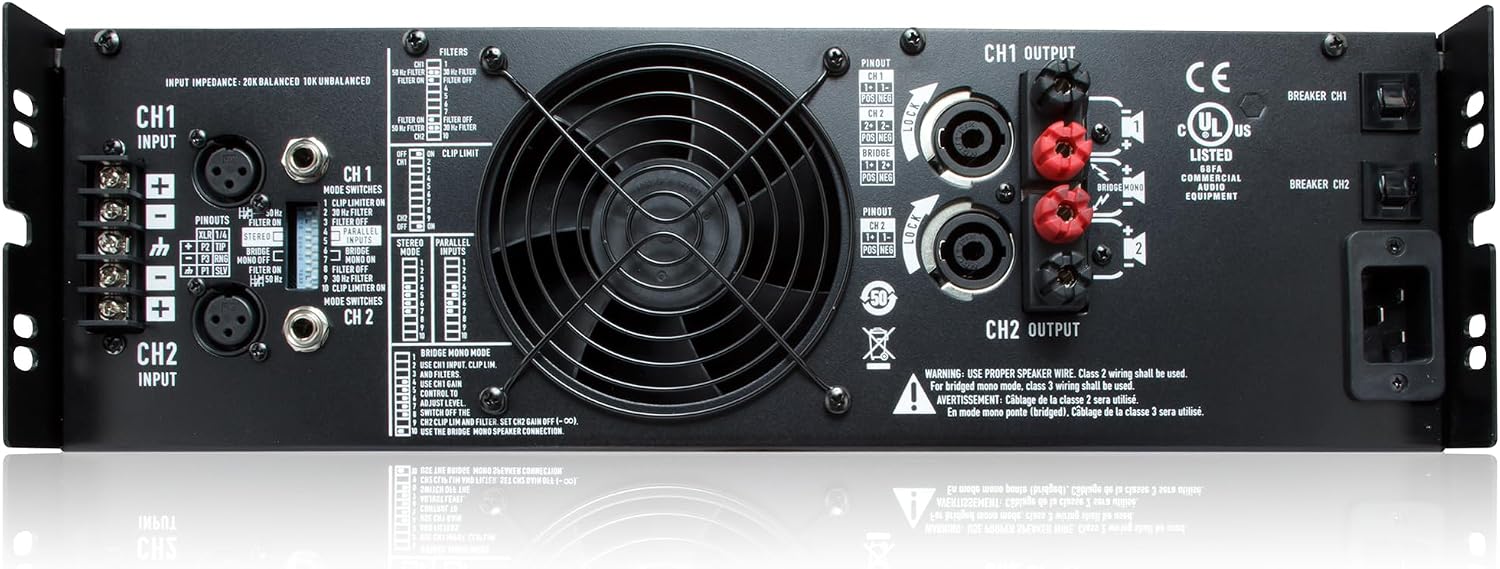
Figure 2: Rear view of the QSC RMX5050a Power Amplifier, detailing input and output terminals, mode switches, and cooling fan.
Input Connections:
- XLR Input Connectors: Balanced XLR inputs for connecting audio sources.
- TRS (1/4") Input Connectors: Balanced 1/4-inch TRS inputs for alternative audio source connections.
- Barrier Strip Input Connector: Provides an additional option for balanced input connections using screw terminals.
Output Connections:
- NL4 Output Connectors: Speakon-type connectors for secure and reliable speaker connections.
- Binding Post Output Connectors: Traditional binding posts for connecting speakers using bare wire, banana plugs, or spade lugs.
Power Connection:
- Connect the supplied IEC power cord to the IEC power inlet on the rear panel and then to a suitable AC power outlet. Ensure the power source matches the amplifier's voltage requirements.
Operating Instructions
Front Panel Controls and Indicators

Figure 3: Detailed view of the RMX5050a front panel, highlighting key controls and indicators.
- Power On Indicator: Illuminates when the amplifier is powered on.
- Power Switch: Toggles the amplifier's power on or off.
- Clip and Signal Indicators:
- Signal (Green): Lights when an audio signal is present.
- Clip (Red): Lights when the output signal is clipping, indicating potential distortion. Reduce gain if this light illuminates frequently.
- Gain Controls: Independent rotary controls for adjusting the input sensitivity (gain) of Channel 1 and Channel 2.
- Protect Mode Indicator: Illuminates if the amplifier enters protection mode due to overheating, short circuits, or other faults.
- Cooling Air Exhaust Vents: Part of the amplifier's thermal management system. Ensure these are not obstructed.
Rear Panel Switches and Settings

Figure 4: Detailed view of the RMX5050a rear panel, showing input/output options and configuration switches.
- Barrier Strip Input Connector: Alternative input connection.
- XLR Input Connector: Standard balanced input.
- TRS (1/4") Input Connectors: Standard balanced input.
- Mode Switches and Settings: These DIP switches configure the amplifier's operational mode and features.
- Stereo Mode: Each channel operates independently.
- Parallel Mode: Input signal is fed to both channels, but each channel drives its own speaker load.
- Bridge Mono Mode: Both channels combine to drive a single, higher-power output into a single speaker load.
- Clip Limiters: User-defeatable clip limiters reduce distortion by preventing severe clipping.
- Low-Frequency Filters: Selectable filters (30 Hz or 50 Hz) protect speakers from damaging low frequencies and increase headroom.
- Cooling Fan: Provides active cooling for the amplifier.
- NL4 Output Connectors: Speakon outputs for speakers.
- Binding Post Output Connectors: Binding post outputs for speakers.
- AC Circuit Breakers: Provide protection against overcurrent conditions.
- IEC Power Inlet: Connection point for the main power cord.
Maintenance
Cleaning
Regularly clean the exterior of the amplifier with a soft, dry cloth. Do not use liquid cleaners or solvents. Periodically check and clean the cooling vents to ensure unrestricted airflow.
Ventilation
Proper ventilation is crucial for the amplifier's longevity and performance. Ensure that the front intake and rear exhaust vents are clear of obstructions. Operating the amplifier in an environment with restricted airflow can lead to overheating and activation of the protection circuitry.
Troubleshooting
This section provides solutions to common issues you might encounter with your RMX5050a amplifier. For problems not listed here, contact QSC customer support.
| Problem | Possible Cause | Solution |
|---|---|---|
| No power / Power indicator off | No AC power, tripped circuit breaker, faulty power cord. | Check power outlet, reset AC circuit breaker on amplifier or wall, ensure power cord is securely connected. |
| No sound output | Input signal issue, incorrect gain settings, speaker connection issue, amplifier in protect mode. | Verify input signal source, adjust gain controls, check speaker cables and connections, check Protect indicator. |
| Distorted sound / Clip indicator frequently on | Input signal too high, amplifier overloaded, clip limiters off. | Reduce input signal level, lower amplifier gain, ensure speaker impedance matches amplifier's capabilities, enable clip limiters. |
| Amplifier overheats / Protect indicator on | Insufficient ventilation, excessive load, prolonged high output. | Ensure vents are clear, reduce load impedance, allow amplifier to cool down, operate within specified limits. |
Specifications
| Feature | Detail |
|---|---|
| Model Number | RMX5050A |
| Brand | QSC |
| Number of Channels | 2 |
| Output Power (Typical) | 1800W per channel at 4 ohms (Stereo), 5000W bridged at 4 ohms |
| Item Dimensions (L x W x H) | 24 x 8 x 22 inches (61 x 20.3 x 55.9 cm) |
| Item Weight | 81 pounds (36.7 kg) |
| Material | Metal and Plastic |
| Mounting Type | Surface Mount (typically rack-mounted) |
| Manufacturer | QSC |
| UPC | 684284003935, 750408382955 |
Warranty and Support
Warranty Information
Specific warranty terms and conditions for the QSC RMX5050a Power Amplifier are typically provided with your purchase documentation. Please refer to the warranty card or registration information included in the product packaging for details regarding coverage, duration, and claims procedures. Retain your proof of purchase for warranty validation.
Customer Support
For technical assistance, service, or additional information regarding your QSC RMX5050a Power Amplifier, please contact QSC customer support directly. You can find contact details on the official QSC website or through the retailer where you purchased the product.
Official QSC Website: www.qsc.com