
1. Product Overview
The GUESS W0243G2 is a sophisticated men's chronograph watch designed for precision and style. It features a durable black plated stainless steel case and bracelet, complemented by a striking black dial with rose gold-tone accents. The watch includes three functional chronograph subdials and a date display window.
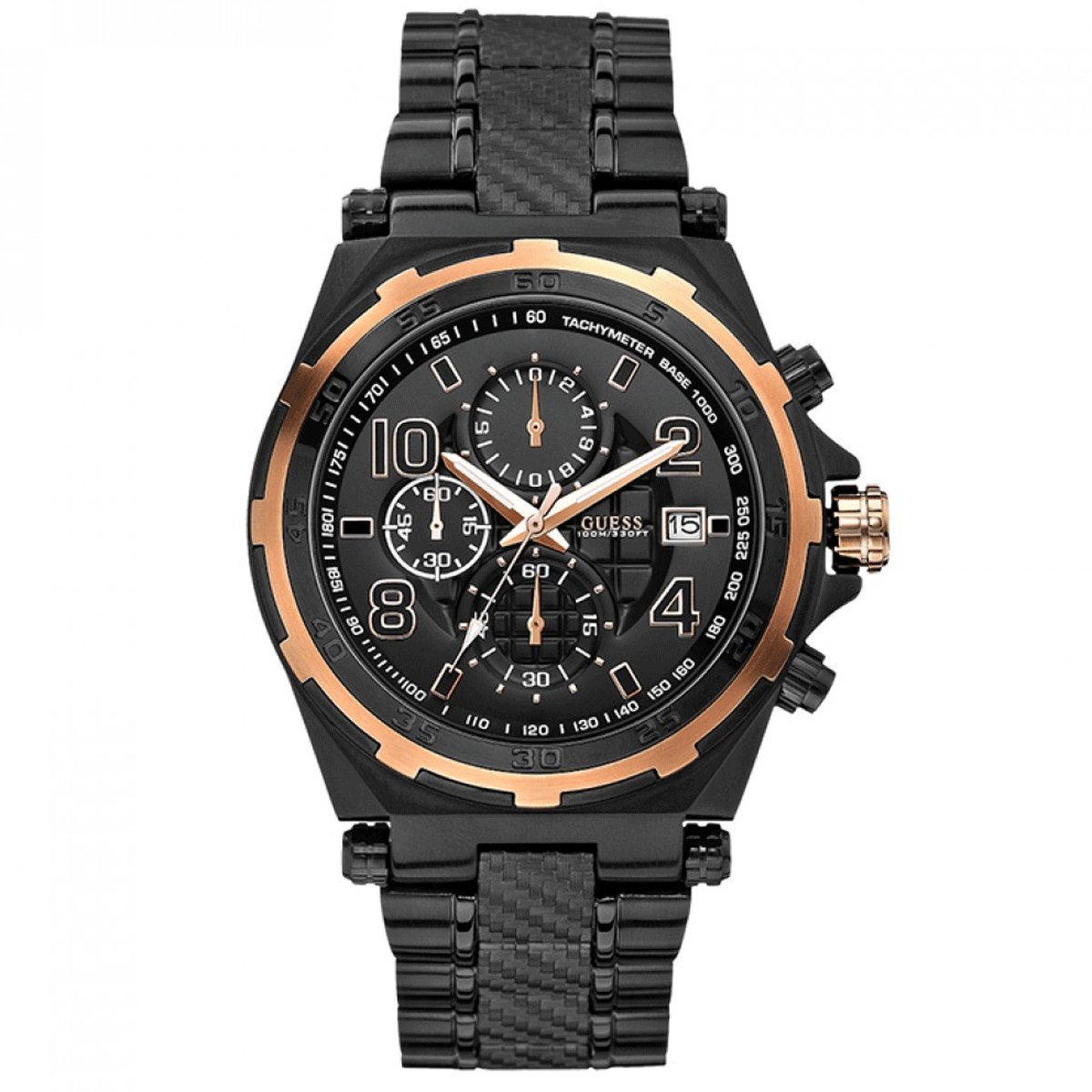
Image 1.1: Front view of the GUESS W0243G2 men's watch. This image displays the black dial with rose gold-tone hour markers and hands, three chronograph subdials, and the date window at the 3 o'clock position. The black plated stainless steel case and bracelet are also visible.
2. Initial Setup
2.1 Unpacking and Inspection
Carefully remove the watch from its packaging. Inspect the watch for any visible damage. Ensure all protective films are removed from the crystal, case back, and bracelet.
2.2 Adjusting the Bracelet
The stainless steel bracelet may need to be adjusted for a comfortable fit. This typically involves removing or adding links. It is recommended to have this procedure performed by a qualified jeweler or watch technician to prevent damage to the bracelet or clasp.
- Locate the pins on the underside of the bracelet links.
- Use a specialized tool to push out the pins to remove links.
- Reinsert pins to secure the bracelet after adjustment.
3. Operating Instructions
Your GUESS W0243G2 watch is equipped with a quartz movement, chronograph functions, and a date display. Familiarize yourself with the crown and pushers located on the side of the watch case.
3.1 Setting the Time
- Pull the crown out to the second click position (farthest out). The second hand will stop.
- Turn the crown to set the hour and minute hands to the desired time. Ensure to consider AM/PM if setting the date simultaneously.
- Push the crown back into the normal position to start the watch.
3.2 Setting the Date
- Pull the crown out to the first click position.
- Turn the crown clockwise or counter-clockwise (depending on the movement) to set the date.
- Once the correct date is displayed, push the crown back into the normal position.
- Important: Avoid setting the date between 9:00 PM and 3:00 AM, as this can damage the date mechanism. If the date needs to be set during this period, first set the time outside this range, adjust the date, then reset the time.
3.3 Using the Chronograph
The chronograph function allows for precise timing of events.
- Start/Stop: Press the upper pusher (button A) to start the chronograph. Press it again to stop.
- Reset: While the chronograph is stopped, press the lower pusher (button B) to reset all chronograph hands to their zero positions.
- Split Time: Some chronographs allow for split-time measurement. Refer to specific movement instructions if this feature is desired.
3.4 Water Resistance
This watch is water resistant up to 10 ATM (100 meters). This rating means the watch is suitable for swimming, snorkeling, and showering. However, it is not suitable for high-impact water sports or diving. Always ensure the crown is fully pushed in before exposing the watch to water. Do not operate the crown or pushers while the watch is wet or submerged.
4. Care and Maintenance
- Cleaning: Wipe the watch regularly with a soft, dry cloth to remove dust and dirt. For water-resistant models, a slightly damp cloth can be used, followed by drying.
- Avoid Chemicals: Do not expose the watch to solvents, detergents, perfumes, or cosmetic sprays, as these can damage the case, bracelet, or seals.
- Temperature Extremes: Avoid exposing the watch to extreme temperatures (above 60°C / 140°F or below 0°C / 32°F) or sudden temperature changes, which can affect accuracy and water resistance.
- Magnetic Fields: Keep the watch away from strong magnetic fields (e.g., speakers, refrigerators, mobile phones) to prevent interference with the quartz movement.
- Battery Replacement: The watch is powered by a battery. When the battery runs low, the second hand may start to jump in two-second intervals (End-of-Life indicator). Replace the battery promptly by a qualified watch technician to ensure proper sealing and function.
- Service: It is recommended to have your watch inspected and serviced by an authorized service center every 2-3 years to maintain its performance and water resistance.
5. Troubleshooting
- Watch Not Running:
- Check if the crown is fully pushed in.
- The battery may be depleted. Refer to 'Battery Replacement' in Section 4.
- Date Not Changing:
- Ensure the time is set correctly, passing midnight for the date to advance.
- Avoid setting the date between 9:00 PM and 3:00 AM.
- Chronograph Hands Not Resetting to Zero:
- Press the lower pusher (button B) firmly while the chronograph is stopped.
- If hands are misaligned, some movements allow for manual adjustment. Consult a service center if issues persist.
- Condensation Inside Crystal:
- This indicates a loss of water resistance. Seek immediate professional service to prevent internal damage.
6. Product Specifications
| Model Number | W0243G2 |
| Brand | GUESS |
| Movement Type | Quartz (Japanese Movement) |
| Display Format | Chronograph |
| Case Material | Stainless Steel |
| Case Color | Black – Rose Gold |
| Case Diameter | 45 Millimeters |
| Case Thickness | 14 Millimeters |
| Crystal Type | Hardened Mineral Crystal |
| Dial Color | Black |
| Strap Material | Plated Stainless Steel |
| Strap Color | Black |
| Strap Width | 24 Millimeters |
| Strap Length | 21 Centimeters |
| Clasp Type | Fold-over-clasp |
| Water Resistance | 10 ATM (100 Meters) |
| Power Source | Battery |
| Product Weight | 195 Grams |
| GTIN (UPC) | 091661430442 |
7. Warranty and Support
This GUESS watch is covered by a manufacturer's warranty. For detailed information regarding warranty terms and conditions, please refer to the warranty card included with your purchase or visit the official GUESS website. For technical support, service, or repair inquiries, please contact an authorized GUESS service center.
For more information, please visit the GUESS Brand Store.


