
Digi-Pas DWL280PRO
Digi-Pas DWL280PRO Waterproof IP67 Digital Torpedo Level and Protractor User Manual
Brand: Digi-Pas
Model: DWL280PRO
1. Product Overview
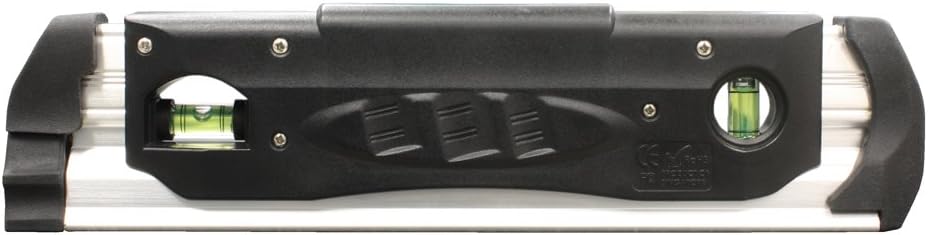
The Digi-Pas DWL280PRO is a robust and precise digital torpedo level and protractor designed for professional use in demanding environments. It features advanced LED technology for a bright display and is built with high-impact resistant ABS plastic and thick rubber material, ensuring durability and reliability.
Key features include:
- WATERPROOF IP67 CERTIFIED: Designed to operate in water up to 1.0 meter deep.
- SHOCK & FREEZE PROOF: Withstands strong impacts and operates in extreme temperatures from -4°F to 140°F (-20°C to 60°C).
- HIGH PRECISION: Resolution of ±0.05° (at 0° & 90°) and ±0.2° for other angles.
- BRIGHT LED DISPLAY: Ensures clear visibility in various lighting conditions.
- MAGNETIC BASE & V-GROOVE: Allows secure attachment to metallic surfaces and alignment on pipes.
- MULTIPLE MEASUREMENT UNITS: Switchable display between degrees (°), slope (%), mm/M, and inch/FT.
- SMART TECHNOLOGIES: Auto-invert display when upside down and buzzer sounds at 0° or any set angle.


2. Setup and Initial Use
2.1 Battery Installation
The DWL280PRO requires 3 AAA batteries (not included). To install or replace batteries:
- Locate the battery compartment cover on the back of the unit.
- Open the cover by twisting or sliding it according to the markings.
- Insert 3 AAA batteries, ensuring correct polarity (+/-) as indicated inside the compartment.
- Securely close the battery compartment cover to maintain the IP67 waterproof seal.
2.2 Powering On/Off
Press the red power button () to turn the device on. Press and hold the same button to turn it off. The device may also feature an auto-off function to conserve battery life if left idle.
2.3 Initial Calibration
The DWL280PRO allows for easy re-calibration by the user back to factory settings without special fixtures. Refer to the operating section for detailed calibration procedures to ensure optimal accuracy.
3. Operating Instructions
3.1 Taking Measurements
Place the base of the DWL280PRO firmly against the surface you wish to measure. The bright LED display will instantly show the angle or slope.

3.2 Changing Measurement Units
The DWL280PRO allows switching between different measurement units. Use the mode button (often indicated by a gear or unit symbol) to cycle through degrees (°), slope (%), mm/M, and inch/FT. The current unit will be displayed on the screen.
3.3 Auto-Invert Display
For convenience when working in awkward positions, the display automatically inverts when the gauge is held upside down, ensuring the reading is always upright and easy to read.
3.4 Buzzer Function
The device features a buzzer that sounds at 0 degrees or any user-set angle, providing an audible indication of level or target angle achievement.
3.5 Magnetic Base and V-Groove
The integrated magnetic base allows the level to securely attach to metallic surfaces, freeing your hands for other tasks. The V-groove design on the base ensures stable placement and accurate measurements on cylindrical objects like pipes.

4. Maintenance
4.1 Cleaning
Due to its IP67 rating, the DWL280PRO can be cleaned with water and mild soap. Ensure the battery compartment is securely sealed before cleaning. Do not use abrasive cleaners or solvents that could damage the display or housing.
4.2 Storage
Store the device in a cool, dry place away from direct sunlight and extreme temperatures. If storing for extended periods, it is recommended to remove the batteries to prevent leakage.
4.3 Battery Replacement
Replace batteries when the display dims or the device fails to power on. Follow the battery installation steps in Section 2.1.
5. Troubleshooting
5.1 Device Does Not Power On
- Check Batteries: Ensure batteries are correctly installed with proper polarity and are not depleted. Replace with fresh AAA batteries.
- Battery Compartment: Verify the battery compartment cover is securely closed.
5.2 Inaccurate Readings
- Recalibration: Perform a user re-calibration to factory settings. Consult the full manual (if available) or manufacturer's website for specific steps.
- Surface Stability: Ensure the surface the level is placed on is stable and free from vibrations.
- Temperature: While designed for wide temperature ranges, extreme fluctuations during measurement can affect precision. Allow the device to acclimate to the environment if moved from one extreme to another.
5.3 Display Issues
- Dim Display: Replace batteries.
- No Display: Check power and battery installation.
6. Specifications
| Feature | Detail |
|---|---|
| Brand | Digi-Pas |
| Model Number | DWL280PRO |
| Material | PC ABS / Aluminum |
| Color | Black Silver |
| Product Dimensions | 9"L x 2.5"W |
| Item Weight | 12 ounces |
| Operation Mode | Automatic |
| Batteries Required | 3 AAA batteries |
| Special Features | Digital, Waterproof IP67, Magnetic Base, LED Display |
| Resolution | ±0.05° (0° & 90°), ±0.2° (other angles) |
| Operating Temperature | -4°F to 140°F (-20°C to 60°C) |
7. Warranty Information
Digi-Pas levels are warranted to be free from defects in workmanship for a period of 18 months from the date of purchase.
For warranty claims or further details, please refer to the official Digi-Pas website or contact their customer support.
8. Customer Support
For technical assistance, product inquiries, or support, please visit the official Digi-Pas website or contact their customer service department. Always refer to your product model number (DWL280PRO) when seeking support.
Note: No official product videos from the seller were available for embedding in this manual.
Related documentsDWL280PRO

Ask a question about this manual
Ask about setup, troubleshooting, compatibility, parts, safety, or missing instructions. Manuals+ will review the question and use this page’s manual context to help answer it.