
1. Introduction and Overview
The MFJ-1026 Noise Canceller is designed to enhance the performance of your radio equipment by effectively reducing unwanted electrical interference across the 1.5-30 MHz frequency range. This device helps achieve clearer signals and improved overall operation by targeting and eliminating various forms of noise before they affect sensitive receiver circuits.
Key features include:
- Effective Noise Reduction: Reduces background noise for improved signal clarity.
- Wide Compatibility: Suitable for various electronic setups and radio applications.
- Easy Installation: Simple setup for quick integration into existing equipment.
- Adjustable Control: Customizable settings for fine-tuning noise reduction levels.
- Compact Design: Space-saving form factor.
- Automatic and Manual Modes: Offers flexibility for precise noise control.
- Works on All Modes: Compatible with various radio operation modes.
- Antenna Options: Can utilize a built-in antenna or an external auxiliary antenna.
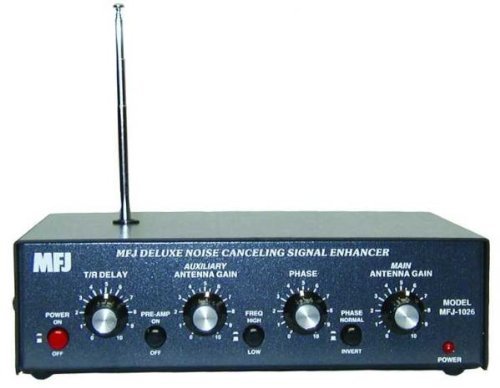
Figure 1: Front view of the MFJ-1026 Noise Canceller, showing the control panel and connections.
2. Setup and Installation
Proper setup is crucial for optimal performance of your MFJ-1026 Noise Canceller. This device requires connection to your main receiver antenna and a separate auxiliary noise antenna.
- Power Connection: Connect the MFJ-1026 to a stable 12-volt DC power source. Ensure the polarity is correct to prevent damage.
- Main Antenna Connection: Connect your primary receiving antenna to the "MAIN ANTENNA" input on the MFJ-1026.
- Auxiliary Noise Antenna Connection: Connect a separate auxiliary antenna to the "NOISE ANTENNA" input. This antenna is critical for the noise cancellation process.
- For best results, the auxiliary antenna should ideally pick up the noise source effectively but not necessarily the desired signal as strongly as the main antenna.
- While a built-in telescopic antenna is provided, an external auxiliary antenna is highly recommended for superior noise reduction performance. Consider a simple wire antenna or a small loop for this purpose.
- Receiver Connection: Connect the "RECEIVER" output of the MFJ-1026 to the antenna input of your radio receiver.
- Grounding: Ensure proper grounding of your radio equipment and the MFJ-1026 to minimize potential interference and ensure safe operation.
3. Operating Instructions
Once connected, the MFJ-1026 can be operated to reduce noise. The process involves adjusting the phase and gain controls to null out the unwanted noise.
- Power On: Turn on the MFJ-1026 using the power switch.
- Select Mode: Choose between automatic or manual noise reduction modes if available. Manual mode typically offers more precise control.
- Tune to Noise: Tune your radio receiver to a frequency where the noise is prominent and the desired signal is weak or absent.
- Adjust Phase Control: Slowly rotate the "PHASE" control knob. You should hear the noise level change. The goal is to find a setting where the noise is significantly reduced or completely nulled.
- Adjust Gain Control: Simultaneously adjust the "GAIN" control for the noise antenna. This control balances the strength of the noise signal from the auxiliary antenna against the noise signal from the main antenna. Fine-tune both "PHASE" and "GAIN" for maximum noise reduction.
- Monitor Signal: After reducing the noise, tune to your desired signal. The signal-to-noise ratio should be improved, making the desired signal clearer.
- Re-adjustment: Noise characteristics can change with frequency or time. Be prepared to re-adjust the "PHASE" and "GAIN" controls as needed for different operating conditions or frequencies.
Note: The effectiveness of noise cancellation heavily relies on the auxiliary antenna picking up the same noise as the main antenna, but ideally not the desired signal. Experimentation with auxiliary antenna placement and type may be necessary.
4. Maintenance
The MFJ-1026 Noise Canceller is designed for reliable operation with minimal maintenance. Follow these guidelines to ensure its longevity:
- Cleaning: Keep the unit clean and free from dust. Use a soft, dry cloth for cleaning. Avoid abrasive cleaners or solvents.
- Environment: Operate the device in a dry environment, away from extreme temperatures and direct sunlight. While rated as "Water Resistant," it is not waterproof and should be protected from moisture.
- Connections: Periodically check all cable connections to ensure they are secure and free from corrosion.
- Power Supply: Use only a compatible 12V DC power supply that meets the device's specifications.
5. Troubleshooting
If you encounter issues with your MFJ-1026, refer to the following troubleshooting tips:
| Problem | Possible Cause / Solution |
|---|---|
| No noise reduction or minimal effect. |
|
| Desired signal is also reduced or distorted. |
|
| Unit does not power on. |
|
| Missing components (e.g., antenna). |
|
6. Specifications
| Feature | Detail |
|---|---|
| Model Number | MFJ-1026 |
| Frequency Range | 1.5 to 30 MHz |
| Special Feature | Noise Canceller |
| Voltage | 12 Volts DC |
| Item Weight | 2.88 pounds |
| Product Dimensions | 6.25 x 6.5 x 1.5 inches |
| Number of Channels | 2 (for main and noise antennas) |
| Water Resistance Level | Water Resistant |
| Included Components | MFJ-120 Deluxe Noise Cancelling Signal Echo Enhancer (Note: This seems to be a typo in the source data, likely referring to the MFJ-1026 itself or a specific component within it. Assuming it refers to the main unit for clarity.) |
7. Warranty and Support
MFJ products typically come with a manufacturer's warranty covering defects in materials and workmanship. Please refer to the warranty card included with your product or visit the official MFJ website for detailed warranty terms and conditions.
For technical support, service, or inquiries regarding your MFJ-1026 Noise Canceller, please contact MFJ customer service directly. Contact information can usually be found on the manufacturer's website or in the product packaging.


