
1. Introduction
Thank you for choosing the Satco 91-222 Professional Metal Surge Strip. This device is designed to provide reliable power distribution and surge protection for your electronic equipment. Featuring six grounded outlets, a durable metal casing, and a 4-foot power cord, it is suitable for various applications in homes, offices, and workshops. Please read this manual thoroughly before using the product to ensure safe and optimal operation.
2. Important Safety Instructions
WARNING: To reduce the risk of electric shock, fire, or injury, always follow these basic safety precautions:
- Do not exceed the electrical ratings of 15 Amps, 125 Volts, or 1875 Watts.
- This surge strip is for indoor use only. Do not expose to moisture or use in wet environments.
- Do not plug into another relocatable power tap or extension cord.
- Ensure the plug is fully inserted into the wall outlet.
- Do not disassemble the unit. There are no user-serviceable parts inside.
- Keep children away from the surge strip and connected devices.
- Avoid routing the power cord through doorways or under carpets where it could be damaged.
- If the surge strip becomes damaged, discontinue use immediately.
3. Package Contents
- 1 x Satco 91-222 Professional Metal Surge Strip
Note: No additional accessories are typically included with this product.
4. Setup Instructions
- Unpack the Surge Strip: Carefully remove the surge strip from its packaging.
- Position the Surge Strip: Place the surge strip on a flat, stable surface, or mount it securely if desired (mounting hardware not included). Ensure it is away from heat sources, water, and areas where the cord could be tripped over.
- Plug into Wall Outlet: Insert the surge strip's Type B plug firmly into a standard 3-prong, 125V AC grounded wall outlet.
- Connect Devices: Plug your electronic devices into the six available outlets on the surge strip. Ensure that the total power consumption of all connected devices does not exceed 1875 Watts.
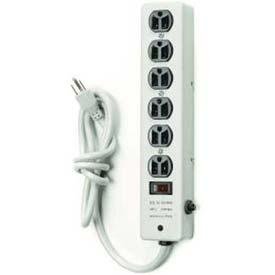
Figure 1: The Satco 91-222 Professional Metal Surge Strip. This image shows the rectangular metal housing, the six power outlets, and the attached power cord with a Type B plug.
5. Operating Instructions
The Satco 91-222 surge strip operates as a pass-through power distributor with integrated surge protection. Once plugged into a live wall outlet, all six outlets are active and protected.
- Power On/Off: This model does not feature an individual power switch. Power is supplied to all outlets when the unit is plugged into a live wall outlet.
- Surge Protection: The surge strip provides 540 Joules of surge protection, safeguarding connected devices from voltage spikes.
- Overload Protection: The surge strip includes a built-in circuit breaker. If the total current drawn by connected devices exceeds 15 Amps, the circuit breaker will trip to prevent overload.
5.1 Resetting the Circuit Breaker
If the surge strip stops providing power to your devices, the circuit breaker may have tripped due to an overload. To reset it:
- Unplug all devices from the surge strip.
- Locate the circuit breaker button (usually a small, recessed button on the side or end of the unit).
- Press the button firmly to reset the breaker. It should click into place.
- Plug in your devices one by one, ensuring the total load does not exceed 15 Amps / 1875 Watts.
6. Maintenance
- Cleaning: Disconnect the surge strip from the wall outlet before cleaning. Use a soft, dry cloth to wipe the exterior. Do not use liquid cleaners or aerosols.
- Inspection: Periodically inspect the power cord and the surge strip for any signs of damage, such as frayed wires, cracks, or loose connections. If damage is found, discontinue use immediately.
- Storage: When not in use, store the surge strip in a cool, dry place, away from direct sunlight and moisture.
7. Troubleshooting
| Problem | Possible Cause | Solution |
|---|---|---|
| No power from outlets. |
|
|
| Devices not protected from surges. | Surge protection component may be compromised after a major surge. | The surge protection capacity may be depleted. Consider replacing the surge strip. |
| Overheating of the surge strip. | Overload of connected devices. | Unplug some devices to reduce the load. Ensure total wattage does not exceed 1875W. |
8. Specifications
- Model: Satco 91-222
- Outlets: 6 Grounded Outlets
- Cord Length: 4 Feet
- Surge Protection: 540 Joules
- Electrical Rating: 15 Amps / 125 Volts / 1875 Watts
- Plug Type: Type B (3-prong)
- Enclosure Material: Metal
- Item Weight: 1.7 Pounds
- Color: White
- Compatible Devices: Hair Dryer, Set Top Box, Noise Maker, Fax Machine, Modem, Iron, Tablet, Cellular Phone, Mixer Grinder, Gaming Console, Television, Printer, Electric Fountain, Rice Cooker, Toaster, Lamp, DVD Player, MP3 Player, Home Theater, Light, E-Reader, Personal Computer, Smartphone, Router, Scanner, Speaker, Camera, Water Boiler, Monitor, Coffee Machine, Audio Sound System, Fan, Juicer.
9. Warranty and Support
For warranty information and technical support, please refer to the documentation provided with your purchase or visit the official Satco website. Keep your purchase receipt as proof of purchase for warranty claims.
Satco Official Website: www.satco.com
Note: Specific warranty terms and conditions may vary and are subject to change by the manufacturer.
