1. Introduction
The Peavey IPR2 3000 is a lightweight power amplifier designed for reliable and flawless operation under rigorous use. It incorporates an advanced design that significantly reduces weight while enhancing output power, reliability, and thermal efficiency. This amplifier utilizes a resonant switch-mode power supply and a high-speed Class D topology, delivering high audio resolution and efficiency. Key features include 2-channel independent fourth-order Linkwitz-Riley crossovers, DDT (Distortion Detection Technique) circuitry for trouble-free operation into loads as low as 2 ohms, Combi XLR 1/4" inputs, and Speakon output connectors.
2. Important Safety Information
To reduce the risk of electric shock, do not open the amplifier. Refer all servicing to qualified personnel. This apparatus must not be exposed to rain or moisture. Ensure proper ventilation and avoid blocking vents. Always connect to a grounded power outlet.
- Electrical Shock Hazard: Do not expose this equipment to rain or moisture. Do not operate near water.
- Ventilation: Ensure adequate airflow around the unit. Do not block ventilation openings.
- Power Source: Connect only to the specified power supply voltage.
- Grounding: Always use a grounded power cord.
- Servicing: Do not attempt to service this unit yourself. Refer all servicing to qualified service personnel.
- Proposition 65 Warning: This product may contain chemicals known to the State of California to cause cancer and birth defects or other reproductive harm.
3. Product Overview
3.1 Front Panel Controls

This image displays the front panel of the Peavey IPR2 3000 amplifier, featuring the power button, input level controls for channels A and B, and various LED indicators for status monitoring. The illuminated 'Push On' power button activates the unit. Rotary knobs allow precise adjustment of input levels for each channel. Status LEDs indicate DC protection, temperature warnings, DDT (Distortion Detection Technique) activation, signal presence, and active status.
3.2 Rear Panel Connections
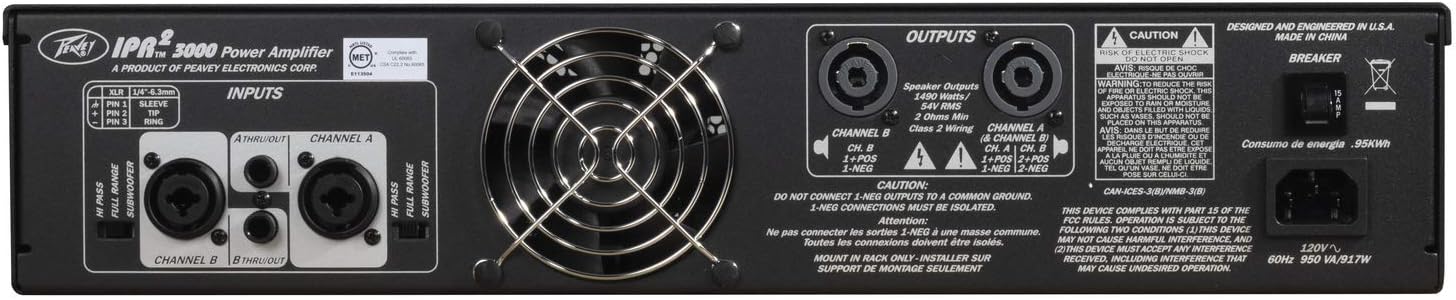
The rear panel of the amplifier is shown, highlighting the Combi XLR 1/4 inch inputs for connecting audio sources, Speakon output connectors for speakers, and the main power input with a circuit breaker. Cooling fans are also visible, ensuring optimal thermal performance.
4. Setup
4.1 Connecting Audio Sources
Connect your mixer or other audio source to the amplifier's input jacks. The IPR2 3000 features Combi XLR 1/4" inputs, allowing for flexible connection with various professional audio equipment. Ensure secure connections for optimal signal integrity.
This video provides a general guide on how to set up Rockville RPA series power amplifiers, including connecting audio sources and speakers. While featuring a different model, the connection principles are broadly applicable to the Peavey IPR2 3000.
4.2 Connecting Speakers
Connect your passive speakers to the Speakon output connectors on the rear panel. The IPR2 3000 supports 2-channel independent fourth-order Linkwitz-Riley crossovers, allowing for precise frequency management. Ensure correct polarity and secure connections for each speaker.
This product video showcases Rockville D Series amplifiers, demonstrating various features and connection options. It can serve as a visual reference for understanding common power amplifier functionalities and connectivity.
5. Operating the Amplifier
5.1 Powering On/Off
Press the 'Push On' button on the front panel to power on the amplifier. The 'Active' LED indicators for each channel will illuminate when the unit is operational. To power off, press the 'Push On' button again.
5.2 Adjusting Levels
Use the rotary input level controls for Channel A and Channel B to adjust the output volume. Start with the levels low and gradually increase them to the desired volume, monitoring the signal and DDT indicators to prevent clipping.
5.3 Understanding Indicators
- DC LED: Indicates DC protection is active, typically due to a fault.
- Temp LED: Illuminates if the amplifier is overheating. Ensure proper ventilation.
- DDT LED: (Distortion Detection Technique) Lights up when the amplifier is approaching or entering clipping, protecting speakers from distortion.
- Signal LED: Indicates the presence of an audio signal at the input.
- Active LED: Shows that the channel is powered on and ready for operation.
6. Maintenance
Regular maintenance ensures the longevity and optimal performance of your Peavey IPR2 3000 amplifier.
- Cleaning: Use a soft, dry cloth to clean the exterior of the amplifier. Do not use liquid cleaners or solvents. Ensure ventilation grilles are free from dust and debris.
- Ventilation: Always ensure the amplifier has adequate ventilation. Do not place it in an enclosed space or cover its cooling vents. The high-efficiency design allows for operation at very low temperatures, but proper airflow is still crucial.
- Storage: When not in use for extended periods, store the amplifier in a cool, dry place, away from direct sunlight and extreme temperatures.
7. Troubleshooting
If you encounter issues with your Peavey IPR2 3000, refer to the table below for common problems and solutions.
| Problem | Possible Cause | Solution |
|---|---|---|
| No sound output | No power, incorrect connections, input level too low, speaker fault. | Check power cable and circuit breaker. Verify all audio and speaker connections. Increase input level. Test speakers with another amplifier. |
| Distorted sound | Input signal too high (clipping), faulty cables, speaker impedance mismatch. | Reduce input level until DDT LED is off or flashes minimally. Check cables for damage. Ensure speaker impedance is compatible (2 ohms minimum). |
| Amplifier overheating (Temp LED on) | Insufficient ventilation, excessive load, prolonged high output. | Ensure vents are clear and amplifier has space for airflow. Reduce output volume. Check speaker impedance. Allow unit to cool down. |
| DC LED on | Internal fault, short circuit in speaker wiring. | Immediately power off the unit. Disconnect all speakers and power on again. If DC LED remains on, seek professional service. If off, check speaker wiring for shorts. |
8. Specifications
| Feature | Detail |
|---|---|
| Brand | Peavey |
| Model Number | 03609520 |
| Output Power | 3000 Watts |
| Number of Channels | 2 |
| Item Weight | 10.8 pounds |
| Product Dimensions (L x W x H) | 21 x 12.62 x 4.75 inches |
| Mounting Type | Surface Mount |
| Operating Temperature | 50 Degrees Celsius |
| Color Name | Black |
| Size | 2U |
| Specification Met | CE, CSA, FCC, RoHS, TUV, WEEE |
| UPC | 014367621730 |
9. Warranty and Support
For warranty information and technical support, please refer to the documentation included with your product or visit the official Peavey website. Keep your proof of purchase for any warranty claims.


