
Introduction
This manual provides comprehensive instructions for the installation and use of the Scosche FD2080 Single DIN Radio Install Dash Kit and Pocket. This kit is designed to facilitate the installation of an aftermarket single DIN car stereo into select Ford, Lincoln, Mazda, and Mercury vehicles from 1995-2011, ensuring a seamless and professional appearance. The kit is crafted from automotive-grade ABS plastic with a factory-matched texture.
Please read all instructions carefully before beginning the installation process to ensure proper fitment and functionality.
Vehicle Compatibility
The Scosche FD2080 Dash Kit is compatible with a range of vehicles. Refer to the compatibility chart below to confirm your vehicle's eligibility.

Image: Scosche FD2080 Fit Guide. This image displays a detailed table listing compatible Ford, Lincoln, Mazda, and Mercury vehicle models along with their respective compatible year ranges (1995-2011).
Note: This kit is specifically designed for single DIN stereos and does not accommodate double DIN units.
Package Contents
Verify that all components listed below are present in your package before beginning installation.
- Single DIN Dash Kit Frame
- Storage Pocket
- Mounting Brackets (various types for different vehicle applications)
- Installation Instructions (this manual)

Image: All components of the Scosche FD2080 Dash Kit. This image displays the main single DIN dash kit frame, the integrated storage pocket, and a variety of mounting brackets and hardware required for installation.
Installation Instructions
This kit is designed for easy installation without special tools. Follow these steps for a secure and professional fit.
1. Preparation
- Disconnect Battery: Before starting any electrical work, disconnect the vehicle's negative battery terminal to prevent electrical shorts.
- Remove Factory Radio: Carefully remove the factory radio and any existing dash components according to your vehicle's specific service manual.
- Identify Mounting Points: Locate the factory mounting points in your vehicle's dash opening.
2. Assembling the Dash Kit
The kit includes various brackets to accommodate different vehicle models. Select the appropriate brackets for your vehicle.

Image: Detailed view of the Scosche FD2080 Dash Kit. This image highlights the automotive-grade ABS plastic construction, the factory-matched texture for seamless integration, and the convenient storage pocket located below the radio opening.
- Attach Brackets: Secure the selected mounting brackets to the sides of the Scosche dash kit frame using the provided hardware. Ensure they are firmly attached.
- Integrate Storage Pocket: If using the storage pocket, ensure it is properly seated and secured within the dash kit frame.
3. Mounting the Aftermarket Stereo
- Secure Stereo: Attach your new single DIN aftermarket stereo to the assembled dash kit frame using the stereo's mounting screws. Ensure the stereo is flush and securely fastened.
- Wiring: Connect the aftermarket stereo's wiring harness to your vehicle's wiring harness. (Note: A separate wiring harness adapter and antenna adapter may be required and are sold separately.)
4. Final Installation
- Insert Assembly: Carefully slide the entire stereo and dash kit assembly into the vehicle's dash opening.
- Secure to Dash: Align the dash kit with the vehicle's factory mounting points and secure it using the vehicle's original screws or clips, or those provided with the kit if applicable. The precision design ensures a gapless fit.
- Reconnect Battery: Reconnect the vehicle's negative battery terminal.
- Test Functionality: Turn on the vehicle and test the new stereo's functionality, including radio, audio playback, and any other features.

Image: A single DIN aftermarket stereo installed in a vehicle dashboard using the Scosche FD2080 dash kit. The kit provides a clean, integrated look.
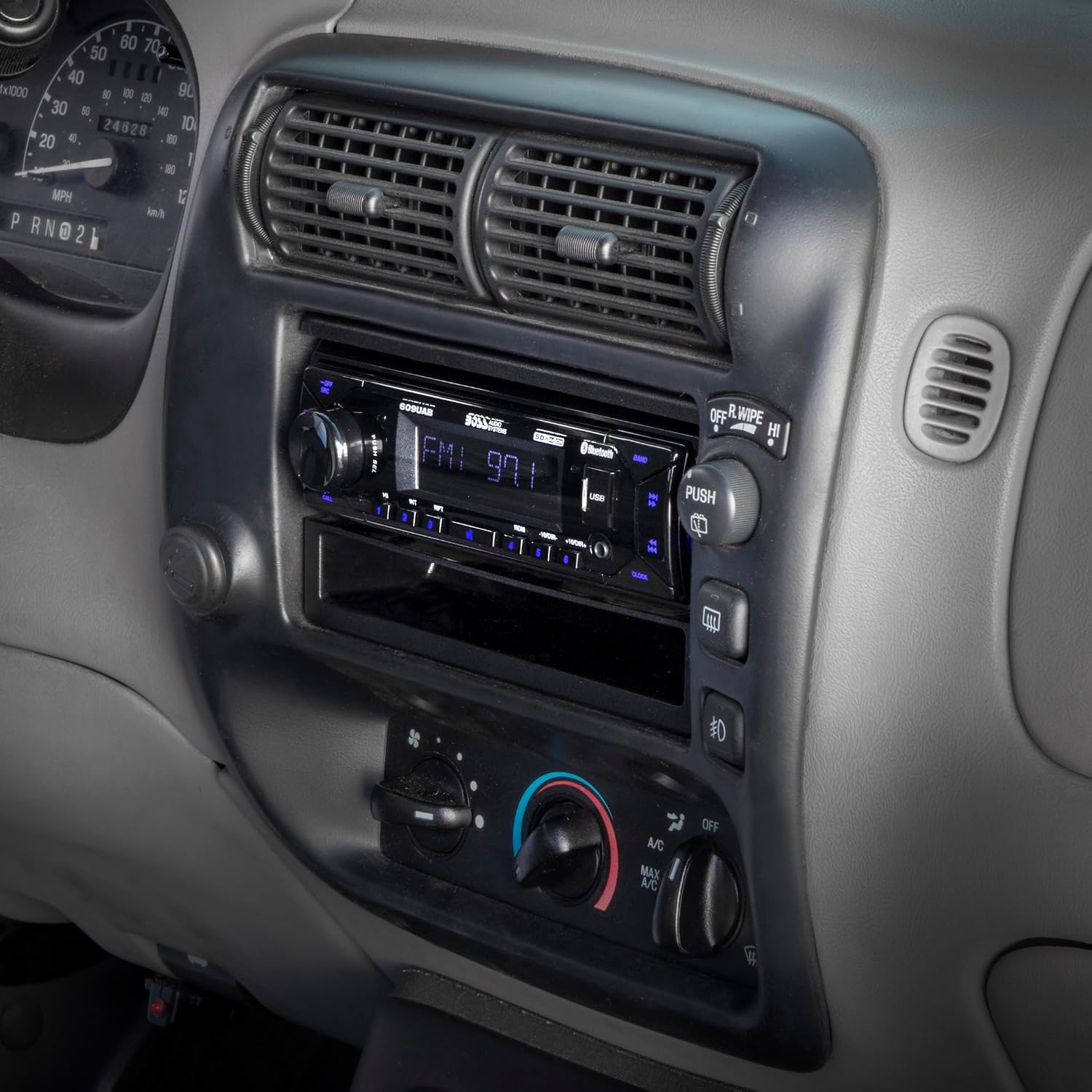
Image: Side angle view of the installed single DIN aftermarket stereo and Scosche FD2080 dash kit, demonstrating the flush and factory-matched appearance within the vehicle's dashboard.
Maintenance
The Scosche FD2080 Dash Kit requires minimal maintenance. To keep the kit looking new:
- Wipe the surface with a soft, damp cloth to remove dust and grime.
- Avoid using harsh chemicals or abrasive cleaners, as these may damage the finish.
- Ensure all connections remain secure over time, especially if experiencing vibrations.
Troubleshooting
If you encounter issues during or after installation, consider the following common solutions:
| Problem | Possible Cause | Solution |
|---|---|---|
| Dash kit does not fit flush. | Incorrect brackets used or not properly aligned. | Verify vehicle compatibility and ensure correct brackets are used and aligned with factory mounting points. Re-seat the kit firmly. |
| Stereo is loose within the kit. | Stereo not securely fastened to the kit. | Ensure all mounting screws for the stereo to the dash kit are tightened. |
| New stereo has no power/sound. | Wiring issues or battery not reconnected. | Check all wiring connections, ensure the battery is reconnected, and verify fuses. Consult your stereo's manual for specific wiring diagrams. |
For further assistance, please contact Scosche customer support.
Specifications
- Model Number: 010FD2080
- Product Type: Single DIN Radio Install Dash Kit and Pocket
- Material: Automotive-grade ABS Plastic
- Color: Factory-matched texture
- Compatibility: Select 1995-2011 Ford, Lincoln, Mazda, and Mercury Vehicles
- Stereo Type: Single DIN (Does not fit Double DIN)
- Package Dimensions: 10.28 x 6.06 x 2.28 inches
- Item Weight: 12.4 ounces
- Manufacturer: SCOSCHE
- Date First Available: October 1, 2013
Warranty and Support
Scosche stands behind the quality of its products. The FD2080 Dash Kit is backed by:
- Limited Lifetime Warranty: All Scosche 12V installation accessories come with a Limited Lifetime Warranty.
- Lifetime Tech Support: Knowledgeable technical support is available to answer any product questions you may have for as long as you own the product.
For warranty claims or technical assistance, please visit the official Scosche website or contact their customer service department directly.
You can find more information and contact details at: www.scosche.com