
Introduction
The Neewer CN-216 is a compact and powerful LED video light designed to provide supplementary illumination for digital cameras and camcorders. Featuring 216 dimmable LEDs, it offers adjustable brightness and color temperature (with included filters) to suit various shooting conditions. This manual provides detailed instructions for the proper setup, operation, maintenance, and troubleshooting of your CN-216 LED video light.
Package Contents
Please verify that all items listed below are included in your package:
- 1x Neewer CN-216 LED Video Light
- 2x Filters (1x White Diffuser, 1x Orange Color Temperature Filter)
- 1x User Manual (this document)

Image: The Neewer CN-216 LED Video Lighting product box, showing the light unit and included filters.
Features
- 216 High-Quality LEDs: Provides bright and consistent illumination.
- Dimmable Brightness: A stepless dimmer switch allows for precise light intensity adjustment.
- Adjustable Color Temperature: Includes a white diffuser for 5400K and an orange filter for 3200K color temperature.
- Widescreen Design: 16:9 aspect ratio for broader light coverage.
- Multiple Power Options: Compatible with 6x AA batteries or various lithium batteries (e.g., Sony NP-F series, not included).
- Battery Power Indicator: Four LED indicators show remaining battery life.
- Expandable Design: Four extension slots allow multiple units to be combined for increased light output.
- Lightweight and Portable: Durable plastic construction for easy transport.

Image: The Neewer CN-216 LED light mounted on a camera, demonstrating the effect of the white diffuser and the orange filter.
Setup
1. Power Source Installation
- AA Batteries: Open the battery compartment cover on the rear of the light. Insert 6 AA batteries, ensuring correct polarity (+/-). Close the cover securely.
- Lithium Battery: If using a compatible lithium battery (e.g., Sony NP-F series), slide it into the designated slot on the rear of the light until it clicks into place.
2. Mounting the Light
The CN-216 can be mounted onto a camera's hot shoe or a light stand with a standard hot shoe mount.
- Loosen the locking knob on the hot shoe adapter at the base of the light.
- Slide the hot shoe adapter into your camera's hot shoe or the light stand mount.
- Tighten the locking knob to secure the light in position. Do not overtighten.

Image: Front and rear views of the Neewer CN-216 LED light securely mounted on a DSLR camera via its hot shoe adapter.
3. Attaching Filters
The CN-216 comes with two filters: a white diffuser and an orange color temperature filter. These filters can be attached to the front of the LED panel.
- Align the filter with the four small tabs on the front of the LED panel.
- Gently slide the filter into place until it is secured by the tabs.
- To change the color temperature from 5400K (white diffuser) to 3200K (orange filter), simply swap the filters.

Image: The Neewer CN-216 LED light on a camera, illustrating the attachment points for the filters and the rear battery compartment.
Operating Instructions
1. Powering On/Off
Locate the ON/OFF switch on the side of the light. Slide the switch to the 'ON' position to power on the light. Slide it to 'OFF' to power off.
2. Adjusting Brightness
The CN-216 features a stepless dimmer dial on the side. Rotate the dial to increase or decrease the light intensity to your desired level.
3. Checking Battery Level
Press the 'TEST' button located on the rear panel. The four LED indicators will illuminate to show the approximate remaining battery power:
- 4 LEDs: 75-100%
- 3 LEDs: 50-75%
- 2 LEDs: 25-50%
- 1 LED: Below 25% (recharge or replace batteries soon)
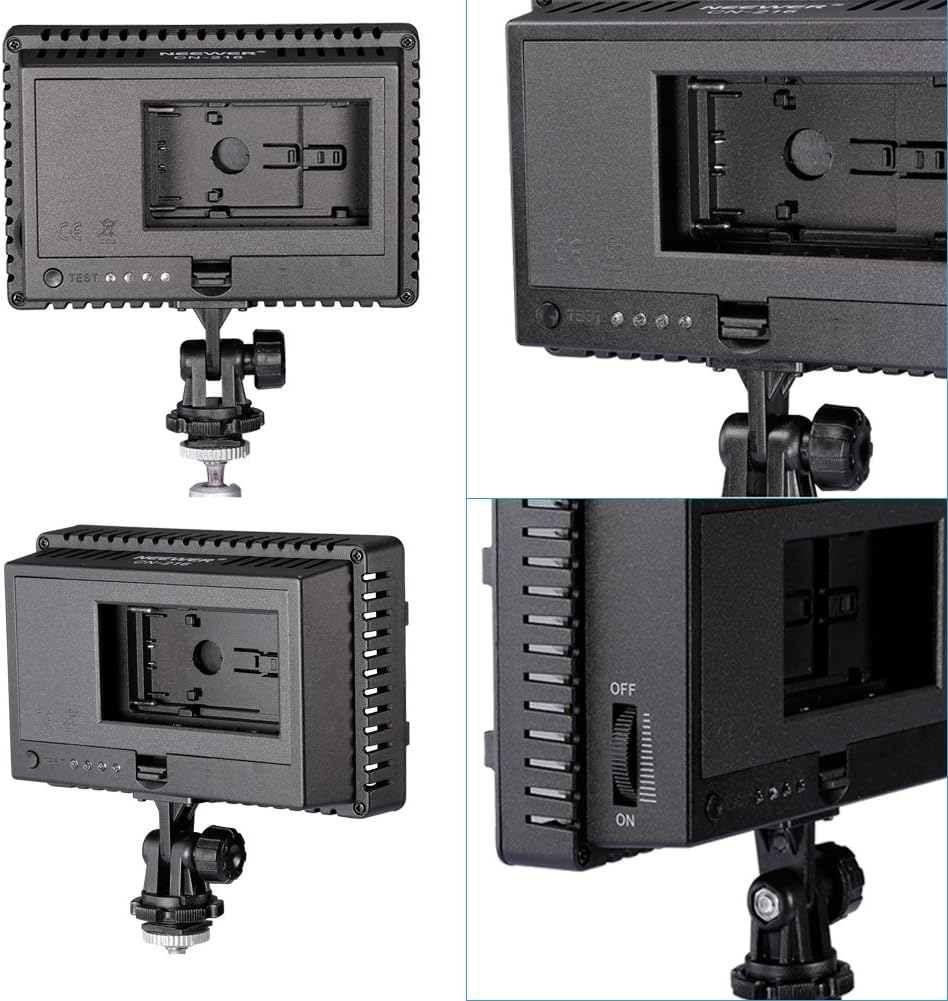
Image: Close-up views of the Neewer CN-216 LED light's rear panel, highlighting the battery compartment, ON/OFF switch, and dimmer control.
4. Combining Multiple Lights
The CN-216 is designed with four extension slots on its sides. This allows you to interlock multiple CN-216 units together to create a larger light panel for increased illumination. Simply slide the extension tabs of one unit into the slots of another until they are securely connected.
Maintenance
- Cleaning: Use a soft, dry cloth to clean the exterior of the light. Do not use abrasive cleaners or solvents.
- Storage: When not in use, store the light in a cool, dry place, away from direct sunlight and excessive humidity. Remove batteries if storing for extended periods to prevent leakage.
- Handling: Avoid dropping the light or subjecting it to strong impacts, as this may damage the internal components or LED panel.
Troubleshooting
| Problem | Possible Cause | Solution |
|---|---|---|
| Light does not turn on. | Batteries are dead or incorrectly installed. | Check battery polarity. Replace with fresh batteries or recharge lithium battery. |
| Light is too dim. | Dimmer dial set too low; low battery power. | Rotate dimmer dial to increase brightness. Check battery level and replace/recharge if necessary. |
| Inconsistent light output or flickering. | Loose battery connection; faulty batteries. | Ensure batteries are seated correctly. Try different batteries. |
| Filters do not stay in place. | Incorrect alignment; damaged tabs. | Ensure filter is properly aligned with all four tabs. If tabs are damaged, contact support. |
Specifications
| Feature | Detail |
|---|---|
| Model | CN-216 |
| LED Quantity | 216 pieces |
| Color Temperature | 5400K (without filter), 3200K (with orange filter) |
| Brightness Adjustment | Dimmable (stepless) |
| Power | 13W (approx.) |
| Lifespan | Up to 50,000 hours |
| Power Source | 6x AA batteries or 1x Lithium battery (e.g., Sony NP-F series, not included) |
| Cooling Mode | Natural ventilation |
| Dimensions | 15 x 9.8 x 5 cm (approx.) |
| Weight | 16.70 oz (approx.) |
| Compatible Devices | Digital SLR cameras (Canon, Nikon, Pentax, Panasonic, SONY, Samsung, Olympus) and camcorders |
Warranty Information
According to the product information, there is no specific warranty description provided for this product. Please refer to the retailer's return policy or contact the manufacturer directly for any warranty-related inquiries.
Support
For further assistance, technical support, or inquiries regarding your Neewer CN-216 LED Video Light, please visit the official NEEWER website or contact their customer service department. Contact information can typically be found on the manufacturer's website or product packaging.