
Product Overview
This manual provides essential information for the safe and efficient operation, maintenance, and troubleshooting of your ECHO 17 in. 21.2 cc Gas PAS Trimmer and Edger Kit, model PAS-225VP. This versatile tool is designed for various lawn care tasks, offering both trimming and edging capabilities.
Key features include:
- 21.2 cc professional-grade, 2-stroke engine for reliable power.
- 17-inch cutting width for efficient trimming.
- Tool-less coupler for quick attachment changes.
- Speed-Feed® 400 trimmer head for easy line reloading.
- Clog-resistant, open-faced shield for improved performance.
- Padded handles for user comfort.

Image: Overview of the ECHO PAS-225VP kit, showing the power source, string trimmer attachment, and edger attachment with key features labeled.
Safety Information
Always prioritize safety when operating power tools. Failure to follow safety instructions can result in serious injury or death.
- Wear appropriate safety gear, including eye protection, hearing protection, and gloves.
- Be aware of potential flying debris. Keep bystanders and pets at a safe distance (at least 50 feet).
- Operate the tool on stable, obstacle-free surfaces.
- Do not use near flammable materials.
- Avoid carbon monoxide exposure by operating in well-ventilated areas.
- Always follow the manufacturer's instructions for safe operation.
- Ensure all guards and safety features are in place and functioning correctly before each use.
Setup and Assembly
Unpacking and Initial Inspection
Carefully remove all components from the packaging. Inspect for any damage that may have occurred during shipping. Ensure all parts listed in the packing list are present.
Fueling the Engine
The PAS-225VP uses a 2-stroke gasoline engine. It requires a specific mixture of gasoline and 2-stroke engine oil. Refer to your engine manual for the correct mixing ratio and fuel type. Always mix fuel in a well-ventilated area away from ignition sources.
Attaching the Trimmer or Edger Head
The ECHO PAS-225VP features a tool-less coupler for easy attachment changes. To attach an accessory:
- Ensure the engine is off and cooled down.
- Loosen the wing nut on the coupler.
- Align the pin on the attachment shaft with the hole on the power source coupler.
- Slide the attachment shaft into the power source until the pin locks into place.
- Tighten the wing nut securely to prevent movement during operation.
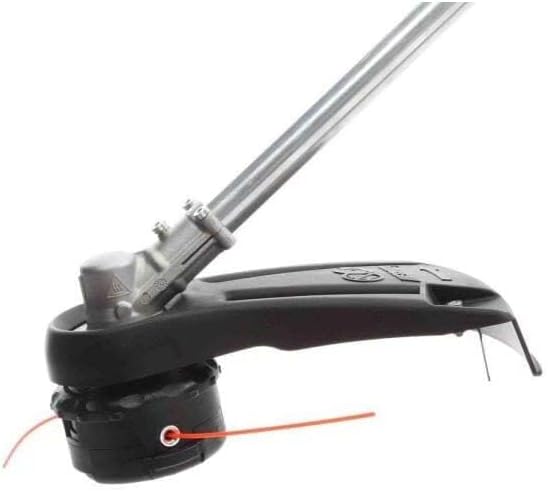
Image: Close-up of the string trimmer head with its protective shield.

Image: The edger attachment for the ECHO PAS-225VP, featuring a wheel for guiding along edges.
Operating Instructions
Starting the Engine
- Place the unit on a flat, stable surface.
- Ensure the ON/OFF switch is in the ON position.
- Push the primer bulb several times until fuel is visible in the return line.
- Move the choke lever to the COLD START position.
- Pull the starter handle firmly and smoothly until the engine attempts to start (usually 1-3 pulls).
- Once the engine "pops" or attempts to start, move the choke lever to the RUN position.
- Pull the starter handle again until the engine starts.
- Allow the engine to warm up for a few moments before engaging the throttle.
Using the Trimmer
Hold the trimmer firmly with both hands, maintaining a balanced stance. Use a sweeping motion to cut grass and weeds. The 17-inch cutting width allows for efficient coverage. To advance the trimmer line, lightly tap the Speed-Feed® 400 head on the ground while the engine is running at full throttle.
Using the Edger
For edging, guide the edger wheel along the edge of sidewalks, driveways, or flowerbeds. Maintain a steady pace and allow the blade to cut cleanly through the grass. Adjust the depth as needed for desired results.

Image: Close-up of the control handle with the throttle trigger and safety switch.
Maintenance
Regular maintenance ensures optimal performance and extends the life of your ECHO PAS-225VP.
Air Filter Cleaning
The unit features a tool-less access air filtration system. Regularly check and clean the air filter to prevent engine damage and maintain performance. Remove the cover, clean the filter with warm, soapy water, rinse thoroughly, and allow to dry completely before reinstallation.
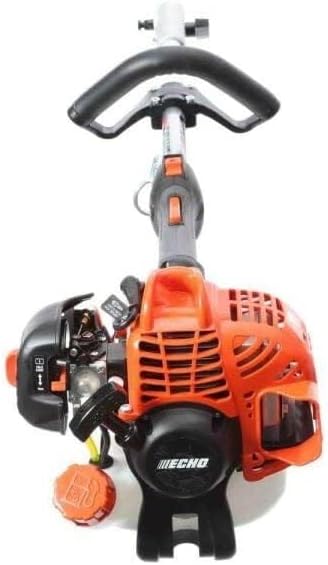
Image: The engine assembly of the ECHO PAS-225VP, highlighting the air filter access.
Spark Plug Inspection
Inspect the spark plug periodically for wear or carbon buildup. Replace if necessary, ensuring the correct gap is set according to the manufacturer's specifications.
Trimmer Line Replacement
When the trimmer line runs out, replace it with the recommended diameter line. The Speed-Feed® 400 head is designed for quick and easy line reloading without disassembly. Follow the instructions provided with your trimmer head for specific reloading steps.
General Cleaning and Storage
After each use, clean the unit of grass clippings and debris. Store the unit in a dry, well-ventilated area, away from direct sunlight and extreme temperatures. For long-term storage, drain the fuel tank or use a fuel stabilizer.
Troubleshooting
This section addresses common issues you might encounter with your ECHO PAS-225VP.
| Problem | Possible Cause | Solution |
|---|---|---|
| Engine won't start | No fuel, incorrect choke position, fouled spark plug, clogged fuel filter. | Check fuel level, adjust choke, clean/replace spark plug, inspect fuel filter. |
| Loss of power during operation | Clogged air filter, old/improper fuel mixture, dull cutting line/blade. | Clean air filter, use fresh fuel mix, replace/sharpen cutting tool. |
| Excessive vibration | Loose attachment, bent shaft, damaged cutting head. | Check all connections, inspect shaft and cutting head for damage. |
If you encounter issues not covered here or require further assistance, please contact ECHO customer support or an authorized service center.
Specifications
- Brand: ECHO
- Model Number: PAS-225VP
- Power Source: Gasoline-powered
- Engine Displacement: 21.2 cc
- Cutting Width: 17 Inches
- Item Weight: 16.2 Pounds
- Speed: 400 RPM
- Required Assembly: Yes
- Item Dimensions (L x W): 54"L x 12"W
- UPC: 743184000779
Warranty and Support
For detailed warranty information, please refer to the warranty card included with your product or visit the official ECHO website. For technical support, replacement parts, or service, contact ECHO customer service or an authorized ECHO dealer.
ECHO Customer Service: Please refer to your product documentation for contact details.
Online Resources: Visit the ECHO Store on Amazon


