1. Introduction
The Mackie 1202VLZ4 is a 12-channel compact analog mixer designed to deliver exceptional audio quality and robust performance for various applications, including broadcast, live sound, and studio recording. This mixer incorporates Mackie's flagship Onyx mic preamps, renowned for their ultra-low noise and wide gain range, ensuring pristine signal integrity.
Key features include:
- 4 high-quality Mackie Onyx mic preamps with phantom power for condenser microphones.
- 12 high-headroom line inputs for connecting various audio sources.
- 3-band EQ and 75Hz low-cut filter on each channel for precise tone shaping.
- Comprehensive routing options with 2 Aux Sends, 2 Stereo Returns, and a 3/4 ALT Stereo Bus.
- Control Room/Headphone outputs for monitoring.
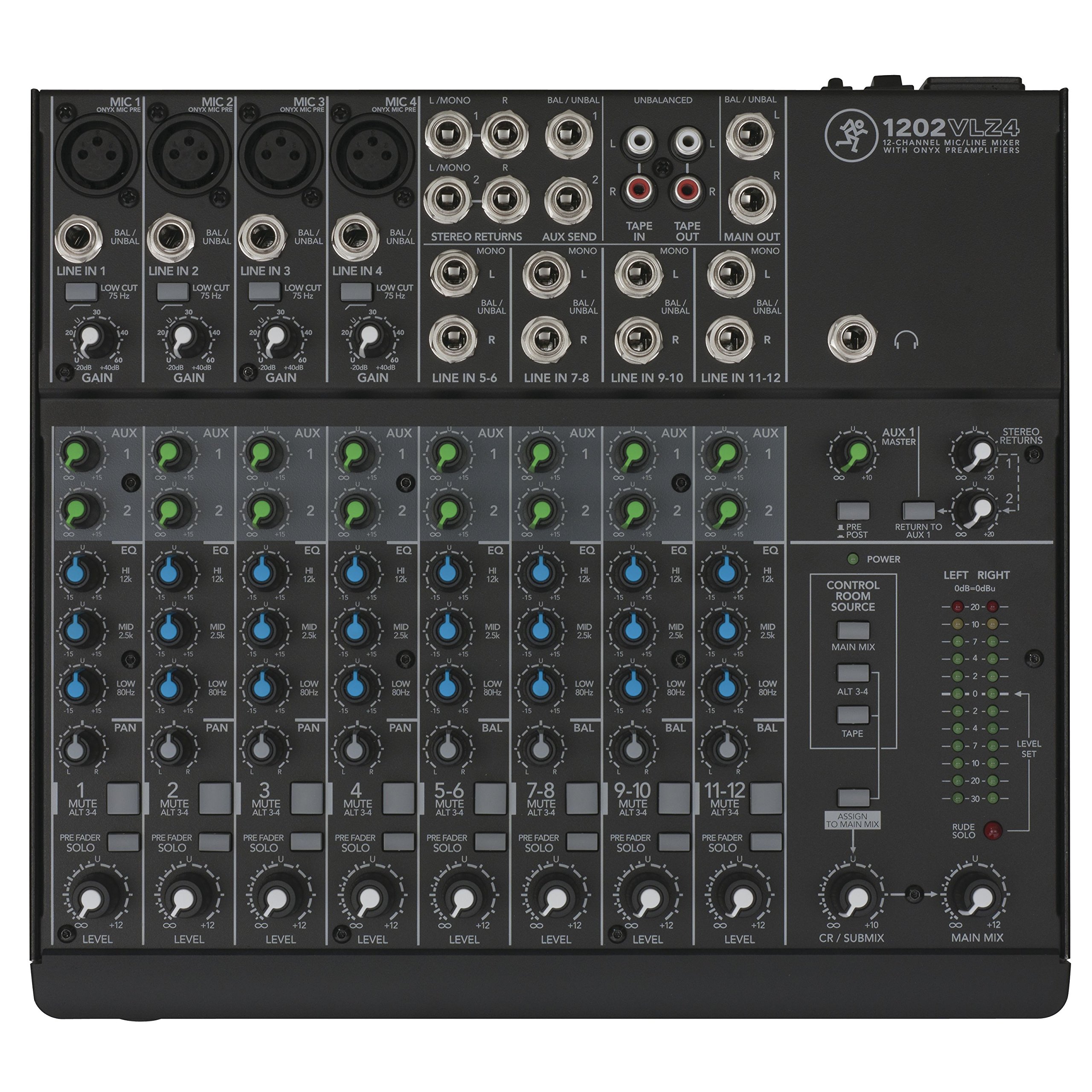
Figure 1: Top-down view of the Mackie 1202VLZ4 Compact Analog Mixer, showing all controls and inputs.
2. Setup
Proper setup is crucial for optimal performance and safety of your Mackie 1202VLZ4 mixer.
2.1 Unpacking and Inspection
Carefully remove the mixer from its packaging. Inspect the unit for any signs of damage that may have occurred during shipping. If any damage is found, contact your dealer immediately.
2.2 Power Connection
The 1202VLZ4 operates on a wired power source and consumes 25 watts. Ensure the mixer's power switch is in the OFF position before connecting the power cable. Connect the appropriate AC power cable to the mixer's power input on the rear panel and then to a suitable electrical outlet. Verify the voltage selector switch on the rear panel matches your local power supply (100-120V or 220-240V).
2.3 Physical Placement
Place the mixer on a stable, flat surface. Ensure adequate ventilation around the unit to prevent overheating. The mixer's dimensions are approximately 10.71 x 11.89 x 2.99 inches, and it weighs 6.38 pounds (2.9 kg).
2.4 Audio Connections
Refer to the rear panel diagram for connecting your audio sources and destinations.
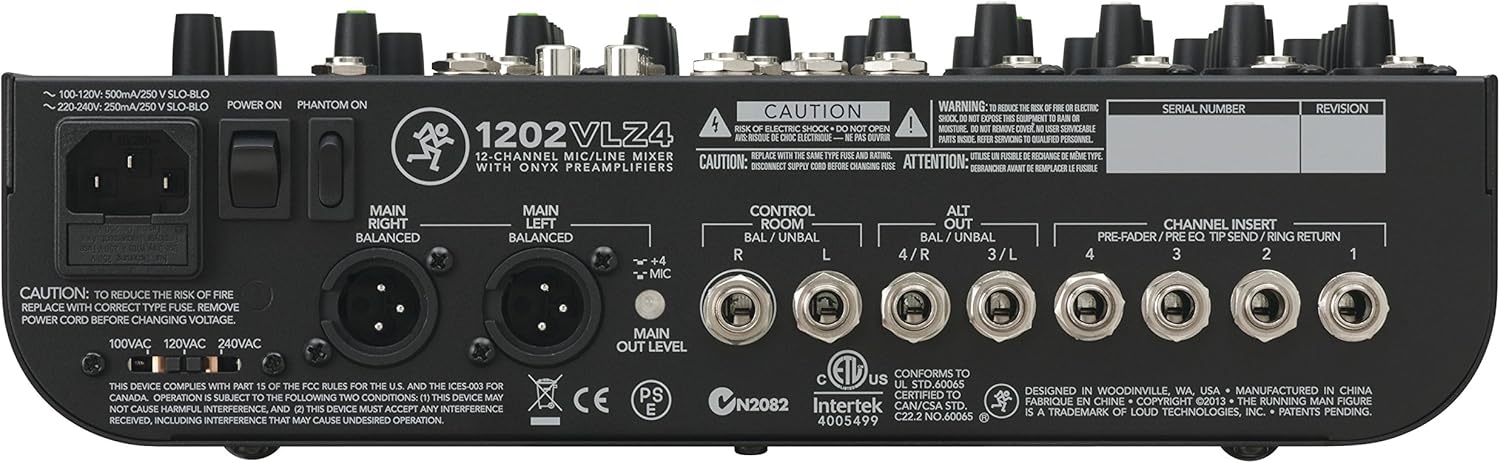
Figure 2: Rear panel of the Mackie 1202VLZ4, showing power input, main outputs, control room outputs, and channel inserts.
- Microphone Inputs (XLR): Connect microphones to the XLR inputs on channels 1-4. Activate phantom power (+48V) via the dedicated switch on the rear panel for condenser microphones.
- Line Inputs (1/4" TRS/TS): Connect line-level devices such as keyboards, drum machines, or playback devices to the 1/4" line inputs. Channels 1-4 have mono line inputs, while channels 5-6, 7-8, 9-10, and 11-12 are stereo pairs.
- Main Outputs (XLR/1/4" TRS): Connect these to your main PA system, studio monitors, or recording interface.
- Control Room Outputs (1/4" TRS): Connect to a separate set of monitors for control room listening.
- Aux Sends (1/4" TS): Used for sending signals to external effects processors or monitor mixes.
- Stereo Returns (1/4" TS): Used for receiving signals back from external effects processors.
- Tape In/Out (RCA): For connecting tape recorders or other consumer-level playback/recording devices.
3. Operating Instructions
This section details the functions of the various controls on your 1202VLZ4 mixer.

Figure 3: Angled view of the Mackie 1202VLZ4, highlighting channel controls and master section.
3.1 Channel Strip Controls (Channels 1-12)
- Gain: Adjusts the input sensitivity for the microphone or line input. Set this to achieve a healthy signal level without clipping.
- Low Cut (75Hz): Engages a 75Hz high-pass filter to remove unwanted low-frequency rumble.
- EQ (High, Mid, Low): Three-band equalizer for shaping the tone of each channel.
- Aux 1 Send: Controls the amount of signal sent to Aux Send 1.
- Aux 2 Send: Controls the amount of signal sent to Aux Send 2.
- Pan: Positions the channel's signal in the stereo field (left to right).
- Mute: Silences the channel's output to the main mix, aux sends, and ALT 3/4 bus.
- PFL Solo: Pre-Fader Listen. Sends the channel's signal to the headphones and control room outputs for monitoring without affecting the main mix.
- ALT 3/4: Routes the channel's signal to the ALT 3/4 stereo bus instead of the main mix.
- Level: Adjusts the overall output level of the channel to the main mix.
3.2 Master Section Controls
- Aux Master: Controls the overall output level of Aux Sends 1 and 2.
- Stereo Returns: Adjusts the level of signals returning from external effects processors.
- Control Room Source: Selects what is heard in the control room and headphones (Main Mix, Tape, or ALT 3/4).
- Control Room/Phones Level: Adjusts the output level for the control room and headphone outputs.
- Main Mix Fader: Controls the overall output level of the main stereo mix.
- CR / Submix Fader: Controls the output level of the Control Room / Submix.
- Level Meters: Provide visual indication of the main mix output level.
4. Maintenance
To ensure the longevity and reliable performance of your Mackie 1202VLZ4 mixer, follow these maintenance guidelines:
- Cleaning: Regularly wipe the mixer's surface with a soft, dry cloth. Avoid using abrasive cleaners, solvents, or excessive moisture, which can damage the finish and internal components.
- Environmental Conditions: Operate and store the mixer in a clean, dry environment, away from extreme temperatures, direct sunlight, and high humidity. Avoid exposing the unit to dust, dirt, and liquids.
- Ventilation: Ensure that the mixer's ventilation openings are not obstructed to allow for proper airflow and prevent overheating.
- Cable Management: Use high-quality cables and ensure they are properly routed and secured to prevent strain on connectors and accidental disconnections.
- Power Off: Always power off the mixer and disconnect it from the power source before cleaning or performing any maintenance.
5. Troubleshooting
This section provides solutions to common issues you might encounter with your 1202VLZ4 mixer.
5.1 No Sound Output
- Check Power: Ensure the mixer is powered on and the power cable is securely connected.
- Main Mix Fader: Verify the Main Mix fader is raised.
- Channel Levels: Ensure individual channel Level controls are raised and not muted.
- Input Connections: Confirm all input cables are correctly connected to the appropriate channels.
- Output Connections: Check that the Main Outputs are connected to your amplifier or powered speakers and that those devices are also powered on and functioning.
- Control Room Source: If monitoring via headphones or control room, ensure the Control Room Source is set to 'Main Mix'.
5.2 Distorted Sound
- Gain Settings: Reduce the Gain control on the input channel. The 'OL' (Overload) LED should only flash occasionally on the loudest peaks.
- Input Level: Ensure the input source itself is not sending an excessively hot signal.
- Output Level: Reduce the Main Mix fader or the input level of the connected amplifier/speakers.
5.3 Hum or Noise
- Cables: Use balanced cables (XLR or TRS) whenever possible, especially for microphone inputs and long cable runs. Ensure all cables are in good condition.
- Ground Loops: Try connecting all audio equipment to the same power outlet or power conditioner to minimize ground loop hum.
- Phantom Power: If using dynamic microphones, ensure phantom power is OFF. It is only required for condenser microphones.
- RF Interference: Keep the mixer away from sources of strong radio frequency interference (e.g., cell phones, wireless routers).
6. Specifications
| Feature | Specification |
|---|---|
| Brand | Mackie |
| Model Number | 2040763-01 (1202VLZ4) |
| Number of Channels | 12 |
| Connectivity Technology | Auxiliary |
| Power Source | Wired |
| Wattage | 25 watts |
| Item Weight | 6.38 pounds (2.9 Kilograms) |
| Product Dimensions | 10.71 x 11.89 x 2.99 inches |
| ASIN | B00FGLCC86 |
| Color | Black |
7. Warranty and Support
For detailed warranty information and technical support, please refer to the official Mackie website or contact your authorized Mackie dealer. Warranty terms and conditions may vary by region and purchase date.
You can visit the Mackie Store on Amazon for more product information.


