
Introduction
Thank you for choosing the Spectrum AIL 439 54-Note Electric Keyboard. This manual provides essential information for setting up, operating, and maintaining your instrument. Please read it thoroughly to ensure proper use and to maximize your musical experience.
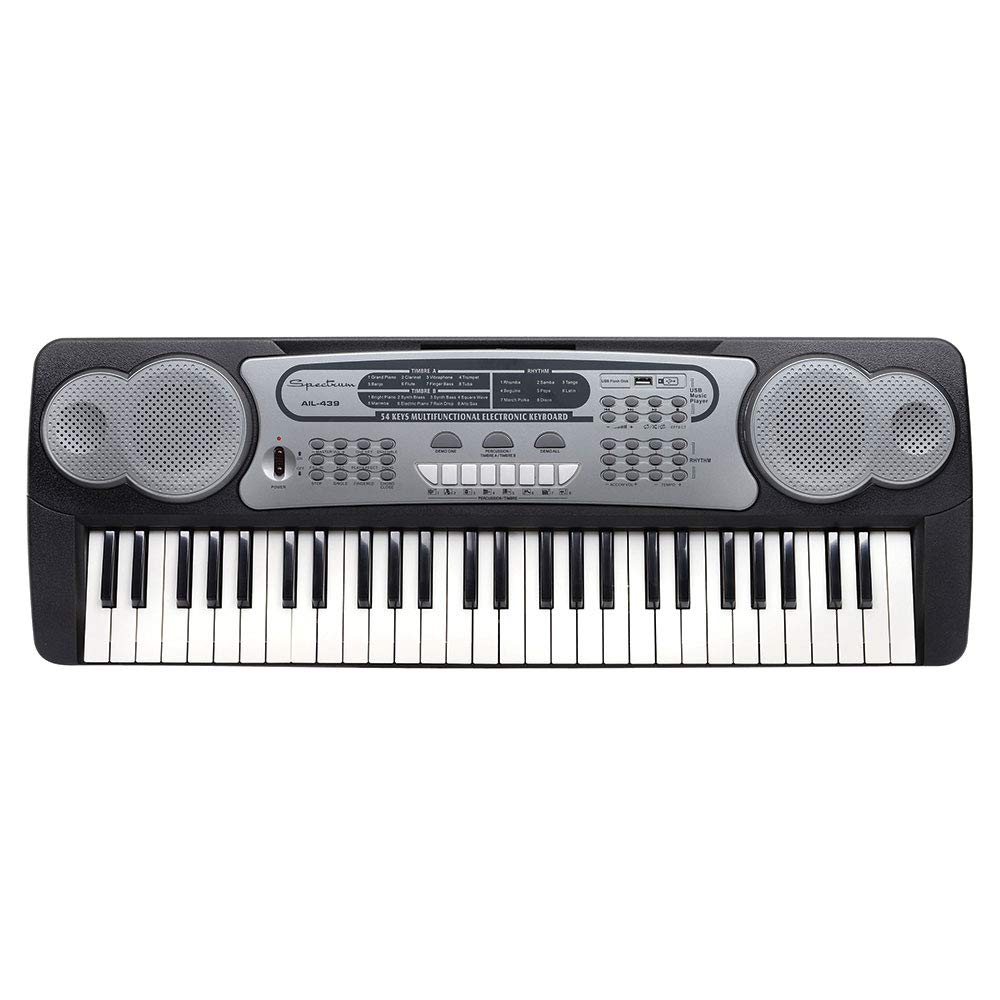
Image: The Spectrum AIL 439 54-Note Electric Keyboard, featuring 54 keys and an integrated music stand.
Setup
1. Unpacking
- Carefully remove all components from the packaging.
- Verify that all accessories are present: the keyboard, AC adaptor, music sheet holder, and sing-along microphone.
2. Power Connection
- AC Adaptor: Connect the included AC adaptor to the DC IN jack on the rear of the keyboard. Plug the adaptor into a standard wall outlet.
- USB Power (Optional): The keyboard can also be powered via a standard USB cable (sold separately) connected to a USB power source.
3. Music Sheet Holder Installation
- Insert the music sheet holder into the designated slots located on the top panel of the keyboard. Ensure it is securely seated.
4. Microphone Connection
- Plug the sing-along microphone into the Microphone Input jack on the keyboard.
Operating Instructions
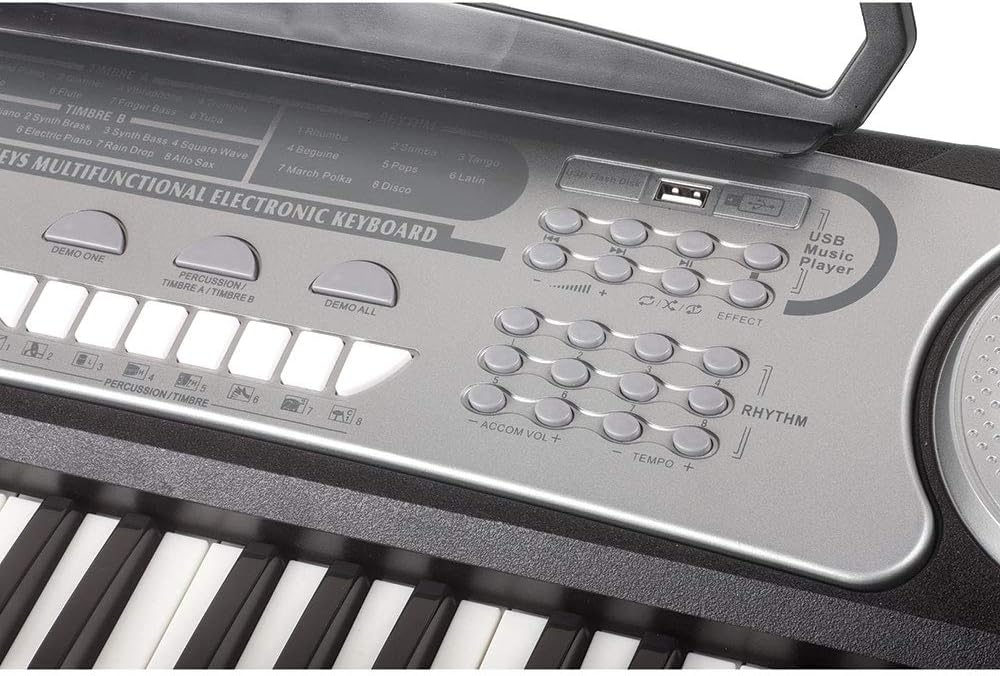
Image: Detailed view of the keyboard's control panel, showing buttons for tones, rhythms, percussion, volume, tempo, and the USB input.
1. Power On/Off
- Press the POWER button to turn the keyboard on or off.
2. Volume and Tempo Controls
- Use the VOLUME + / - buttons to adjust the overall sound level.
- Use the TEMPO + / - buttons to adjust the speed of rhythms and demo songs.
3. Selecting Tones (16 Tones)
- Press the TONE button, then use the number keys (0-9) to select from the 16 available instrument tones. Refer to the panel for tone assignments.
4. Selecting Rhythms (8 Rhythms)
- Press the RHYTHM button, then use the number keys (1-8) to select from the 8 available rhythms.
- Press START/STOP to begin or end the rhythm.
5. Selecting Percussion (8 Percussion Tones)
- Press the PERCUSSION button, then use the designated keys to play 8 different percussion sounds.
6. Playing Demo Songs (8 Demo Songs)
- Press the DEMO ONE button to play a single demo song.
- Press the DEMO ALL button to cycle through all 8 demo songs.
7. Record & Replay Function
- Press the RECORD button to start recording your playing.
- Press the PLAY button to listen to your recorded performance.
8. Single Finger Chords
- Activate the SINGLE FINGER CHORD mode to play full chords by pressing a single key in the lower section of the keyboard.
9. USB Input for Music Playback
- Insert a USB flash drive containing MP3 audio files into the USB INPUT port.
- Use the playback controls (Play/Pause, Next, Previous) on the keyboard to manage your music.
10. E-Media Online Interactive Lessons
- Your keyboard includes access to E-Media Introductory Keyboard Lessons. Refer to the included documentation for instructions on how to access these online resources.
Maintenance
Cleaning
- Wipe the keyboard surface with a soft, dry cloth.
- For stubborn dirt, slightly dampen the cloth with water and a mild soap, then wipe dry immediately.
- Do not use abrasive cleaners, solvents, or waxes, as these can damage the finish.
Storage
- Store the keyboard in a cool, dry place away from direct sunlight and extreme temperatures.
- Avoid placing heavy objects on the keyboard.
Troubleshooting
| Problem | Possible Cause | Solution |
|---|---|---|
| No power | AC adaptor not connected or faulty; USB cable not connected or power source insufficient. | Ensure AC adaptor is securely plugged into the keyboard and a working outlet. If using USB, check cable and power source. |
| No sound | Volume too low; headphones connected; internal fault. | Increase volume using VOLUME +. Disconnect any headphones. If problem persists, power cycle the keyboard. |
| Rhythm/Demo not playing | Rhythm/Demo not selected; START/STOP not pressed. | Select a rhythm or demo song, then press START/STOP. |
| Microphone not working | Microphone not connected properly; microphone faulty. | Ensure microphone is fully inserted into the Microphone Input jack. Test with another microphone if available. |
Specifications
- Model Name: AIL 439
- Number of Keys: 54
- Tones: 16
- Rhythms: 8
- Percussion Tones: 8
- Demo Songs: 8
- Connectivity: USB Input, Microphone Input
- Power Source: Electric (AC Adaptor) / USB Powered
- Functions: Two Volume Controls, Tempo Controls, Record & Replay, Single Finger Chords
- Accessories: Music Book Holder, Sing-along Microphone, E-Media Introductory Keyboard Lessons
- Product Dimensions: 34 x 5 x 16 inches
- Item Weight: 7.53 pounds
- Manufacturer: Ashley Entertainment Corp.
Warranty and Support
For warranty information and technical support, please refer to the documentation included with your purchase or contact Spectrum customer service. Keep your proof of purchase for any warranty claims.