
Introduction
This manual provides essential instructions for the safe and efficient operation of your Sony DVP-SR510H DVD Player. Please read this manual thoroughly before using the unit and retain it for future reference. The DVP-SR510H is designed to deliver near-HD picture quality from your DVDs and robust sound, all within a compact design. It supports various disc formats, including CDs and discs containing WMA and JPEG files.
Important Safety Information
- Power Source: Operate the unit only on the voltage specified on the nameplate.
- Ventilation: Do not block ventilation openings. Ensure adequate space around the unit for proper airflow.
- Water and Moisture: Do not expose the unit to rain or moisture. Do not place objects filled with liquids, such as vases, on the unit.
- Heat: Keep the unit away from heat sources such as radiators, heat registers, stoves, or other apparatus (including amplifiers) that produce heat.
- Cleaning: Unplug the unit from the wall outlet before cleaning. Use a soft, dry cloth. Do not use liquid or aerosol cleaners.
- Servicing: Do not attempt to service this product yourself. Refer all servicing to qualified service personnel.
Package Contents
Verify that your package contains the following items:
- Sony DVP-SR510H DVD Player
- Remote Control (Multi-brand compatible)
- Power Cord
- (HDMI cable sold separately)
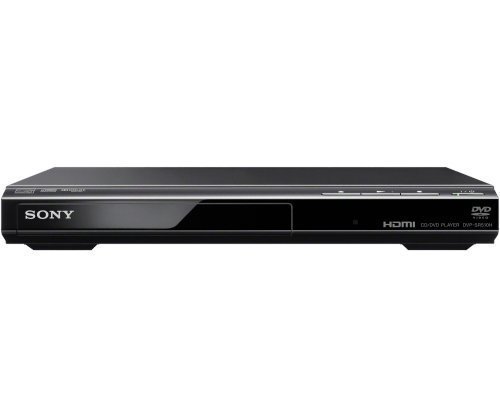
Image: Front view of the Sony DVP-SR510H DVD Player, showing the disc tray, control buttons, and display panel.
Setup
1. Connecting to a Television
For optimal picture quality, connect the DVD player to your television using an HDMI cable.
- Locate the HDMI OUT port on the rear of the DVP-SR510H.
- Connect one end of an HDMI cable (not included) to the HDMI OUT port on the DVD player.
- Connect the other end of the HDMI cable to an available HDMI IN port on your television. Note the HDMI input number (e.g., HDMI 1, HDMI 2) for later selection.
- If your TV does not have an HDMI input, refer to your TV's manual for alternative connection methods (e.g., composite video).
2. Connecting Power
- Plug the power cord into the AC IN jack on the rear of the DVD player.
- Plug the other end of the power cord into a wall outlet.
3. Initial Setup
- Turn on your television and select the correct HDMI input source that the DVD player is connected to.
- Press the POWER button on the DVD player or its remote control to turn on the unit.
- Follow the on-screen instructions to complete the initial setup, which may include language selection and aspect ratio settings.
Operating Instructions
Basic Disc Playback
- Press the OPEN/CLOSE button to open the disc tray.
- Place a DVD or CD onto the disc tray with the label side facing up.
- Press the OPEN/CLOSE button again to close the disc tray.
- Playback will usually start automatically. If not, press the PLAY button.
- Use the STOP, PAUSE, FAST FORWARD, and REWIND buttons on the remote control to manage playback.
Fast/Slow Playback with Sound
The DVP-SR510H supports fast and slow playback while maintaining audible sound. During playback:
- Press the SCAN button (often labeled with double arrows) repeatedly to cycle through fast forward speeds.
- Press the SLOW button to engage slow motion playback.
- Press PLAY to return to normal playback.
Multi-Format Disc Playback
This player can play WMA and JPEG files burned onto CD-R/RW discs. When inserting such a disc, the player will typically display a menu allowing you to select between audio or image files.
- For WMA files: Navigate to the desired audio file using the arrow keys on the remote and press ENTER or PLAY.
- For JPEG files: Navigate to the desired image file and press ENTER or PLAY to view. You may have options for slideshows or rotation.
Upscaling to Near-HD Quality
When connected via HDMI to a compatible HDTV, the DVP-SR510H can upscale standard definition DVDs to near-HD (1080p) resolution, enhancing picture clarity and detail. This feature is automatically enabled when using an HDMI connection.
Maintenance
Cleaning the Unit
- Before cleaning, ensure the DVD player is turned off and unplugged from the power outlet.
- Use a soft, dry cloth to wipe the exterior surfaces of the unit.
- Do not use abrasive pads, scouring powder, or solvents such as alcohol or benzene, as these can damage the finish.
Disc Care
- Handle discs by their edges to avoid fingerprints on the playing surface.
- Keep discs clean. Wipe them with a soft, lint-free cloth from the center outwards.
- Store discs in their cases away from direct sunlight and heat.
- Do not use solvents, abrasive cleaners, or anti-static sprays on discs.
Troubleshooting
If you encounter issues with your DVD player, refer to the following common problems and solutions:
| Problem | Possible Cause / Solution |
|---|---|
| No Power / Unit does not turn on. |
|
| No picture on TV. |
|
| No sound. |
|
| Disc does not play or freezes/stutters. |
|
| Remote control does not work. |
|
Specifications
- Brand: Sony
- Model: DVP-SR510H
- Product Dimensions: 10 x 6 x 10 inches (approximately)
- Item Weight: 1.98 pounds
- Color: Black
- Media Type: CD, DVD (DVD-R/RW, DVD+R/RW, CD-R/RW with WMA/JPEG)
- Special Feature: Compact design, Fast/Slow playback with sound
- Resolution: Upscales to 1920x1080 (1080p) via HDMI
- Connector Type: HDMI
- Connectivity Technology: HDMI
- Audio Output Mode: Stereo, Surround Sound
Warranty and Support
For warranty information and technical support, please refer to the documentation provided at the time of purchase or visit the official Sony support website. Keep your proof of purchase for warranty claims.
Online Support: www.sony.com/electronics/support
Note: As this product may be sold as "Renewed," warranty terms may vary. Please consult your seller for specific warranty details.


