Introduction
Thank you for purchasing the Sony Walkman M-Series NW-M505 digital music player. This device combines high-quality audio playback with convenient features such as Bluetooth, NFC, and FM radio, all within a compact design. This manual will guide you through the setup, operation, and maintenance of your new Walkman.
Product Overview
The Sony Walkman NW-M505 is designed for an enhanced portable audio experience. It features a clear organic EL display for easy navigation and integrates advanced sound technologies.
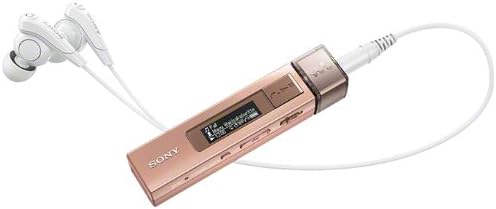
This image shows the compact design of the Sony Walkman NW-M505/P, highlighting its portable nature and the organic EL display.
Setup
1. Charging the Device
Before first use, fully charge your Walkman. Connect the device to a computer or a USB AC adapter (not included) using the supplied USB cable. The charging indicator will illuminate during charging and turn off when complete.
2. Transferring Music Files
Connect your Walkman to a computer using the USB cable. The device will appear as a removable disk. You can drag and drop compatible audio files (MP3, AAC, WMA, L-PCM, ATRAC) directly into the 'MUSIC' folder on the Walkman. For more advanced management, use Sony's recommended music management software (refer to the Sony support website for details).
Operating Instructions
Basic Playback
- Power On/Off: Press and hold the power button.
- Play/Pause: Press the play/pause button.
- Skip Tracks: Use the forward/backward buttons to navigate between tracks.
- Volume Control: Use the volume up (+) and volume down (-) buttons located on the side of the device.
Display Navigation
The organic EL display shows track information, battery status, and menu options. Use the navigation buttons to scroll through menus and select options. The display supports 3-line monochrome text.
Connectivity
Bluetooth Pairing
Your Walkman supports Bluetooth for wireless audio playback with compatible headphones or speakers. To pair:
- Ensure the Bluetooth device you wish to connect to is in pairing mode.
- On your Walkman, navigate to the Bluetooth settings menu.
- Select "Add Device" or "Pairing" and choose your device from the list.
- Confirm the connection on both devices if prompted.
Supported Bluetooth profiles include A2DP, AVRCP, HFP, and HSP.
NFC One-Touch Connection
For quick pairing with NFC-compatible devices, simply touch the Walkman's NFC tag area to the NFC tag area of the other device. The connection will be established automatically.
Smartphone Integration
When connected to a smartphone via Bluetooth, the Walkman can display incoming call notifications and allow you to answer calls directly through the device, utilizing its built-in microphone.
FM Radio
The Walkman includes an FM radio tuner. To use the FM radio, connect your headphones as they act as the antenna. Navigate to the FM radio menu, then scan for available stations or manually tune to a frequency.
Audio Playback Features
The NW-M505 incorporates several Sony audio technologies to deliver a superior listening experience:
- S-Master MX: A full digital amplifier that reduces distortion and noise across a wide frequency range.
- Digital Noise Canceling: Reduces ambient noise, allowing you to focus on your music.
- Clear Phase: Optimizes sound phase characteristics for clearer, more natural sound.
- EX Headphones: High-quality in-ear headphones designed to complement the Walkman's audio capabilities.
Maintenance
- Keep the device clean using a soft, dry cloth. Avoid liquid cleaners.
- Do not expose the Walkman to extreme temperatures, direct sunlight, or moisture.
- Store the device in a safe place when not in use to prevent scratches or damage.
Troubleshooting
If you encounter issues with your Walkman, try the following basic troubleshooting steps:
- Device not powering on: Ensure the battery is charged.
- No sound: Check headphone connection, volume level, and ensure Bluetooth is correctly paired if using wireless headphones.
- Cannot transfer files: Ensure the USB cable is securely connected and the computer recognizes the device.
For more detailed troubleshooting or persistent issues, please refer to the official Sony support website or contact customer service.
Specifications
| Model Name | NW-M505 |
| Brand | Sony |
| Memory Storage Capacity | 16 GB |
| Battery Life (Music Playback) | Approx. 15 hours (MP3 128kbps) |
| Battery Life (Bluetooth Connection) | Approx. 10 hours |
| Connectivity Technology | Bluetooth, NFC |
| Supported Audio Formats | MP3, AAC, WMA, L-PCM, ATRAC |
| Display Technology | OLED (Monochrome, 3-line display) |
| Special Features | Digital Noise Canceling, S-Master MX, Clear Phase, FM Radio, Built-in Microphone, Smartphone Integration |
| Dimensions (Approx.) | 12.1 x 8.1 x 4.9 cm |
| Weight (Approx.) | 144 g |
Warranty and Support
For warranty information, product registration, and technical support, please refer to the documentation included with your product or visit the official Sony support website. Keep your proof of purchase for warranty claims.