
1. Introduction
The SkylinkHome LK-318-3 Wireless Three Button Keychain Remote Control is designed to wirelessly operate compatible SkylinkHome receiver modules. This compact and lightweight transmitter allows for convenient control of various home automation devices, such as lighting and small appliances, from a distance. It incorporates rolling code technology for enhanced security and offers optional password protection.
2. Package Contents
- SkylinkHome LK-318-3 Keychain Remote Control
- Lithium Battery (CR-2032, pre-installed)
- User Instructions
3. Features
- Three-Button Control: Operates up to three distinct SkylinkHome receiver modules.
- Wireless Operation: Provides remote control for lighting, small appliances, and other home electronics.
- Extended Range: Operates up to 500 feet in an open area, including through walls and floors.
- Compact Design: Small and lightweight, suitable for carrying on a keychain, in a pocket, or purse.
- Pre-installed Battery: Includes a long-life CR-2032 lithium battery.
- Optional Password Protection: Enhances security by requiring a 2 to 8-digit password (using buttons 1, 2, and 3) before operation.
- Rolling Code Technology: Generates a unique code with each activation, preventing unauthorized code duplication.
4. Setup
4.1 Battery Installation
The SkylinkHome LK-318-3 remote control comes with a CR-2032 lithium battery pre-installed. If the battery needs replacement, refer to the Maintenance section.
4.2 Programming the Remote
To program the LK-318-3 remote control to your SkylinkHome receiver modules, follow the specific programming instructions provided with your SkylinkHome receiver module. The remote is designed for easy synchronization with compatible receivers. Typically, this involves placing the receiver into a learning mode and then pressing a button on the remote.
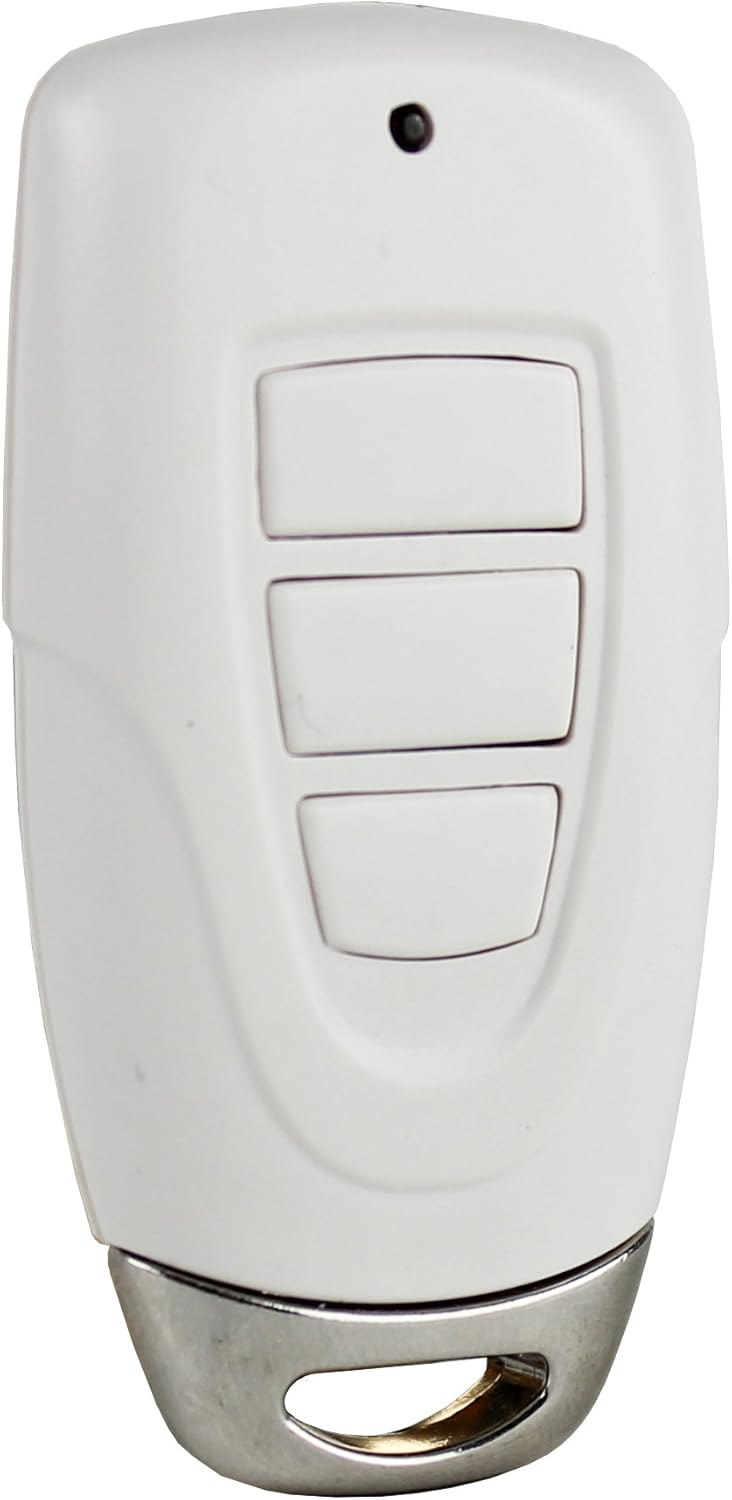
Figure 1: Front view of the SkylinkHome LK-318-3 Remote Control, showing the three control buttons and the LED indicator.
5. Operating Instructions
5.1 Basic Operation
Once programmed to your SkylinkHome receiver modules, press the corresponding button (1, 2, or 3) on the keychain remote to activate or deactivate the linked module. The remote can control up to three separate modules.
5.2 Optional Password Protection
For enhanced security, you can enable password protection. When enabled, the remote will only operate after the correct password has been entered. The password can be a sequence of 2 to 8 digits, created using a combination of buttons 1, 2, and 3. For example, a password could be '1-2-1-2'. Refer to your SkylinkHome receiver's manual for specific instructions on enabling and setting up password protection.
5.3 Rolling Code Technology
The LK-318-3 remote utilizes rolling code technology. This means that each time you press a button, the remote generates a new, unique code. This code is recognized by your rolling code compatible receiver, which then performs the desired function. This technology significantly reduces the risk of unauthorized access by preventing code duplication through electronic scanners, as the next code will always be different.

Figure 2: The SkylinkHome LK-318-3 Remote Control shown attached to a keychain with a car key, illustrating its compact and portable design.
6. Maintenance
6.1 Battery Replacement
The remote control is powered by a CR-2032 lithium battery. When the remote's operational range decreases or the LED indicator does not light up consistently, it may be time to replace the battery. To replace the battery:
- Carefully open the remote control casing.
- Remove the old CR-2032 battery.
- Insert a new CR-2032 lithium battery, ensuring correct polarity (+ side up).
- Close the remote control casing securely.
Dispose of old batteries according to local regulations.
7. Troubleshooting
- Remote not responding:
- Check the battery. Replace if necessary (refer to Section 6.1).
- Ensure the remote is within the operational range of the receiver (up to 500 feet in open area).
- Verify that the remote is correctly programmed to the receiver (refer to Section 4.2).
- If password protection is enabled, ensure the correct password is being entered.
- Limited range:
- Replace the battery.
- Ensure there are no significant obstructions (e.g., thick concrete walls, large metal objects) between the remote and the receiver.
- Avoid sources of strong radio interference.
- Compatibility issues:
- The LK-318-3 remote is designed for use with SkylinkHome receiver modules. It may not be compatible with other brands or older systems from different manufacturers.
8. Specifications
| Model Number | LK-318-3 |
| Brand | SKYLINK |
| Power Source | Battery-Powered |
| Battery Type | CR-2032 Lithium (1 included) |
| Battery Life | Approximately 5000 Hours |
| Operational Range | Up to 500 feet (open area) |
| Product Dimensions | 4.32 x 1.78 x 12.7 cm (1.7 x 0.7 x 5 inches) |
| Item Weight | 90.72 g (3.2 ounces) |

Figure 3: The SkylinkHome LK-318-3 Remote Control positioned beside a car key, highlighting its compact size for easy integration with existing keychains.
9. Warranty and Support
For warranty information or technical support regarding your SkylinkHome LK-318-3 Wireless Three Button Keychain Remote Control, please refer to the documentation included with your purchase or visit the official Skylink website. Contact information for customer service is typically available on the product packaging or the manufacturer's support page.


