
1. Introduction
This manual provides essential information for the safe and efficient operation of your AXI Model Motors Gold Line 5320/28 Outrunner Brushless Motor. Please read this manual thoroughly before installation and use to ensure optimal performance and longevity of your motor.
The AXI Gold Line 5320/28 is a high-performance outrunner brushless motor designed for RC hobby applications. Key features include:
- Max. 32 Ni-CD or 10s Li-Poly cells compatibility.
- Current capacity: 65A / 30s.
- RPM/V: 249.
- Max. efficiency: 92%.
- Max. efficiency current: 10 - 36A (>85%).
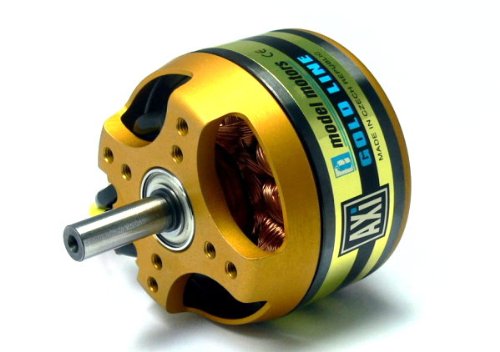
Figure 1: AXI Model Motors Gold Line 5320/28 Outrunner Brushless Motor. This image shows the main view of the motor, highlighting its gold and black casing and exposed copper windings.
2. Understanding Your Motor Model
The model designation provides important information about the motor's characteristics. For the AXI 5320/28, the numbers indicate specific design parameters:
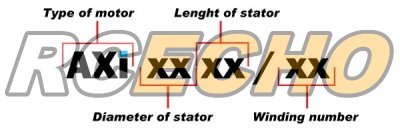
Figure 2: Diagram illustrating the AXI motor naming convention. "AXI" denotes the brand, "XX" for diameter of stator, "XX" for length of stator, and "/XX" for winding number.
3. Setup and Installation
Proper installation is crucial for the motor's performance and safety.
3.1 Mounting the Motor
The AXI 5320/28 motor typically mounts using the included hardware. Ensure the motor is securely fastened to the airframe's motor mount using appropriate screws. Use thread-locking compound on screws to prevent loosening due to vibration.
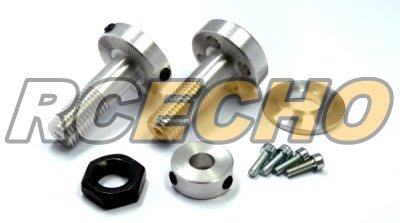
Figure 3: Included mounting hardware and accessories for the AXI motor. This image displays various screws, nuts, and adapters used for securing the motor and propeller.
3.2 Electrical Connections
Connect the motor to a compatible Electronic Speed Controller (ESC) according to the ESC's instructions. The three motor wires can be connected in any order; if the motor spins in the wrong direction, swap any two of the three wires.
- Ensure all connections are secure and insulated to prevent short circuits.
- Verify that your ESC is rated for the motor's current draw (65A / 30s peak).
- Use appropriate battery packs (max. 32 Ni-CD or 10s Li-Poly) that can supply the required current.
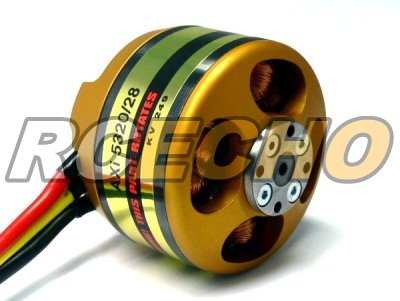
Figure 4: Rear view of the AXI motor showing the three electrical connection wires. This view also highlights the rotating outer casing and the fixed stator with copper windings.
4. Operating Instructions
Before operating, ensure all components are correctly installed and secured. Always perform a pre-flight check.
4.1 Propeller Selection
Choosing the correct propeller is vital for efficiency and to prevent motor overload. Refer to the table below for recommended propeller sizes based on aircraft type and battery configuration. Exceeding recommended propeller sizes can lead to overheating and damage.
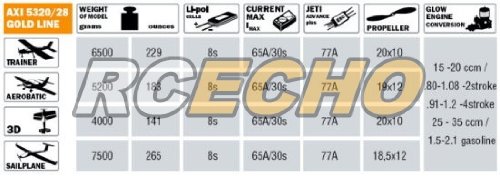
Figure 5: Performance chart for the AXI 5320/28 Gold Line motor, detailing recommended propeller sizes, model weight, cell count, current, and efficiency for various aircraft types (Trainer, Aerobatic, 3D, Sailplane).
4.2 Initial Run and Calibration
After installation, perform a low-power test run to confirm correct motor rotation and ESC calibration. Gradually increase throttle to check for smooth operation and unusual noises. Monitor motor temperature during initial flights.
5. Maintenance
Regular maintenance ensures the longevity and reliability of your AXI motor.
- Cleaning: Keep the motor free from dirt, dust, and debris. Use compressed air or a soft brush to clean the motor, especially around the bearings and windings.
- Bearings: The motor's bearings are sealed and generally maintenance-free. However, if you notice excessive noise or play, the bearings may need replacement.
- Inspections: Periodically inspect all wiring for fraying or damage. Check motor mounts and propeller adapters for tightness.
- Temperature: Avoid operating the motor at excessively high temperatures. If the motor is too hot to touch after a flight, review your propeller choice, battery, or ESC settings.
6. Troubleshooting
This section addresses common issues you might encounter.
- Motor not spinning:
- Check battery connection and charge level.
- Verify ESC is armed and connected correctly.
- Inspect motor wires for breaks or loose connections.
- Ensure propeller is not obstructed.
- Motor spinning in wrong direction:
- Swap any two of the three motor wires connected to the ESC.
- Motor overheating:
- Propeller may be too large or too aggressive for the motor/battery combination. Refer to the propeller chart.
- Insufficient airflow for cooling.
- ESC timing settings may be incorrect (refer to ESC manual).
- Damaged bearings or internal short.
- Loss of power/intermittent operation:
- Loose connections between motor, ESC, or battery.
- Battery voltage sag or low charge.
- ESC thermal shutdown or faulty.
7. Specifications
Detailed technical specifications for the AXI Model Motors Gold Line 5320/28.
| Parameter | Value |
|---|---|
| Model Number | OM698 |
| No. of Cells (Ni-CD) | Max. 32 |
| No. of Cells (Li-Poly) | Max. 10s |
| Current Capacity | 65A / 30s |
| RPM/V (Kv) | 249 |
| Max. Efficiency | 92% |
| Max. Efficiency Current | 10 - 36A (>85%) |
| Item Weight | 670 g |
| Material | Plastic (referring to casing/insulation) |
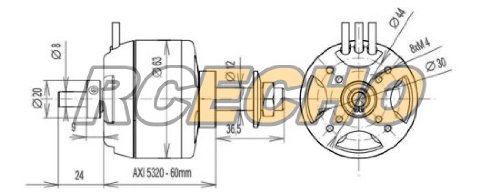
Figure 6: Technical drawing of the AXI 5320-60mm motor, showing key dimensions such as diameter, length, shaft diameter, and mounting hole patterns.
8. Warranty and Support
For warranty information and technical support, please refer to the official AXI Model Motors website or contact your authorized dealer. Keep your proof of purchase for any warranty claims.
It is recommended to register your product if such an option is available from the manufacturer to receive updates and support.