
Introduction
This manual provides comprehensive instructions for the safe and effective use of your Kryptonite R2 Retractor Combo Cable Lock. Please read this manual thoroughly before first use and retain it for future reference. This lock is designed for securing quick-release components and accessories, offering a deterrent against opportunistic theft.
Safety Information
- This lock is a deterrent and not a guarantee against theft. Always use appropriate security measures for your valuables.
- Keep the lock away from children to prevent accidental injury or misuse.
- Do not attempt to force the lock mechanism or cable, as this may cause damage.
- Ensure the combination is set correctly and remembered. Incorrect combination entry can prevent unlocking.
Package Contents
- 1 x Kryptonite R2 Retractor Combo Cable Lock
Product Overview
The Kryptonite R2 Retractor Combo Cable Lock features a compact design with a retractable cable and a 4-digit resettable combination mechanism. It is lightweight and designed for convenient storage and quick use.
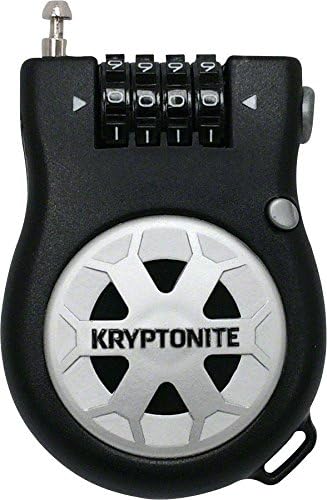
Figure 1: Front view of the Kryptonite R2 Retractor Combo Cable Lock, showing the combination dials and the cable exit point.

Figure 2: Side view of the Kryptonite R2 Retractor Combo Cable Lock with the cable partially extended, illustrating its retractable nature.
- Cable: 2.4mm x 3-foot (90cm) vinyl coated steel cable.
- Combination Dials: Patented 4-digit resettable combination with easy-grip dials.
- Retraction Button: For retracting the cable.
- Set Button/Pin: Used for setting or resetting the combination.
Setup: Setting Your Combination
Your lock is factory preset to 0-0-0-0. Follow these steps to set your personal combination:
- Ensure the lock is open and set to the current combination (factory default is 0-0-0-0).
- Locate the reset button or pin on the side or bottom of the lock. This is often a small, recessed button.
- Using a pen or a pointed object, press and hold the reset button/pin.
- While holding the reset button/pin, rotate the combination dials to your desired 4-digit code. Choose a memorable but secure combination.
- Release the reset button/pin. Your new combination is now set.
- Important: Scramble the dials immediately after setting your combination to lock it. Test your new combination several times before securing any valuables.
Note: Some users have reported difficulty with the reset button. Ensure it is fully depressed and held firmly during the combination setting process.
Operating the Lock
To Lock:
- Enter your set 4-digit combination on the dials.
- Pull the cable end out from the lock body to the desired length.
- Loop the cable around the item(s) you wish to secure and insert the cable end into the locking mechanism on the other side of the lock body.
- Scramble the combination dials to secure the lock.
To Unlock:
- Align the combination dials to your personal 4-digit code.
- Press the release button (usually located near where the cable end inserts) to disengage the cable.
- To retract the cable, press the cable retraction button (often a larger button on the side or front) and guide the cable back into the housing.
Maintenance
- Keep the lock clean and free from dirt and debris. Wipe with a damp cloth if necessary.
- Avoid exposing the lock to extreme temperatures or harsh chemicals.
- Periodically check the cable for any signs of wear or damage. Discontinue use if the cable is compromised.
Troubleshooting
| Problem | Possible Cause | Solution |
|---|---|---|
| Lock does not open with the correct combination. | Combination dials may have shifted slightly after setting or scrambling. | Ensure each dial is precisely aligned with its mark. Gently wiggle the dials while attempting to open. If the combination was recently set, try the factory default (0-0-0-0) or the previous combination if you recall it. |
| Difficulty setting a new combination. | Reset button/pin not fully depressed or released prematurely. | Ensure the reset button/pin is held firmly throughout the entire process of rotating the dials to the new combination. Release only after the new combination is set. |
| Cable does not retract smoothly. | Dirt or debris in the mechanism; cable twisted. | Ensure the cable is not twisted. Gently pull the cable out fully and then press the retraction button, guiding the cable back in. Clean any visible debris. |
Specifications
- Model: R2 (280187)
- Cable Dimensions: 2.4mm diameter x 3 feet (90 cm) length
- Material: Vinyl coated steel cable, Alloy Steel body
- Lock Type: 4-digit resettable combination lock
- Overall Dimensions: Approximately 22.86 x 1.24 x 1.97 cm (9 x 0.49 x 0.77 inches)
- Weight: Approximately 68 grams (0.15 lbs)
- Special Feature: Keyless operation
Warranty Information
This Kryptonite R2 Retractor Combo Cable Lock is covered by a Limited Lifetime Warranty. For detailed warranty terms and conditions, please refer to the official Kryptonite website or contact customer support. This warranty typically covers manufacturing defects but does not cover damage due to misuse, neglect, or normal wear and tear.
