
1. Product Overview
This document provides essential instructions for the Trane/American Standard Integrated Furnace Control with Igniter and Wiring Kit, Model KIT15816A. This kit is a genuine OEM replacement part designed for use in various Trane and American Standard furnace units. It integrates the furnace control board with an igniter and the necessary wiring harness for a complete replacement solution.
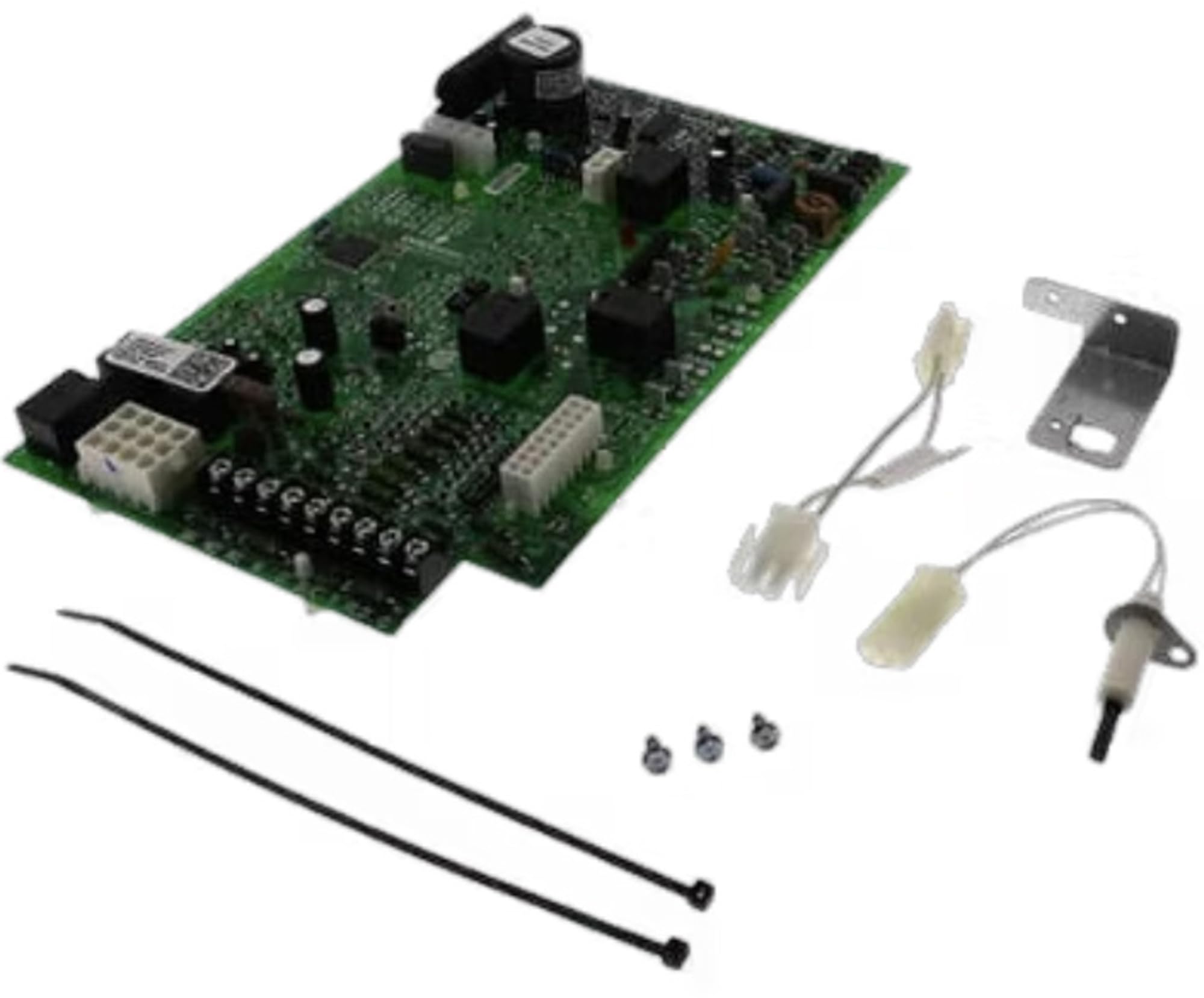
Image: The Trane/American Standard Integrated Furnace Control Board, igniter, and wiring harness components.
2. Safety Information
WARNING: Installation and servicing of heating, ventilation, and air conditioning (HVAC) equipment can be hazardous due to electrical components, gas connections, and moving parts. Improper installation, adjustment, alteration, service, or maintenance can cause property damage, personal injury, or loss of life.
- Always disconnect all electrical power to the furnace before installing or servicing this control kit.
- Ensure gas supply is turned off before working on gas-fired appliances.
- Wear appropriate personal protective equipment (PPE), including safety glasses and gloves.
- This product should be installed and serviced by a qualified HVAC technician.
- Refer to the furnace manufacturer's specific wiring diagrams and instructions.
3. Package Contents
The KIT15816A package typically includes the following components:
- Genuine American Standard / Trane OEM 2-Stage Furnace Control Board
- Igniter
- Wiring Harness
4. Setup and Installation
Installation of the integrated furnace control board requires technical expertise. It is recommended that this procedure be performed by a certified HVAC professional.
- Power Disconnection: Turn off all electrical power to the furnace at the main service panel. Verify power is off using a voltage meter.
- Access Control Board: Open the furnace access panel to locate the existing control board.
- Document Wiring: Carefully photograph or sketch the existing wiring connections to the old control board. Note the position and color of each wire.
- Disconnect Components: Disconnect all wires, the igniter, and any other components connected to the old control board.
- Remove Old Board: Unmount the old control board from its housing.
- Install New Board: Mount the new KIT15816A control board in the same location.
- Connect Wiring: Reconnect all wires, the new igniter, and other components to the new control board according to your documentation and the furnace manufacturer's wiring diagram. Ensure all connections are secure.
- Close Access Panel: Securely close the furnace access panel.
- Restore Power: Restore electrical power to the furnace.
- Test Operation: Initiate a heating cycle to verify proper furnace operation. Observe for any error codes or unusual behavior.
5. Operating Instructions
The Trane/American Standard Integrated Furnace Control Board (KIT15816A) manages the operational sequences of your furnace. Once properly installed, the furnace will operate according to its designed sequence, typically initiated by a call for heat from the thermostat.
- Ensure your thermostat is set to the desired heating mode and temperature.
- The control board will manage the blower motor, igniter, gas valve, and safety limits to provide heat.
- Refer to your specific furnace model's user manual for detailed operating procedures and thermostat settings.
6. Maintenance
The furnace control board itself typically requires no routine maintenance. However, regular maintenance of the overall furnace system is crucial for its longevity and efficient operation.
- Annual Professional Inspection: Schedule annual inspections and maintenance by a qualified HVAC technician.
- Air Filter Replacement: Regularly check and replace the furnace air filter as recommended by your furnace manufacturer (typically every 1-3 months).
- Clear Vents: Ensure all supply and return air vents are unobstructed.
- Clean Components: Keep the area around the furnace clean and free of debris.
7. Troubleshooting
If your furnace is not operating correctly after installing the KIT15816A, consider the following general troubleshooting steps. For complex issues, contact a qualified HVAC technician.
- No Power: Check the circuit breaker for the furnace. Ensure the furnace access panel is securely closed, as some units have safety switches.
- No Heat: Verify the thermostat setting. Check if the igniter glows. If not, inspect igniter wiring and ensure it is properly seated.
- Error Codes: Many furnace control boards have diagnostic LED lights that flash specific codes to indicate issues. Consult your furnace's manual for the meaning of these codes.
- Blower Issues: If the blower runs continuously or not at all, check thermostat settings and wiring connections to the control board.
- Gas Supply: Ensure the gas valve to the furnace is open.
8. Specifications
| Feature | Detail |
|---|---|
| Manufacturer | Trane Parts |
| Part Number | KIT15816 |
| Item Model Number | KIT15816A |
| Item Weight | 1.84 pounds |
| Package Dimensions | 6 x 5 x 3 inches |
| Material | Plastic |
| Item Package Quantity | 1 |
| Batteries Included? | No |
| Batteries Required? | No |
| Date First Available | August 7, 2013 |
9. Warranty and Support
This Trane/American Standard OEM part is typically covered by the manufacturer's standard warranty. Warranty terms and duration may vary. Please retain your proof of purchase for warranty claims.
For technical support, warranty inquiries, or to locate a qualified service technician, please contact Trane or American Standard customer service directly or visit their official websites. Always provide the model number (KIT15816A) and any relevant furnace model information when seeking support.
Important: Attempting repairs or modifications not outlined in official documentation may void your warranty.