1. Introduction
The iHome iDL100 is a versatile Lightning Dock FM Clock Radio designed to enhance your bedside experience. It features triple charging capabilities, allowing you to charge up to three devices simultaneously via two flexible Lightning docks and a universal USB port. Enjoy waking up or falling asleep to your favorite iPad, iPhone, iPod, a custom playlist, or FM radio. The clock also includes an auto-sync feature for seamless time setting with your iPhone and a 7-5-2 alarm system for flexible scheduling.
2. Product Overview

Figure 1: Front view of the iHome iDL100 with multiple Apple devices docked and charging.
The iHome iDL100 is designed for convenience and multi-device compatibility. Its sleek design integrates seamlessly into any bedroom or office environment. The top panel features intuitive controls for alarm settings, radio functions, and display adjustments.

Figure 2: Side view highlighting the dual Lightning docks and overall compact design.
Key features include:
- Dual flexible Lightning docks for iPhone/iPad/iPod.
- One universal USB port for additional device charging.
- FM radio with programmable presets.
- Dual alarms with 7-5-2 scheduling.
- Auto-sync time with docked iPhone.
- Adjustable display dimmer.
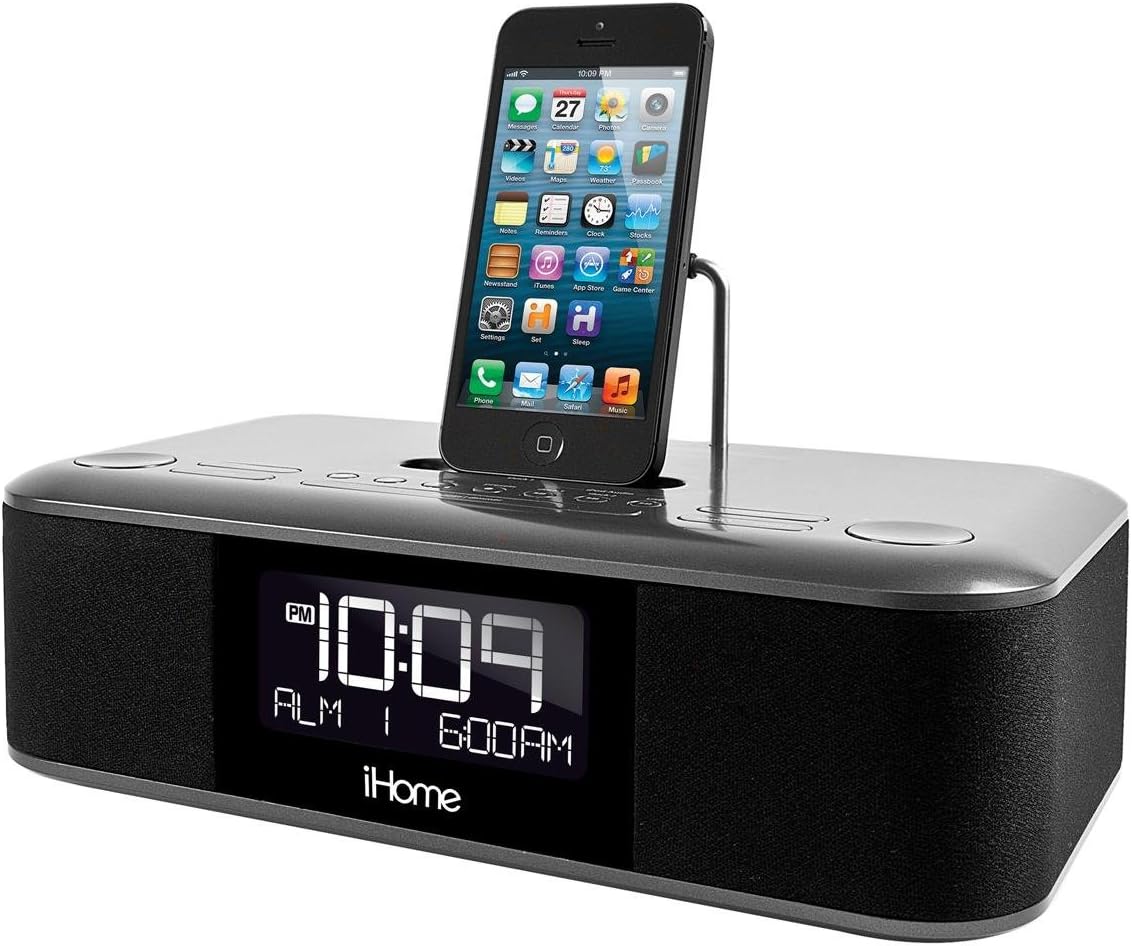
Figure 3: Close-up of the top controls and a single iPhone docked.

Figure 4: The adjustable Lightning connector in one of the docks.
3. Setup
3.1 Power Connection
- Connect the supplied AC adapter to the DC jack on the back of the iDL100.
- Plug the AC adapter into a working wall outlet.
- The unit will power on and the display will illuminate.
3.2 Time Setting
The iDL100 features an auto-sync function to set the time automatically when a compatible iPhone is docked.
- Auto-Sync: Dock your iPhone into one of the Lightning docks. The iDL100 will automatically synchronize its time with your iPhone's time.
- Manual Time Set: Refer to the included quick start guide for detailed instructions on manually setting the time and switching between 12/24-hour formats using the dedicated buttons.
3.3 Alarm Setting
The iDL100 allows for two independent alarms with a 7-5-2 day setting feature.
- Press and hold the desired Alarm button (Alarm 1 or Alarm 2) to enter alarm setting mode.
- Use the navigation buttons to adjust the alarm time.
- Select your desired alarm source: docked device (iPad, iPhone, iPod), custom playlist, or FM radio.
- Choose the 7-5-2 setting for daily, weekday, or weekend alarms.
- Confirm your settings by pressing the Alarm button again.
4. Operating Instructions
4.1 Charging Devices
The iDL100 offers triple charging options:
- Lightning Docks: Place your compatible iPhone, iPad, or iPod onto one of the two flexible Lightning docks. Ensure the device is properly seated for charging to begin.
- USB Port: Connect any USB-powered device (e.g., smartphone, tablet, earbuds) to the USB port located on the back of the unit using its charging cable.
4.2 FM Radio Operation
- Press the FM Radio button to turn on the radio.
- Use the tuning buttons to scan for stations or manually adjust the frequency.
- To save a station as a preset, press and hold a preset button until the display flashes, then release.
4.3 Audio Playback from Docked Devices
Once your Apple device is docked, you can play audio through the iDL100's speakers.
- Start playback on your docked device.
- Use the volume controls on the iDL100 or your device to adjust the audio level.
- Track navigation buttons on the iDL100 may control playback on your device.
4.4 Display Brightness Adjustment
Adjust the display brightness to your preference using the dedicated dimmer button, typically located on the top panel or rear of the unit.
5. Maintenance
- Clean the unit with a soft, dry cloth. Do not use liquid cleaners or abrasive materials.
- Keep the unit away from direct sunlight, heat sources, and excessive moisture.
- Ensure proper ventilation around the unit.
6. Troubleshooting
- No Power: Ensure the AC adapter is securely plugged into both the unit and a working wall outlet.
- Alarm Not Sounding: Verify that the alarm is set correctly, enabled, and the volume is not set to minimum. Check the alarm source.
- Device Not Charging: Ensure your device is properly seated on the Lightning dock or securely connected to the USB port. Check for any debris in the connectors.
- Poor FM Reception: Extend the FM antenna fully and try repositioning it for better signal.
7. Specifications
- Model: IDL100GC
- Product Dimensions: 12.1 x 9.8 x 6.2 inches
- Item Weight: 4.94 pounds
- Power: Universal 100-240V AC adaptor
- Charging Ports: 2 x Lightning Docks, 1 x USB Port (5V Input)
- Hardware Interface: USB
- Compatible Devices: iPad, iPhone, iPod (Lightning connector models)
- Color: Black
8. Official Product Video
Video: A user demonstrates the iHome iDL100, highlighting its features and functionality.
9. Warranty and Support
For warranty information and customer support, please refer to the documentation included with your product or visit the official iHome website. Keep your purchase receipt for warranty claims.


