
1. Introduction
This manual provides detailed instructions for the installation, operation, and maintenance of your Signstek YL-99 Keyless Entry Door Lock. Please read this manual thoroughly before installation and use to ensure proper function and security.

Image 1: Signstek YL-99 Keyless Entry Door Lock, Satin Nickel. This electronic door knob features a keypad for keyless access and is designed for enhanced security.
2. Setup and Installation
Installation of the Signstek YL-99 Keyless Entry Door Lock requires basic tools, primarily a screwdriver. Follow these steps for a successful installation:
2.1. Door Compatibility
The lock is designed to fit most standard US doors. Verify your door's dimensions:
- Backset: 2-3/8 inches (60mm) or 2-3/4 inches (70mm)
- Door Hole Diameter: 2-1/8 inches (54mm)
- Door Thickness: 1.3 to 2.15 inches
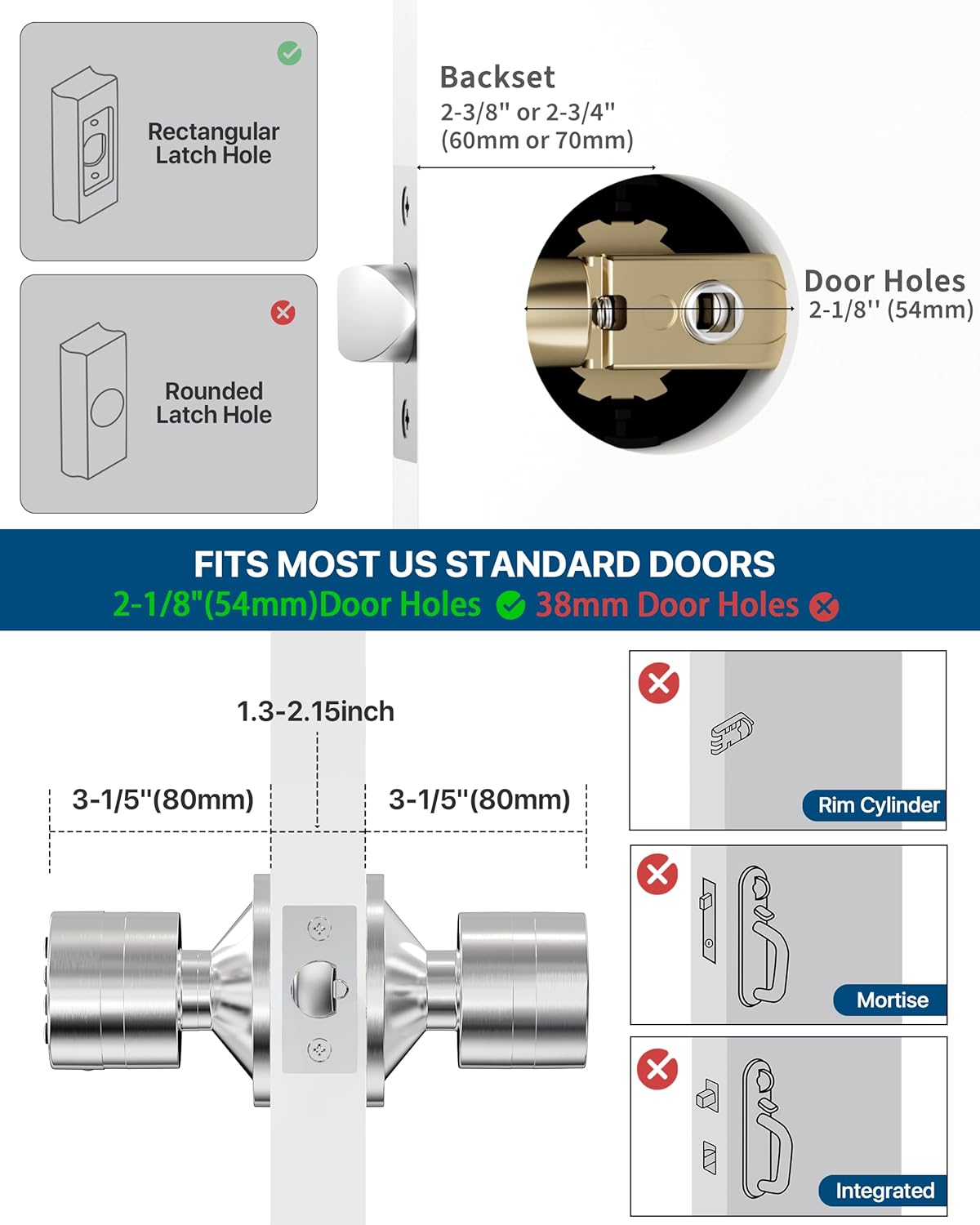
Image 2: Door dimension requirements for the Signstek YL-99 Keyless Entry Door Lock, illustrating compatible backset and door hole sizes.
2.2. Battery Installation
The lock requires 4 AAA batteries (not included). Install them into the battery box located within the interior knob assembly.
- Remove the battery cover from the interior knob.
- Insert 2 AAA batteries into each of the two battery slots. Ensure correct polarity.
- Replace the battery cover.

Image 3: Exploded view of the interior knob showing the battery box and the placement of 4 AAA batteries.
2.3. Latch and Knob Assembly
Install the latch mechanism into the door edge, ensuring it is flush. Then, assemble the interior and exterior knobs, connecting any necessary wires and securing them with the provided screws.

Image 4: A hand using a screwdriver to install the latch mechanism of the Signstek YL-99 Keyless Entry Door Lock into a door frame.
3. Operating Instructions
3.1. Setting and Changing Codes
The lock supports up to 15 different user codes, in addition to a master code. Codes can be up to 15 digits long.
- To Enter Programming Mode: Enter the current Master Code followed by the '#' key. The keypad will illuminate, and you will hear a beep.
- To Change Master Code: While in programming mode, press '0' then '#'. Enter your new Master Code (4-15 digits) followed by '#'. Re-enter the new Master Code followed by '#' to confirm.
- To Add User Code: While in programming mode, press '1' then '#'. Enter the new User Code (4-15 digits) followed by '#'. Re-enter the new User Code followed by '#' to confirm.
- To Delete User Code: While in programming mode, press '2' then '#'. Enter the User Code to be deleted followed by '#'. Re-enter the User Code followed by '#' to confirm.
- To Delete All User Codes: While in programming mode, press '3' then '#'.

Image 5: The keypad of the Signstek YL-99 lock, highlighting its ability to store multiple access codes for various users.
3.2. Unlocking and Locking
- To Unlock: Enter a valid user code or master code, then press the '#' key. The lock will disengage, allowing the knob to turn.
- Automatic Locking: The lock features an auto-lock function, securing the door automatically after a short period once closed.
- Mute Function: For enhanced security and quiet operation, the lock includes a mute function to prevent audible beeps when entering codes. Refer to the full instruction manual for activation/deactivation steps.

Image 6: The Signstek YL-99 Keyless Entry Door Lock on a wooden door, illustrating its automatic locking feature.
4. Maintenance
4.1. Battery Replacement
The lock will emit a two-tone beep to indicate low battery power. Replace all 4 AAA batteries promptly to ensure continuous operation. Battery life is approximately 1.5 years under normal usage.
4.2. Emergency Power Supply
In case batteries completely drain, an emergency power supply port is located on the exterior knob. Connect an external 9V battery (not included) to this port to temporarily power the lock and gain entry.
4.3. Waterproofing
The exterior knob is designed to be splash-proof and can withstand outdoor conditions. The interior knob is not waterproof and should be used indoors only.

Image 7: Illustration of the Signstek YL-99 lock's waterproof exterior knob and the recommendation for indoor use of the interior knob.
5. Specifications
| Feature | Detail |
|---|---|
| Brand | Signstek |
| Model Number | YL-99 |
| Lock Type | Keypad |
| Material | Zinc |
| Color | Satin Nickel |
| Item Dimensions (L x W x H) | 7.09 x 3.94 x 3.15 inches |
| Item Weight | 2 Pounds |
| Power Source | Battery Powered (4 AAA batteries required) |
| Special Features | Electronic Keypad Knob, Keyless Entry, Mute Mode, Passage Function, Emergency Power Supply |
6. Warranty and Support
For warranty information and customer support, please refer to the product packaging or contact Signstek customer service directly. Specific warranty terms and conditions may vary.


