1. Introduction
This manual provides essential information for the safe and effective use of your Upstart Battery replacement for Bosch 52318 18V NiCD battery. This battery is designed to be compatible with various Bosch 18V power tools requiring a 1300mAh NiCD battery. Please read this manual thoroughly before first use and retain it for future reference.
2. Safety Information
WARNING: Read all safety warnings and instructions. Failure to follow the warnings and instructions may result in electric shock, fire, and/or serious injury.
- Do not disassemble, open, or shred the battery pack.
- Do not short-circuit a battery pack. Do not store battery packs haphazardly in a box or drawer where they may short-circuit each other or be short-circuited by conductive materials.
- Do not expose battery packs to heat or fire. Avoid storage in direct sunlight.
- Do not subject battery packs to mechanical shock.
- In the event of battery leakage, do not allow the liquid to come into contact with the skin or eyes. If contact has been made, wash the affected area with copious amounts of water and seek medical advice.
- Do not use any charger other than that specifically provided for use with the equipment.
- Keep battery packs out of the reach of children.
- Do not use a battery pack that is not designed for use with the equipment.
- Observe the plus (+) and minus (-) marks on the battery and equipment and ensure correct use.
- Dispose of battery packs properly at designated collection points.
3. Setup
Before initial use, it is recommended to fully charge the battery. Ensure the battery is compatible with your Bosch 18V power tool and charger.
- Inspect the Battery: Before each use, visually inspect the battery for any signs of damage, cracks, or leakage. Do not use a damaged battery.
- Charge the Battery: Place the battery into a compatible Bosch 18V NiCD battery charger. Follow the charger's instructions for proper charging.
- Insert into Tool: Once charged, align the battery with the battery port on your Bosch 18V power tool. Slide the battery firmly into place until it clicks, indicating it is securely locked.
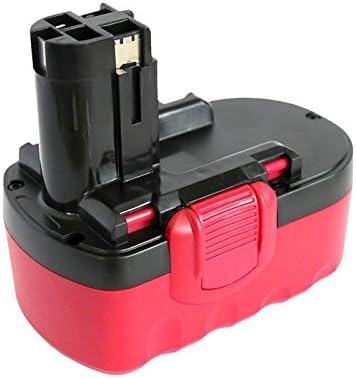
An image showing the Upstart Battery replacement for Bosch 52318 18V NiCD battery. The battery features a red and black casing with a black terminal block designed to fit compatible Bosch 18V power tools.
4. Operating
Once the battery is securely installed in your Bosch 18V power tool, the tool is ready for operation. Refer to your power tool's instruction manual for specific operating procedures.
- Ensure the battery is fully charged for optimal performance.
- Do not force the battery into the tool. If it does not slide in easily, check for obstructions or incorrect alignment.
- Monitor the tool's performance. A decrease in power or speed may indicate a low battery charge.
- To remove the battery, press the release button (if present on your tool) and slide the battery out.
5. Charging
Proper charging is crucial for the longevity and performance of your NiCD battery.
- Use Compatible Charger: Always use a charger specifically designed for Bosch 18V NiCD batteries. Using an incompatible charger can damage the battery and pose a safety risk.
- Connect Battery: Insert the battery into the charger, ensuring a secure connection.
- Monitor Charging: Observe the charger's indicator lights. These typically show when the battery is charging and when it is fully charged.
- Avoid Overcharging: While NiCD batteries are somewhat tolerant to overcharging, prolonged overcharging can reduce battery life. Remove the battery from the charger once fully charged.
- Temperature: Charge the battery in a well-ventilated area, away from direct sunlight and extreme temperatures.
6. Maintenance
Regular maintenance helps ensure the battery's performance and extends its lifespan.
- Cleaning: Keep the battery terminals clean and free from dirt or corrosion. Use a clean, dry cloth to wipe them if necessary.
- Storage: Store the battery in a cool, dry place, away from direct sunlight and extreme temperatures. For long-term storage, it is best to store NiCD batteries in a partially discharged state (around 40-60% charge) to prevent memory effect.
- Avoid Deep Discharge: While NiCD batteries can be deeply discharged, repeatedly doing so can contribute to the memory effect. It is often beneficial to fully discharge and then fully recharge NiCD batteries periodically to mitigate this.
- Disposal: When the battery reaches the end of its life, dispose of it responsibly at a certified recycling facility. Do not dispose of batteries in household waste or fire.
7. Troubleshooting
If you encounter issues with your battery, refer to the following common troubleshooting steps:
- Battery Not Charging:
- Ensure the charger is plugged into a working power outlet.
- Verify the battery is correctly seated in the charger.
- Check for any visible damage to the battery or charger.
- Confirm the charger is compatible with NiCD batteries.
- Battery Not Holding Charge:
- NiCD batteries can develop a 'memory effect' if repeatedly partially discharged and recharged. Try a full discharge and recharge cycle.
- The battery may be nearing the end of its lifespan. Battery capacity naturally degrades over time and use.
- Tool Not Operating with Battery:
- Ensure the battery is fully charged and securely inserted into the tool.
- Check the tool's contacts for dirt or corrosion.
- Test the tool with another known-good battery if available to rule out a tool malfunction.
8. Specifications
| Feature | Specification |
|---|---|
| Brand | Upstart Battery |
| Model Number | BO-18V-NICD-13-DL49 |
| Compatible With | Bosch 52318, Bosch 18V Power Tools |
| Battery Cell Composition | NiCAD (Nickel Cadmium) |
| Battery Capacity | 1300 mAh (Milliampere Hour) |
| Voltage | 18V |
| Recommended Uses | Power Tool |
| Unit Count | 1 Count |
| Manufacturer | Upstart Battery |
9. Warranty and Support
For warranty information or technical support regarding your Upstart Battery product, please refer to the documentation included with your purchase or visit the official Upstart Battery website. Keep your purchase receipt as proof of purchase.
For further assistance, you may contact the seller directly through the platform where the purchase was made.


