
Introduction
The Retevis RT45 walkie-talkies are designed for reliable and easy communication, ideal for various settings including commercial, business, and personal use. These license-free radios offer 22 FRS channels, ensuring clear communication without legal complexities or usage fees. With features like dual power options, NOAA weather alerts, and VOX hands-free operation, the RT45 provides a robust and user-friendly experience.
What's in the Box
Your Retevis RT45 package includes the following items:
- 20 x RT45 Two Way Radios (Packed in pairs with 10 boxes)
- 60 x AA NiMH Rechargeable Batteries
- 20 x Belt Clip
- 10 x USB Charge Cable & Adapter
- 10 x User Manual

Image: A visual representation of the items included in the Retevis RT45 package, showing the radios, batteries, and charging accessories.
Setup
Battery Installation
The RT45 radios use AA batteries. To install or replace batteries:
- Remove the belt clip if attached.
- Locate the battery compartment cover on the back of the radio.
- Slide the cover downwards to open the compartment.
- Insert 3 AA NiMH rechargeable batteries, ensuring correct polarity (+/-).
- Replace the battery compartment cover and reattach the belt clip if desired.

Image: A close-up view of the Retevis RT45 radio with its battery cover removed, showing the slots for AA batteries.
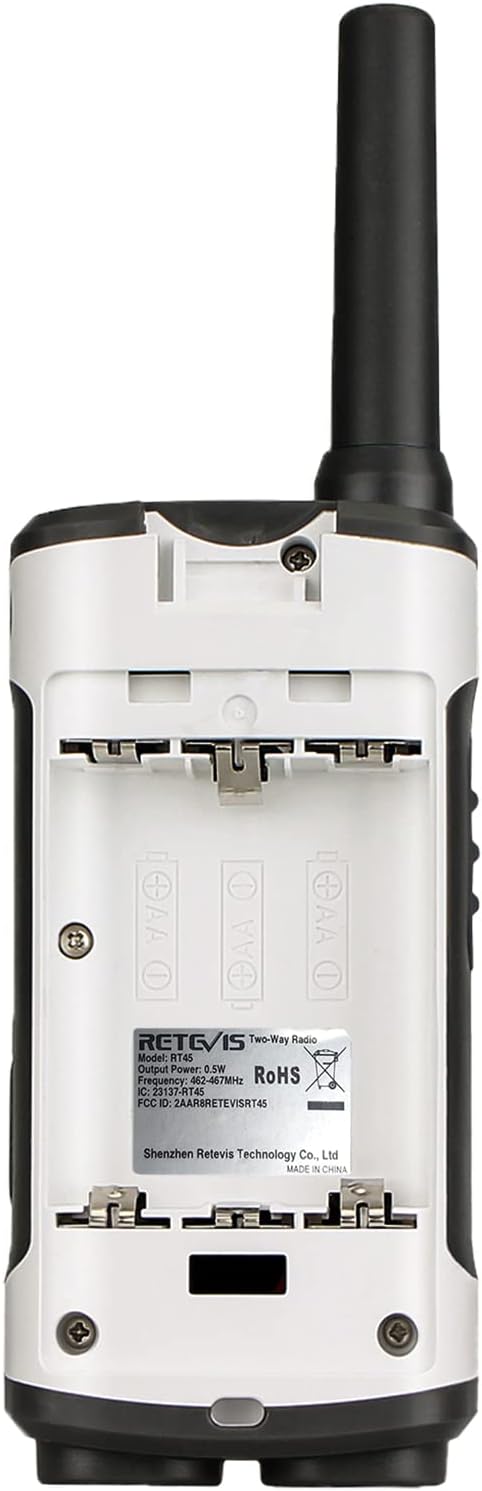
Image: The rear view of the RT45 radio, highlighting the battery compartment and regulatory information.
Charging the Radios
The RT45 radios can be charged using the included USB charging cable and adapter. The dual-head USB cable allows for simultaneous charging of two radios.
- Connect the USB charging cable to the micro-USB port on the side of each radio.
- Plug the USB adapter into a standard wall outlet. Alternatively, you can connect the USB cable to a computer's USB port or any compatible USB charging accessory.
- The battery icon on the LCD screen will indicate charging status.

Image: Two RT45 radios connected to a dual USB charging cable, illustrating the charging process.
Video: This video demonstrates how to use and operate the Retevis RT45 walkie-talkies, including battery installation and charging procedures.
Operating Instructions
Radio Controls Overview

Image: A detailed diagram illustrating the various parts and controls of the Retevis RT45 walkie-talkie.
- Antenna: Integrated for signal transmission and reception.
- Headset Jack: For connecting an external headset (not included).
- LED Light: Built-in flashlight for illumination.
- Call Button: Initiates a call tone.
- Volume/Channel Up/Down Buttons: Adjusts volume and navigates channels/menu options.
- Menu/Power Button: Accesses the menu and turns the radio on/off.
- Select/Lock Button: Confirms selections and locks/unlocks the keypad.
- Microphone: For voice input.
- Speaker: For audio output.
Power On/Off and Volume Adjustment
- To power on, press and hold the Menu/Power button.
- To power off, press and hold the Menu/Power button again.
- Adjust the volume using the Volume Up (▲) and Volume Down (▼) buttons.
Channel Selection and Privacy Codes (CTCSS/DCS)
The RT45 features 22 FRS channels and 121 privacy codes (38 CTCSS and 83 DCS codes) to minimize interference.
- Press the Menu button once to enter channel selection mode. Use the Up/Down buttons to select a channel (1-22). Press Menu again to confirm.
- To set a privacy code, press the Menu button twice (for CTCSS) or three times (for DCS). Use the Up/Down buttons to select a code. Press Menu to confirm. Both radios must be on the same channel and privacy code to communicate.
VOX (Voice Activated Transmission)
VOX allows for hands-free communication. The radio transmits automatically when it detects your voice.
- Press the Menu button until 'VOX' appears on the display.
- Use the Up/Down buttons to select a VOX sensitivity level (1-5, with 5 being most sensitive). 'OF' disables VOX.
- Press Menu to confirm.
Dual Watch
The Dual Watch feature allows the radio to monitor two channels simultaneously.
- Press the Menu button until 'DW' appears on the display.
- Use the Up/Down buttons to select the second channel to monitor.
- Press Menu to confirm. The radio will scan both channels and stop on the one receiving a signal.
Call Tones
The RT45 offers 10 selectable call tone alerts.
- Press the Menu button until 'CA' appears on the display.
- Use the Up/Down buttons to cycle through the 10 call tones.
- Press Menu to confirm your selection.
- To send a call tone, press the Call button.
Keypad Lock
To prevent accidental changes to settings, you can lock the keypad.
- To lock the keypad, press and hold the Select/Lock button until a lock icon appears on the display.
- To unlock, press and hold the Select/Lock button again until the lock icon disappears.
NOAA Weather Alert
Stay informed about severe weather conditions with the built-in NOAA weather alert feature.
- The radio can automatically scan for and lock onto the strongest NOAA weather channel to alert you of severe weather updates.
- Refer to the detailed user manual for specific instructions on activating and managing NOAA weather alerts.

Image: The RT45 radio displaying the NOAA weather alert feature, indicating its capability to receive weather warnings.
Built-in Flashlight
The RT45 includes an LED flashlight for convenience in low-light conditions.
- To turn the flashlight on or off, locate the dedicated flashlight button on the side of the radio (as shown in the controls overview image).
Video: This video provides a comprehensive guide on how to use and operate the Retevis RT45 walkie-talkies, covering various functions and settings.
Maintenance
- Cleaning: Use a soft, damp cloth to clean the radio's exterior. Do not use harsh chemicals or abrasive cleaners.
- Battery Care: To maximize battery life, fully charge the NiMH rechargeable batteries before first use. Avoid overcharging or completely draining the batteries frequently. If storing the radios for an extended period, remove the batteries.
- Storage: Store the radios in a cool, dry place away from direct sunlight and extreme temperatures.
- Durability: The RT45 is built with durable material and an integrated antenna to prevent loosening and falling off, ensuring long-term use even under tough conditions.
Troubleshooting
| Problem | Possible Cause | Solution |
|---|---|---|
| Radio does not power on | Low or dead batteries; Incorrect battery installation | Charge batteries or replace with fresh ones; Ensure batteries are inserted with correct polarity. |
| Cannot communicate with other radios | Different channels or privacy codes; Out of range; Obstructions | Ensure all radios are on the same channel and privacy code; Move closer to other radios; Avoid large obstructions like buildings or hills. |
| Poor audio quality / Static | Weak signal; Interference; Low battery | Move to an open area; Change channel or privacy code; Charge batteries. |
| Batteries not holding charge | Old or faulty batteries; Improper charging | Replace batteries with new rechargeable AA NiMH batteries; Ensure proper charging procedure is followed. |
Specifications
- Item Weight: 3.7 ounces
- Product Dimensions: 2.09 x 0.83 x 6.81 inches
- Item Model Number: RT45
- Batteries: 60 AA batteries required (included)
- Manufacturer: Retevis
- Color: White
- Number of Channels: 22
- Special Feature: Lightweight, NOAA Weather Alert
- Frequency Range: 462.55 - 462.725 / 467.5625 - 467.7125MHz
- Talking Range Maximum: 1.5 Kilometer
- Tuner Technology: FRS
- Voltage: 3.6 Volts
- Water Resistance Level: Not Water Resistant
Warranty and Support
Retevis provides a comprehensive warranty and support for the RT45 walkie-talkies:
- Warranty: We provide a 2-year warranty for the radio body and a 1-year warranty for accessories.
- Return Policy: 30 days no reason to return.
- Post-Warranty Service: Even beyond the warranty period, we offer maintenance services. Buyers are required to cover corresponding costs.
- Contact Support: For any inquiries or support needs, please contact us on Amazon. We aim to reply within 12 hours.
- FCC Compliance: Our walkie-talkies (FCC ID: 2AAR8RETEVISRT45) meet FCC Part 95 rules.


