
1. Introduction
The PIXEL King Pro is a 3rd generation wireless TTL flash trigger designed for Nikon cameras, offering enhanced reliability and extended range. This device functions as both a transmitter and a receiver, providing comprehensive control over remote flash units. Its robust design, featuring an internal metal frame, ensures durability and stable performance. The King Pro supports advanced features such as TTL pass-through, high-speed sync up to 1/8000th, and a shutter release function.
This manual provides detailed instructions for setting up, operating, and maintaining your King Pro flash trigger to ensure optimal performance.
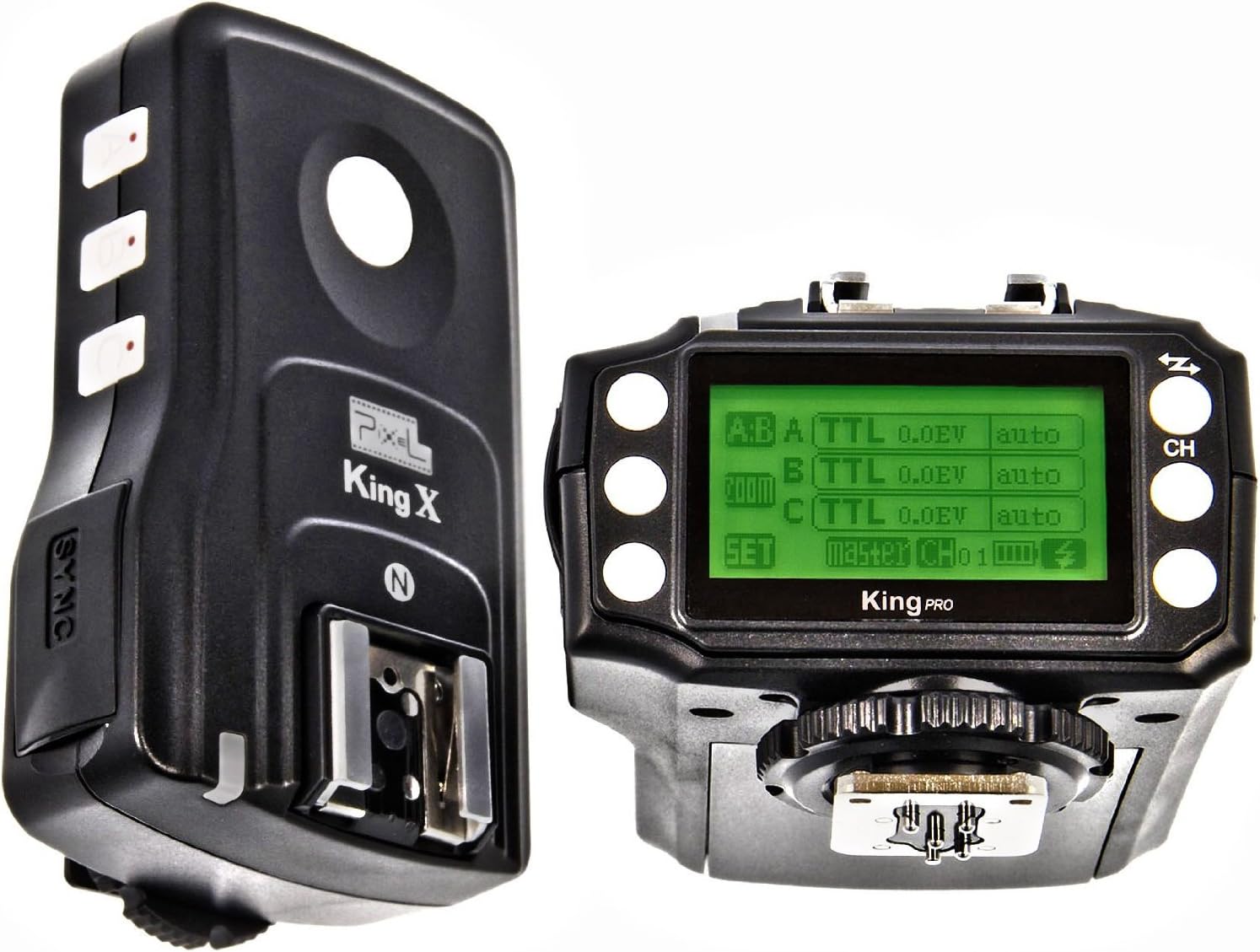
Image 1.1: PIXEL King Pro (right) and King X (left) units.
2. Package Contents
Verify that all items are present in your package:
- PIXEL King Pro Wireless TTL Flash Trigger (Transceiver)
- 1/4" threaded bracket
- USB cable
- User Manual (this document)
- (Optional) PIXEL King X Receiver (if purchased separately)
3. Component Identification
Familiarize yourself with the various parts of the King Pro and King X units.

Image 3.1: Side view of King Pro (right) and King X (left).

Image 3.2: King Pro unit, detailing the USB port and 1/4" threaded bracket mounting point. A 2.5mm PC sync port is also visible.
4. Setup
4.1. Battery Installation
Both the King Pro and King X units require 4 AA batteries for operation. Locate the battery compartment cover on the underside of each unit, slide it open, insert the batteries according to the polarity indicators, and close the cover securely.
4.2. Mounting the Units
- Transmitter (King Pro): Mount the King Pro unit onto your camera's hot shoe. Ensure it is securely fastened by tightening the locking wheel.
- Receiver (King X or King Pro): Mount your compatible Nikon speedlite onto the hot shoe of the receiver unit (King X or a second King Pro). For off-camera use, the receiver can be mounted on a light stand using the integrated 1/4" threaded bracket or a cold shoe adapter.
4.3. Initial Power On and Channel Setting
Turn on both the transmitter and receiver units using their respective ON/OFF switches. The King Pro features a backlit LCD screen. To ensure proper communication, both the transmitter and all receiver units must be set to the same channel. Refer to the on-screen interface of the King Pro to adjust the channel settings. Typically, a 'CH' button or menu option will allow channel selection.

Image 4.1: King Pro LCD screen showing channel and group settings.
4.4. Firmware Updates
The King Pro and King X units are equipped with a USB port for firmware updates. Regularly check the PIXEL official website for the latest firmware versions to ensure compatibility with new camera models and flashguns, and to benefit from performance improvements. Follow the instructions provided with the firmware download for the update process.
5. Operating Instructions
5.1. Basic Flash Triggering
Once the transmitter and receiver(s) are powered on and set to the same channel, a test flash can be performed by pressing the test button on the King Pro transmitter. When mounted on the camera, the flash will trigger automatically with the camera's shutter release.
5.2. TTL (Through-The-Lens) Mode
The King Pro supports TTL flash metering, allowing your camera and flash to automatically determine the correct exposure. Ensure your flash unit is set to TTL mode. The King Pro's interface allows for TTL exposure compensation adjustments for individual groups (A, B, C).

Image 5.1: King Pro display showing TTL settings for multiple groups.
5.3. Manual Flash Mode
For precise control, the King Pro allows you to set flash power manually for each group. Switch the desired flash group to manual mode via the King Pro's interface and adjust the power output (e.g., 1/1, 1/2, 1/4, etc.).
5.4. High-Speed Sync (HSS)
The King Pro supports high-speed sync up to 1/8000th of a second with compatible speedlites and monolights. This feature allows you to use flash at shutter speeds faster than your camera's native sync speed, useful for overpowering ambient light or using wide apertures in bright conditions. Activate HSS through your camera or flash settings as required.
5.5. Shutter Release Function
The King Pro includes a shutter release function. Connect a compatible USB cable from the King Pro to your camera's remote port. This allows for remote camera triggering, and it is possible to trigger multiple cameras simultaneously if properly configured with additional cables.
5.6. TTL Pass-Through Hot Shoe
The King Pro transmitter features a TTL pass-through hot shoe on top. This allows you to mount an additional flash unit directly onto the transmitter, which can operate in either TTL or manual mode, while still controlling remote flashes wirelessly.
6. Maintenance
- Cleaning: Use a soft, dry cloth to clean the exterior of the units. For stubborn dirt, a slightly damp cloth can be used, followed by immediate drying. Avoid using harsh chemicals or abrasive materials.
- Battery Care: Remove batteries from the units if they will not be used for an extended period to prevent leakage and damage.
- Storage: Store the King Pro and King X in a cool, dry place, away from direct sunlight and extreme temperatures. The provided padded case is ideal for protection during storage and transport.
- Hot Shoe Contacts: Keep the hot shoe contacts clean and free from dust or debris to ensure reliable communication with your camera and flash units.
7. Troubleshooting
If you encounter issues with your PIXEL King Pro, refer to the following common problems and solutions:
| Problem | Possible Cause / Solution |
|---|---|
| Flashes not firing or misfiring intermittently. |
|
| Incorrect exposure (over/under-exposed images). |
|
| Flash sync issues (e.g., black bar in images at high shutter speeds). |
|
| Flash unit not compatible. |
|
8. Specifications
| Feature | Detail |
|---|---|
| Model | KingPro/Nikon |
| Compatibility | Nikon cameras and compatible speedlites |
| Wireless Frequency | 2.4GHz (typical) |
| Range | Up to 300 meters (approx.) |
| Flash Sync Speed | Up to 1/8000th second (High-Speed Sync) |
| Flash Modes | TTL, Manual |
| Groups | A, B, C (3 groups) |
| Channels | Multiple selectable channels |
| Power Source | 4 x AA batteries (per unit) |
| Ports | USB port for firmware updates, 2.5mm PC Sync port |
| Dimensions (King Pro) | 5.12 x 3.15 x 5.91 inches |
| Weight (King Pro) | 14.8 ounces |
| Construction | Internal metal frame structure |
9. Warranty and Support
9.1. Warranty Information
Specific warranty terms and conditions for the PIXEL King Pro Wireless TTL Flash Trigger are provided by the manufacturer or the authorized seller at the time of purchase. Please retain your proof of purchase for warranty claims. For detailed warranty information, refer to the documentation included with your product or visit the official PIXEL website.
9.2. Technical Support
For technical assistance, troubleshooting beyond this manual, or inquiries regarding firmware updates, please visit the official PIXEL support website or contact their customer service. Contact information can typically be found on the manufacturer's website or on the product packaging.


