
Introduction
The Honeywell TH3110D1008 is a non-programmable digital thermostat designed for straightforward control of 1 Heat/1 Cool HVAC systems. This manual provides essential information for installation, operation, maintenance, and troubleshooting to ensure optimal performance of your thermostat.
Setup
Installation and Wiring
Before installation, ensure the power to your HVAC system is turned off at the circuit breaker. This thermostat is designed for 1 Heat/1 Cool systems. Refer to the wiring diagram provided with your product for specific connections. The thermostat can be powered by batteries or hardwired to your system.
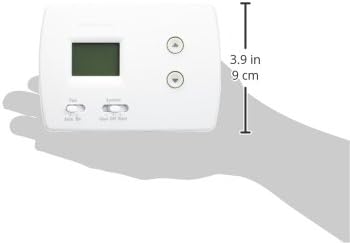
Figure 1: Thermostat Wiring Terminals
This image displays the rear of the thermostat, revealing the wiring terminals. The label 'C is optional with batteries' indicates flexibility in power connection. Ensure proper wire connections for your HVAC system type, matching the wires from your wall to the corresponding terminals on the thermostat base.
Power Source
The TH3110D1008 thermostat supports dual power options: battery-powered or hardwired (24 volts). If using batteries, ensure they are correctly installed. The 'C' wire connection is optional when batteries are used for power.
Operating Instructions
The thermostat features a clear digital display and intuitive controls for adjusting your home's temperature.

Figure 2: Thermostat Front Panel
The front panel features a digital display for current temperature, up and down arrow buttons for temperature adjustment, a 'Fan' switch (Auto/On), and a 'System' switch (Cool/Off/Heat).
Adjusting Temperature
Use the Up and Down arrow buttons located on the right side of the thermostat to set your desired temperature. The digital display will show the set temperature.
Fan Operation
The Fan switch has two settings:
- Auto: The fan runs only when the heating or cooling system is actively operating. This is the most common and energy-efficient setting.
- On: The fan runs continuously, regardless of whether the heating or cooling system is active.
System Mode Selection
The System switch allows you to select the operating mode for your HVAC system:
- Cool: The thermostat will activate your air conditioning system to cool your home to the set temperature.
- Off: Both heating and cooling systems are turned off. The fan can still be operated manually if set to 'On'.
- Heat: The thermostat will activate your heating system to warm your home to the set temperature.
Maintenance
Battery Replacement
If your thermostat is battery-powered, replace the batteries when a low battery indicator appears on the display. Typically, two AA alkaline batteries are required. To replace, gently pull the thermostat body away from its wall plate to access the battery compartment. Insert new batteries, ensuring correct polarity, then reattach the thermostat body to the wall plate.
Cleaning
Clean the thermostat's exterior with a soft, damp cloth. Avoid using abrasive cleaners or solvents, as these can damage the finish or internal components.
Troubleshooting
- No Display/No Power: Check if the circuit breaker for your HVAC system is tripped. If battery-powered, replace the batteries. Ensure all wiring connections are secure.
- System Not Responding (Heating/Cooling): Verify that the 'System' switch is set to the desired mode (Heat or Cool) and the temperature setting is appropriately above or below the current room temperature. Check for any error messages on the display.
- Fan Not Operating: Ensure the 'Fan' switch is set to 'On' for continuous operation, or 'Auto' if you expect it to run with the system.
- Inaccurate Temperature Reading: Ensure the thermostat is not exposed to direct sunlight, drafts, or heat sources that could affect its sensor.
If issues persist after performing these checks, it is recommended to contact a qualified HVAC technician for further assistance.
Specifications
| Brand | Honeywell (Manufactured by American Standard) |
| Model Name | Honeywell TH3110D1008 Heat/Cool Digital Thermostat |
| Model Number | TH3110D1008 |
| Type | Non-Programmable Digital Thermostat |
| System Compatibility | 1 Heat / 1 Cool Systems |
| Color | White |
| Power Source | Battery Powered, Corded Electric (24 volts) |
| Display Type | Digital |
| Control Type | Button Control |
| Mounting Type | Wall Mount |
| Item Weight | 8.53 g |
| UPC | 703765975841 |
Warranty Information
For specific warranty terms and conditions, please refer to the warranty card included with your product packaging or visit the official American Standard (manufacturer) website. Keep your purchase receipt as proof of purchase for any warranty claims.
Customer Support
Should you require technical assistance, have questions about your thermostat, or need to report an issue, please contact American Standard customer support. Contact information, including phone numbers and online resources, can typically be found on the manufacturer's website or in the documentation provided with your product.


